A major threat operation known as the FortiBleed campaign has compromised enterprise perimeters globally. Security researchers and national authorities have issued warnings about this threat. Canada’s Cyber Centre published Alert AL26-014 on June 18, 2026, and CISA followed with its own guidance. If any organization relies on a FortiGate firewall to protect critical assets, taking immediate defensive action is vital to prevent unauthorized access to the network.
The campaign is linked to a Russian-speaking Initial Access Broker (IAB). Stolen authentication details are currently being traded on dark web forums and are being actively weaponized by ransomware strains such as Lynx and INC Ransomware. These attackers use compromised access to bypass traditional boundary defenses, move laterally across internal networks, and deploy destructive encryption payloads.
This blog breaks down the threat and key indicators behind the FortiBleed campaign. It also covers the critical steps every IT team must take today to safeguard their organization’s infrastructure.
Looking for a secure, India cloud platform?
Try CloudPeWhat is the FortiBleed campaign?
The FortiBleed campaign represents an aggressive, automated credential harvesting operation targeting internet-facing Fortinet firewall appliances and SSL-VPN gateways.
Unlike traditional zero-day exploits aimed solely at achieving immediate Remote Code Execution (RCE), this operation focuses heavily on the mass theft, extraction, and operational reuse of valid authentication artifacts. Threat actors compiled and leaked or sold datasets containing authentication details for over 73,000 to 80,000 Fortinet firewall devices across 194 countries.
The leaked data includes multinational corporations, public-sector infrastructure, telecom providers, and small-to-medium businesses. Possessing legitimate firewall credentials allows adversaries to bypass boundary defenses, blend in with standard network noise, and establish stealthy, long-term holds on corporate networks.
How does the FortiBleed attack work?
The FortiBleed attack operates as a multi-stage intrusion cycle targeting internet-facing FortiGate devices without relying on a new zero-day software vulnerability. Instead, it exploits automated credential stuffing, historic breach dumps, and offline hash cracking against legacy password configurations.
Various Fortinet firewall models with exposed management interfaces or active SSL-VPN connections are mapped during initial automated scans. Attackers analyze these open portals to prepare for targeted configuration extraction.
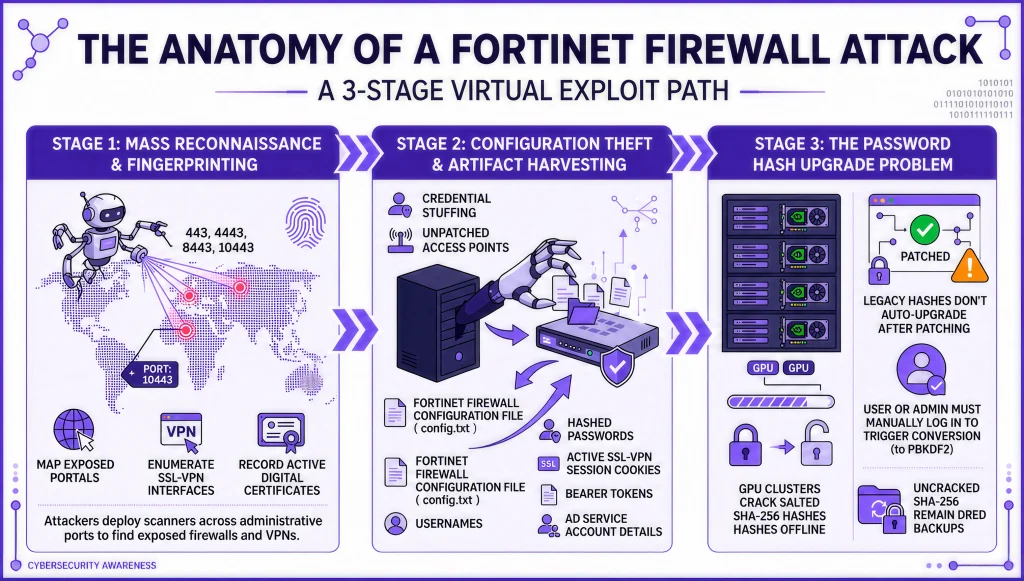
Stage 1: Mass reconnaissance and fingerprinting
Attackers deploy automated scanning engines across port 443 and alternative administrative ports such as 4443, 8443, and 10443. These tools map exposed portals, enumerate SSL-VPN interfaces, and record active digital certificates.
Stage 2: Configuration theft and artifact harvesting
Threat actors exfiltrate critical system files using credential stuffing or unpatched access points. An exposed fortinet firewall configuration file often contains local administrator usernames, hashed passwords, active SSL-VPN session cookies, bearer tokens, and Active Directory service account details.
Stage 3: The password hash upgrade problem
Legacy FortiOS versions used salted SHA-256 algorithms to store local passwords, which attackers can quickly crack offline using high-performance GPU clusters. Although updated firmware introduces stronger PBKDF2 hashing, existing password hashes do not upgrade automatically after patching. An administrator or user must manually log back in to trigger the conversion, leaving uncracked SHA-256 hashes inside stored backups.
Which key FortiBleed indicators require immediate investigation?
Key FortiBleed have multiple indicators. Spotting these early signals helps IT teams detect unauthorized access before attackers move laterally. Monitoring system logs for abnormal activity ensures your team catches compromised credentials before serious operational damage occurs.
Here are the key FortiBleed indicators one should keep an eye out for: on high alert for the following indicators:
- Unusual SSL-VPN Logins: Authentication events originating from unrecognized foreign IP addresses, non-business hours, or impossible travel profiles.
- Session Cookie Replay: Active VPN sessions establishing connectivity without initiating a standard Multi-Factor Authentication (MFA) challenge sequence.
- Creation of Unauthorized Accounts: Newly created local admin accounts or unexpected changes to user privileges in the FortiGate system settings.
- Suspicious Command Line Activity: Execution of internal discovery commands like nltest, net group, dsquery, or ldapsearch immediately following a successful VPN session establishment.
- Unusual Configuration Exports: Automated backup commands or system configuration export events triggered by non-standard users or unusual source IPs.
How to protect Fortinet firewall against FortiBleed?
Firmware patching isn’t enough. Valid stolen credentials grant total perimeter access no matter how current your firmware is. If those credentials stay active or crackable, the environment stays exposed.
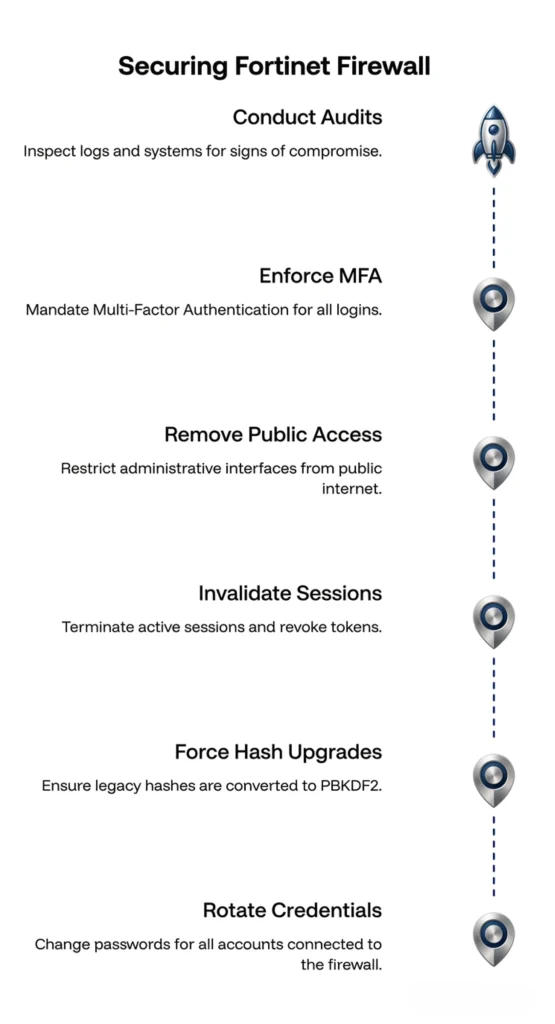
Pair immediate remediation with Fortinet firewall training for internal staff to lock down administrative hygiene and configuration auditing. Start with the action plan below:
- Rotate all credentials: Immediately change passwords for every local admin account, SSL-VPN user, and Active Directory service account integrated with the Fortinet firewall.
- Force hash upgrades: Instruct all administrators to execute an active login sequence after password rotation to ensure legacy SHA-256 hashes are converted to PBKDF2.
- Invalidate active sessions: Terminate all active SSL-VPN sessions, clear active authentication caches, and revoke all existing session tokens/cookies to prevent session replay attacks.
- Remove public access to admin panels: Strictly restrict administrative interfaces (ports 443, 8443, 10443) from public internet access. Require a dedicated management jump-box or IP-restricted management zone.
- Enforce robust MFA: Mandate Multi-Factor Authentication (MFA) for every SSL-VPN connection and admin portal login. Ensure MFA is evaluated on every new connection, not just during initial session setup.
- Conduct thorough audits: Inspect system event logs, firewalls, and Active Directory domain controllers for signs of post-compromise lateral movement or persistence mechanisms.
Conclusion
The recent FortiBleed campaign highlights a key security reality. Edge devices will always be top targets for attackers. Even if the software is up to date, past breaches, leaked passwords, or outdated settings could still leave you exposed.
Acting quickly will drastically lower the risk of a breach. Moving forward, security or IT teams should closely track FortiBleed updates and monitor all Fortinet infrastructure for unusual activity.
Looking for a secure, India cloud platform?
Try CloudPe