Online festive sales in India are projected to grow up to 29% this year, to ₹1.55 trillion, according to Datum Intelligence. Behind every order in that total, cloud infrastructure has to answer a search, hold a cart, check stock, and confirm a payment, all within seconds.
The pressure shows up in the first hour. In the opening hour of Big Billion Days 2026, Flipkart recorded 6.3 million concurrent users in a single minute. Early access on 8 October had already generated 287 million sessions.
This article explains how cloud infrastructure scales for Indian e-commerce. It covers why a mega-sale strains systems, what breaks first, and how scaling works layer by layer.
It also covers what changes in India, how to prepare and operate during a sale, how to control costs, and what to look for in a provider.
Note: The architecture shown is representative, not Flipkart’s internal design.
Why does Big Billion Days put e-commerce infrastructure under pressure?
Because demand arrives in a rush, across every step of the shopping flow, and the peak is far above a normal day. The numbers from Flipkart show how steep the first hours are.
In that opening hour, Flipkart said 6x more Indians shopped on its platform than in a regular hour. The 2024 edition drew more than 330 million visits across early access and day one.
The load is also varied. Flipkart reported 12.7 million users in video and live shopping experiences, on top of search, login, cart, and checkout traffic.
The peak keeps rising. Datum Intelligence projects online festive sales to grow up to 29% to ₹1.55 trillion, from ₹1.20 trillion in 2025.
That gap between average and peak demand is the core problem. Systems sized for the average fail at the peak, and systems sized for the peak sit idle for the rest of the year.
What breaks first when traffic exceeds capacity?
The most constrained shared resource breaks first, and it is often the database or an outside payment service, not the web servers. Adding servers does not fix a bottleneck further down the chain.
Here are the usual failure points:
- Application servers: CPU, memory, and connection limits fill up, request queues grow, and response times rise
- Databases: product, inventory and order requests compete for the same data, and connections run out. Connection pooling exists for this reason, because it reuses a small set of database connections instead of opening a new one for every request.
- Networks: bandwidth and load balancer limits cap how much traffic gets through
- Payment services: checkout depends on rails that carry heavy load of their own. UPI averaged 802 million transactions a day in September.
- Retries: failed requests are tried again, which adds load. Site reliability guidance warns that retries can amplify low error rates into higher levels of traffic and lead to cascading failures.
Because the bottleneck moves, scaling has to happen at every layer.
Autoscaling, load balancing, and multi-zone clusters on one platform.
Check CloudPeHow does cloud infrastructure scale during a traffic surge?
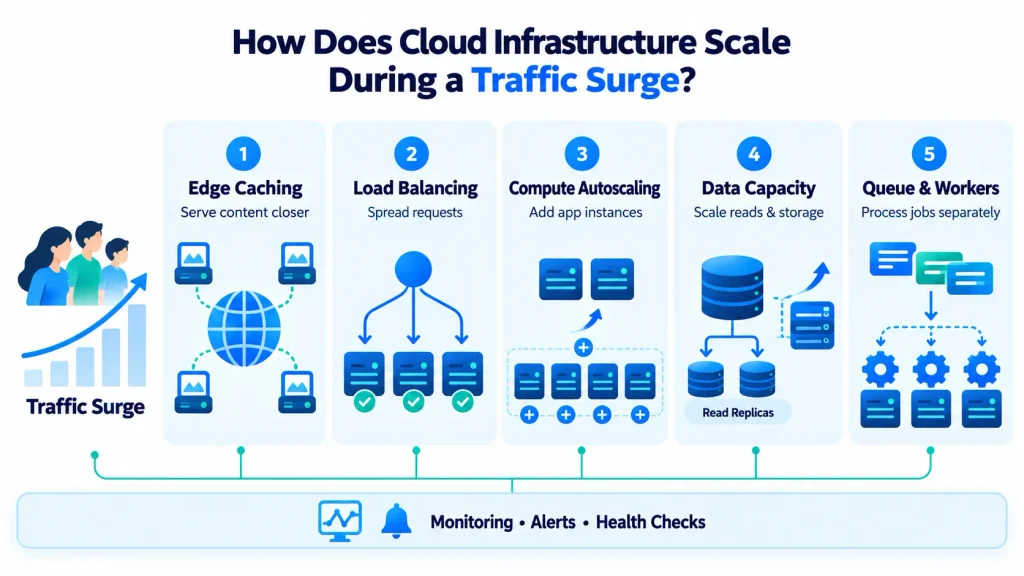
Cloud infrastructure scales by adding capacity at each layer of the stack. It is the compute, storage, networking, and software that run an application, and five mechanisms matter most during a sale.
Load balancer distributes incoming traffic
A load balancer spreads requests across many application instances and stops sending traffic to any instance that fails its health checks. That keeps one overloaded or broken server from taking down the whole store.
It also helps when capacity is removed. Before an instance is terminated, the load balancer waits for in-flight requests to finish in a step called connection draining, often with a default wait of 300 seconds. Autoscaling also replaces an unhealthy instance without waiting for a cooldown to end.
Autoscaling adds capacity when demand rises
Autoscaling adds or removes instances or pods automatically, based on a metric such as CPU use or requests per instance. Horizontal scaling adds more instances, while vertical scaling makes one instance larger, and sale traffic is usually handled horizontally.
Target tracking policies scale based on metrics like average CPU utilisation or requests per target. In Kubernetes, the Horizontal Pod Autoscaler scales a workload on CPU, memory or custom metrics. Load balancer traffic is also a leading indicator of load that complements CPU and memory.
Scaling is not instant. New capacity needs time to start and settle, and a default instance warmup gives resource consumption time to stabilise. Autoscaling also stops at the maximum size set for the group, so that limit, and any provider quota, needs checking before a sale.
Sharp jumps need bigger steps. One example step scaling policy adds 10, 30 or 40 instances as an alarm metric crosses 60%, 75% or 85%. For a known event such as a sale, teams can also raise minimum capacity before the doors open, because waiting for metrics to react costs minutes at the worst moment.
Caching and CDNs reduces infrastructure load
A CDN and cache serve repeated requests from stored copies, so fewer requests reach the application and the database. Caching helps reduce the amount of traffic sent to the origin server, and static assets such as images, CSS and JavaScript are ideal for it.
Not everything can be cached. Dynamic assets, such as authenticated API endpoints, shouldn’t be cached, to avoid leaking personal information. CDNs also skip responses marked private or no-store.
For a store, that means product images, scripts and style files suit long cache times. Cart contents, stock counts and prices need short cache times or none, because stale values cause oversells and wrong prices.
Databases and storage handles increased demand
Databases cope through connection pooling, read replicas, tuned queries and faster storage, but the data behind inventory and payments needs strict consistency. Browsing traffic can be spread out, while checkout writes cannot.
Read replicas use asynchronous replication, so writes appear on a replica after they have occurred on the source, and the lag can vary significantly. Product browsing can read from replicas. Stock at checkout, and anything else that must be current, should read from the primary.
Storage speed matters as well, because block storage is sold in tiers by IOPS. For instance, CloudPe lists NVMe tiers from up to 15,000 to up to 50,000 IOPS, with the top tier aimed at databases such as PostgreSQL.
Queues absorb bursts of background work
A queue lets work wait in line instead of failing, so slower tasks such as emails, invoices and stock syncs do not block checkout. Message queues let teams decouple application components so they run and fail independently.
Queues also give a useful scaling signal. External metrics, such as queue depth, can drive the pod autoscaler, so the number of workers grows with the backlog.
What does a scalable e-commerce architecture look like?
A scalable design routes each request through a CDN, a load balancer and a pool of autoscaled application instances, backed by a cache, a database and a queue. The cloud infrastructure diagram below shows the flow in text form.
Each layer scales in its own way and protects the layer behind it:
| Layer | How it scales | What it protects |
| CDN and cache | Serves repeated requests from stored copies | Application servers and the database |
| Load balancer | Spreads requests and removes unhealthy instances | Individual servers |
| Application instances | Autoscaling adds or removes instances or pods | Response times |
| Database | Pooling, read replicas, faster storage | Inventory and order data |
| Queue and workers | Workers scale with the backlog | Checkout speed |
Teams running containers often use managed Kubernetes, where the pod and node autoscalers do this work. For example, CloudPe’s managed Kubernetes page lists horizontal pod autoscaling on CPU, memory or custom metrics, node autoscaling and multi-zone clusters.
Note: This is a representative design. Flipkart’s own architecture may differ.
What changes when scaling for India?
Three things change: shoppers come increasingly from smaller towns, checkout leans on UPI, and data rules shape where systems can run. Each affects how infrastructure is designed.
- Demand from beyond the metros: In Flipkart’s opening hour, nearly 1 in 2 visits came from Tier 3 towns and beyond, and about 60% of early access demand came from non-metro customers. Lighter pages, compressed images and a CDN with nearby edge locations reduce both load and waiting time. That is an inference from the traffic mix, not a Flipkart statement.
- UPI-led checkout: UPI processed 24.07 billion transactions in September, including 15.22 billion person-to-merchant payments. Checkout therefore calls payment services that can slow or time out. Retries should use exponential backoff with jitter, and should apply only to operations that are safe to repeat.
- Data rules: RBI requires that payment system data be stored only in systems in India. Under DPDP, transfers abroad are allowed except to countries the government restricts, and the cross-border provisions are not yet operational. In practice, the region, backups and logs for customer and payment data need a deliberate choice. Each business should confirm which rules apply to its own data.
How should teams prepare infrastructure before a major sale?
Teams prepare by forecasting demand, load testing past the expected peak, and checking every limit that could stop scaling. Then they rehearse failure. Six steps cover most of the work.
- Forecast demand: Use past sale traffic, campaign calendars and bank-offer dates. Flipkart’s 330 million visits in 2024 covered only early access and day one, which shows how front-loaded a sale can be. Plan for the first hours, not the weekly average.
- Test to failure: Site reliability guidance recommends load testing until failure and beyond, including popular clients and noncritical backends. Ramp up gradually, then test sudden spikes.
- Validate scaling limits: Check scaling policies, warm-up times, maximum sizes, provider quotas, and database connection limits. A policy that works in a test can still stall if an account quota blocks the next instance.
- Test the money path: Run checkout, inventory, and payment integrations end to end, including failure and timeout cases. Confirm that a repeated payment request cannot charge a customer twice.
- Exercise the degraded mode: The same guidance advises regularly running a small set of servers near overload so the graceful degradation path stays working.
- Prepare rollback and response: Freeze risky changes before the sale, agree who decides what during an incident, and keep a tested rollback ready. Name an owner for each layer, from CDN to database.
Planning for a festive sale? Talk to our team about sizing, testing, and scaling.
Contact usHow do teams keep performance steady during the sale?
They watch a short list of signals, scale on the right one, and shed load before an overload spreads. The aim is to protect the checkout first.
Useful signals to track include:
- Latency and error rates: per step, from search to payment
- Saturation: CPU, memory, connections, and queue depth
- Database health: including replica lag, which managed databases publish as a replica lag metric
- Checkout outcomes: payment success and failure counts
When load still exceeds capacity, controlled loss beats uncontrolled failure. Load shedding means dropping some traffic as a server approaches overload, and graceful degradation means reducing the work each request needs. A well-known example is a large search service that searches a smaller fraction of its index and stops serving extras like instant results when overloaded.
For a store, degradation could mean fewer recommendations or simpler search, so that cart and payment keep working. Rate limits, per-customer quotas, and client-side throttling, all covered in guidance on handling overload, keep one noisy source from starving the rest.
How can teams balance performance and cost during sales events?
By scaling out for the event and back in afterwards, while accepting that some costs keep running. A fixed peak-sized setup is costly all year, and a minimal setup fails on sale day.
Scale-in is not instant. During a scale-out activity, scale-in activities are blocked until the new instances finish warming up, so some overlap in spend is normal.
Four cost levers matter most:
| Lever | What it saves | Risk if overdone |
| Scaling in after the event | Idle compute | Scaling in too early, before demand settles |
| Right-sizing instances and storage tiers | Paying for unused capacity | Under-sizing the database |
| Committing for the steady base | A lower rate on always-on capacity | Committing to the peak, not the base |
| Caching more | Origin and database load | Serving stale prices or stock |
Some costs never scale to zero: the primary database, minimum instance counts and redundancy across zones. Cutting them to save money risks the checkout reliability the sale depends on.
Storage tiers show how right-sizing works. CloudPe lists Eco, Standard and Pro NVMe tiers at ₹4.50, ₹6.20 and ₹8.00 per GB a month, so logs and catalogue files can sit on a cheaper tier than the order database.
What should teams look for in cloud infrastructure for peak traffic?
Teams should check scaling controls that can be tested, networking that removes load from the origin, fast storage, multi-zone availability, clear monitoring and support, and pricing that can be forecast. A provider’s page shows what a service can do. A load test shows what it does under a given workload.
| Area | What to check |
| Compute and scaling | Autoscaling options, maximum sizes, quotas and startup times |
| Networking and delivery | Load balancer features, health checks, firewall rules and CDN options |
| Storage and databases | IOPS tiers, snapshots and replica options |
| Availability and recovery | Multi-zone design, backups and failover |
| Monitoring and support | Metrics, alerts, logs and response times |
| Security and data location | Firewalls, DDoS protection and where data is stored |
| Pricing | Billing model, egress terms and the cost of idle capacity |
Five questions help test any provider before a sale:
- What are the account quotas for instances, IP addresses and load balancers, and how fast can they be raised?
- How long does a new instance or node take to start and pass health checks?
- Is load testing allowed on the platform, and is prior notice needed?
- What support response time applies during an event window?
- How are data transfer and idle capacity charged at peak?
| Looking for cloud infrastructure for peak traffic? | Try CloudPe |
Conclusion
Big Billion Days are over, but the pressure does not. Diwali sales and year-end offers come next, and demand is changing shape. Quick commerce, which promises delivery within minutes, is expected to account for about 16% of festive sales, up from 12% last year. Each shift leaves less room for a slow page or a stuck payment.
The harder test is the peak that no calendar announces. A viral product or a sudden campaign can send traffic the way a mega-sale does, with no notice. Cloud infrastructure that is ready for that moment is built before it arrives.
We think readiness is a habit, not a project. Teams that retest their limits every quarter treat the next surge as routine work, not an emergency.
Frequently Asked Questions
What is cloud infrastructure in e-commerce?
Cloud infrastructure in e-commerce is the compute, storage, networking and software that run an online store. It includes application servers, databases, storage, load balancers and monitoring tools. A provider rents these resources, and a business scales them up or down as demand changes.
How does cloud infrastructure handle sudden traffic spikes?
It adds capacity at several layers. Load balancers spread requests, autoscaling adds instances or pods, CDNs and caches serve repeated requests, replicas and pooling relieve databases, and queues absorb background work. Warmup times and limits still apply, so the setup needs testing before the event.
What is the difference between autoscaling and load balancing?
A load balancer decides which instance receives each request, while autoscaling decides how many instances exist. They work together. Autoscaling adds instances when a metric rises, and the load balancer starts sending traffic to each new instance once it passes its health checks.
How do CDNs and caching help during high-traffic sales?
They serve repeated requests, such as images and scripts, from stored copies near the shopper, so fewer requests reach the application servers. Carts, stock counts and personalised data should not be cached for long, because stale values can cause errors and oversold items.
How can e-commerce businesses control cloud infrastructure costs during seasonal demand?
Scale out for the event and back in afterwards, match instance and storage sizes to each workload, and commit only for the steady base load. Keep redundancy and checkout capacity in place, because savings that cause an outage cost more than they save.