A virtual machine runs a complete operating system on virtualised hardware. Kubernetes orchestrates containerised applications across a cluster of servers. They are not alternatives to each other. Most production environments use both.
82% of container users now run Kubernetes in production, according to the CNCF 2025 Annual Cloud Native Survey. That does not mean VMs are going away. Most production environments use both. The cost of getting the split wrong shows up in your infrastructure bill every month.
In this blog we have broken down the concepts of VMs and Kubernetes, how they are different from each other, when to use what, and when running them together is the actual answer.
TL;DR
- A virtual machine (VM) runs a full OS on virtualised hardware. Strong hardware-level isolation. Higher resource overhead. Best for legacy apps, compliance-sensitive workloads, and Windows environments.
- Kubernetes manages containers across a cluster of servers. Lightweight. Auto-scaling. Best for microservices, CI/CD pipelines, and cloud-native applications.
- Startup time: VMs take 1 to 5 minutes. Kubernetes pods start in seconds.
- Isolation: VMs offer hardware-level isolation. Containers share the host kernel, which is weaker for multi-tenant environments.
- Cost: VMs carry full OS overhead regardless of workload size. Kubernetes packs workloads more efficiently, reducing idle resource waste.
- In production: Kubernetes clusters most commonly run on top of VMs. The two coexist.
- Choose a VM when you need a full OS, strict hardware isolation, or have legacy applications that cannot be containerised.
- Choose Kubernetes when you need auto-scaling, fast deployments, and containerised microservices.
At a glance: VM vs Kubernetes
| Feature | Virtual machine | Kubernetes |
| Primary unit | Guest operating system | Pods and containers |
| Virtualisation layer | Hardware level, via hypervisor | OS level, shares host kernel |
| Resource overhead | High (dedicated OS per instance) | Low (containers share host kernel) |
| Startup time | 1 to 5 minutes | Seconds |
| Isolation level | Hardware-level | Process-level |
| Scalability | Manual or hypervisor-managed | Automatic horizontal scaling |
| Best for | Legacy apps, compliance, full OS access | Microservices, CI/CD, cloud-native apps |
What is a virtual machine?
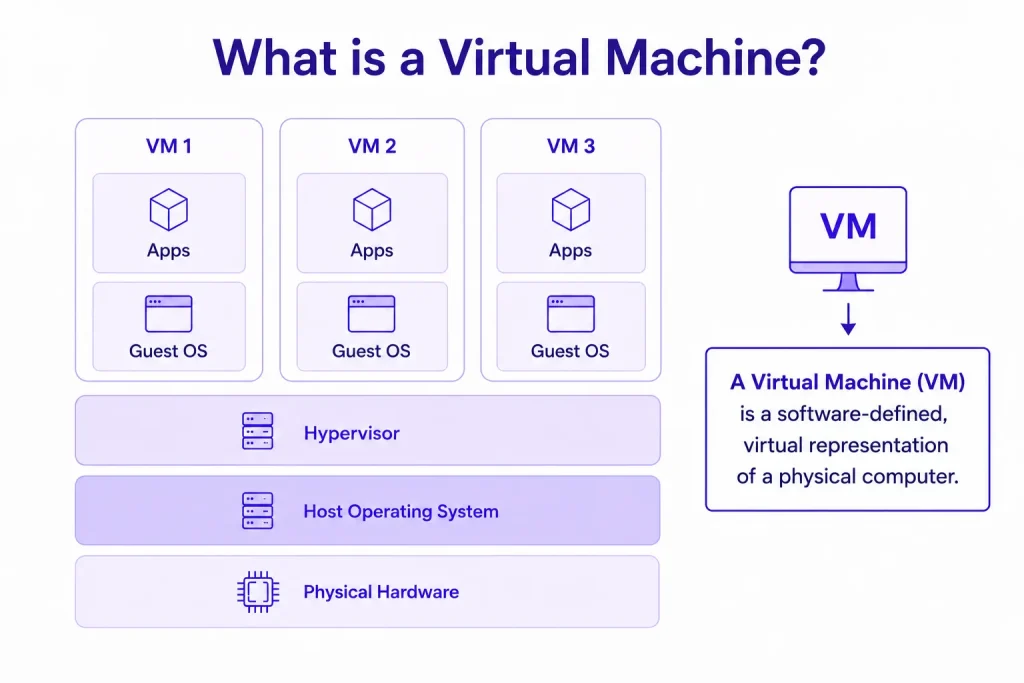
A Virtual Machine (VM) is a software-defined, virtual representation of a physical computer. It behaves exactly like a real physical computer, complete with its own virtual CPU, memory, storage, and network interface. However, it exists purely as an isolated digital file running on top of actual physical hardware.
How a VM Works
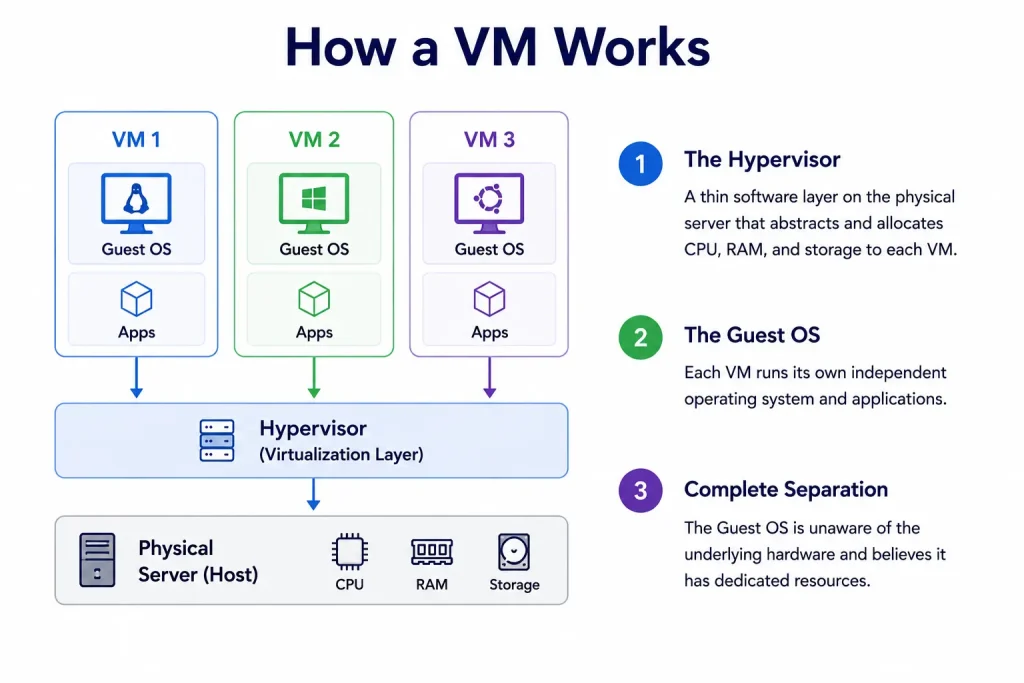
A VM operates by using a virtualization layer to separate its software operations from the physical machine it lives on:
- The Hypervisor: This is a thin software layer installed directly on the physical server hardware (the Host). The hypervisor abstracts the hardware and dynamically slices up the physical CPU cores, RAM, and hard drive space.
- The Guest OS: Each individual VM (the Guest) runs its own independent operating system (like Linux Ubuntu or Windows Server) inside its allocated slice.
- Complete Separation: The Guest OS is entirely unaware that it is running on shared hardware. It believes it has direct control over its own dedicated physical components
Key Benefits of VMs
- Absolute Isolation: Because each VM operates in its own sandboxed layer with its own operating system, a security breach, malware infection, or system crash on one VM cannot spread to other VMs sharing the same physical hardware.
- Cost Efficiency & Consolidation: Instead of purchasing ten individual physical servers that sit idle most of the day, a business can buy one powerful server and run ten VMs on it simultaneously, maximizing resource utilization.
- Instant Scalability: Cloud administrators can vertically scale a VM’s capacity, such as instantly increasing its RAM from 8 GB to 32 GB via software configurations, without needing to physically open a server chassis or install hardware upgrades.
- Portability & Snapshots: Since a VM is essentially a collection of data files, it can be easily backed up, duplicated, or seamlessly moved from a local server to a public cloud network without downtime.
What is Kubernetes?
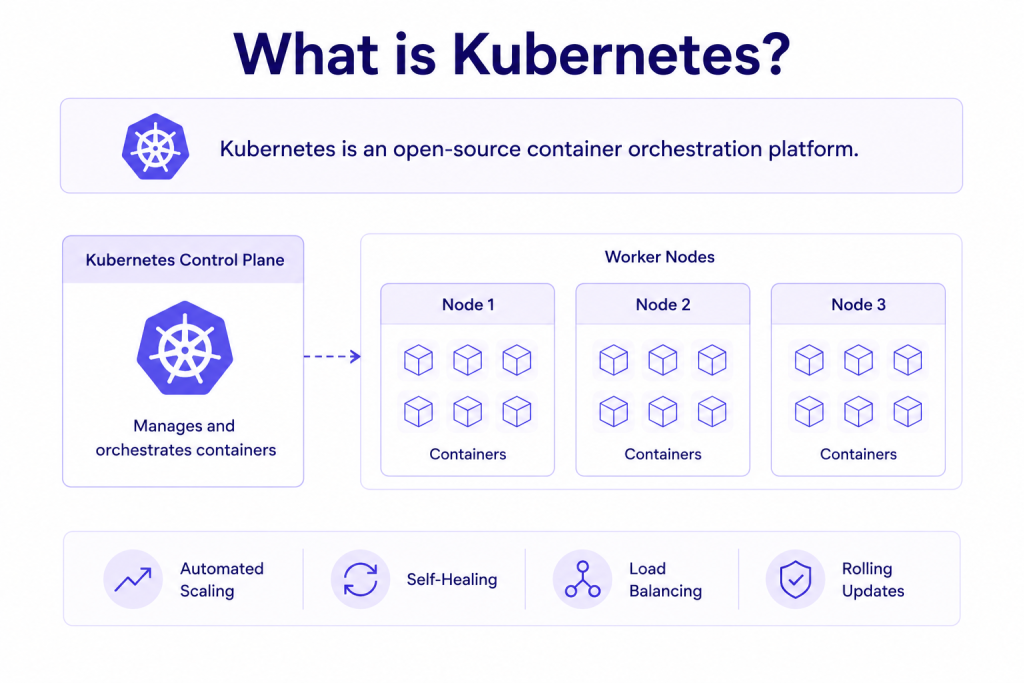
Kubernetes is an open-source container orchestration platform. It is a system that automatically manages where and how your containerised applications run across a group of servers. It was built by Google internally and handed over to the Cloud Native Computing Foundation (CNCF) in 2016.
Here is what that means in practice. You have an application made up of ten separate programs. Each program runs in its own container. Each container needs to be running on one of your servers at all times. When traffic increases, some containers need to run as multiple copies simultaneously. When a container crashes, it needs to restart immediately. When a server goes down, the containers on it need to move to healthy servers automatically.
Doing all of that manually across multiple servers is complex and error-prone. Kubernetes does it automatically.
How Kubernetes works
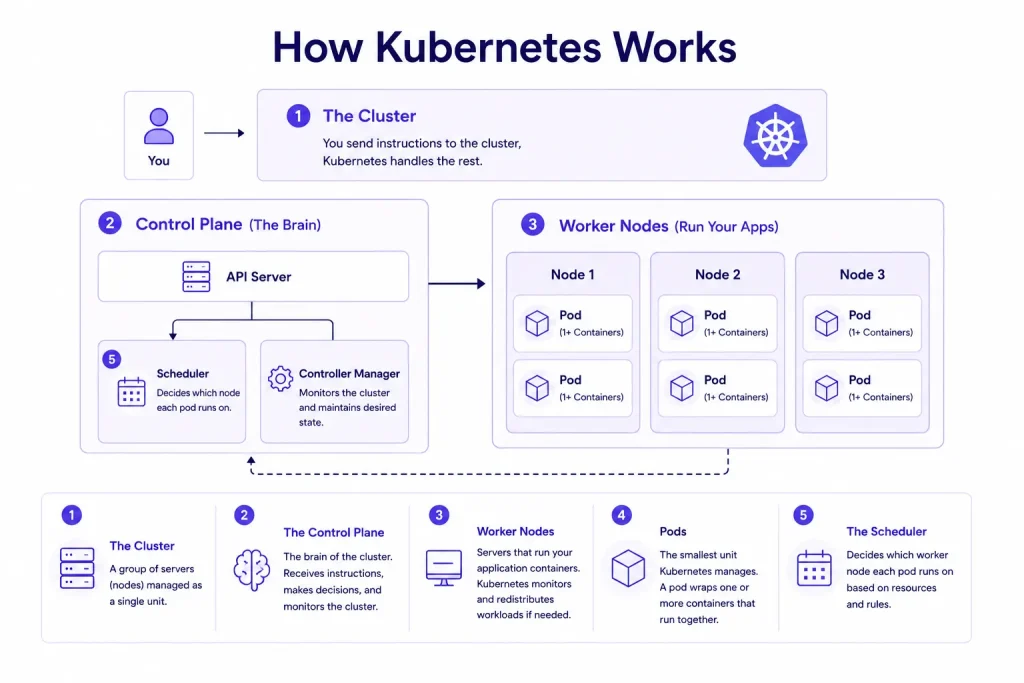
- The Cluster: A Kubernetes cluster is a group of servers called nodes, which Kubernetes manages as a single unit. Instead of logging into each server individually to deploy or manage applications, you issue instructions to the cluster and Kubernetes handles the distribution of work across all nodes within it.
- The Control Plane: This is the brain of the cluster. It receives your instructions (run this application, scale to five copies, deploy the new version), makes scheduling decisions, and continuously monitors the state of the cluster. It runs in the background at all times.
- Worker Nodes: These are the servers that actually run your application containers. The control plane assigns work to them, monitors their health, and redistributes their workloads if one becomes unavailable.
- Pods: The smallest unit Kubernetes manages. A pod is a wrapper around one or more containers that need to run together. Kubernetes schedules, starts, stops, scales, and restarts pods automatically.
- The Scheduler: A component inside the control plane that decides which worker node each pod should run on, based on available CPU and memory across the cluster, and any rules you have defined.
What is Kubernetes as a Service (KaaS)?
Running Kubernetes requires setting up and maintaining the control plane, which is the most operationally complex part. Kubernetes as a Service (KaaS) is a managed offering where the cloud provider handles all of that. You deploy your applications. The provider manages the infrastructure underneath.
CloudPe offers KaaS across data centres in Mumbai, Pune, Delhi, and Bengaluru, with infrastructure aligned to DPDP and RBI data localisation requirements.
Key benefits of Kubernetes
- Self-healing: If a container crashes, Kubernetes detects it within seconds and starts a replacement automatically, with no manual intervention required.
- Traffic-based scaling: If your application receives a spike in traffic, Kubernetes can start additional pod copies within seconds. When traffic drops, it scales back down, so you are not paying for capacity you are not using.
- Efficient resource use: Kubernetes continuously monitors how much CPU and memory each pod is consuming and redistributes workloads across nodes to reduce idle resource waste.
- Consistent deployments: Your application runs in a container. That container runs identically whether it is on your test environment, your staging server, or your production cluster. There is no “it works on my machine” problem.
VM vs Kubernetes: core differences
Now that you understand what each technology is, here is how they compare on the dimensions that matter most.
Isolation
A VM runs its own OS. If one VM gets infected with malware, the malware runs inside that VM’s OS. It cannot reach another VM on the same server because the hypervisor keeps each VM in a completely separate environment.
Containers share the host OS kernel. If an attacker exploits a kernel-level vulnerability inside one container, they may be able to reach other containers on the same node because they all share the same underlying kernel.
Resource overhead
Every VM runs a full OS regardless of what your application needs. Before your application starts, a typical VM has already consumed 1 to 4 GB of RAM just for the OS. A container packages only the application and its dependencies. Containers are typically 10 to 100 times lighter.
Startup speed
A VM boots an entire operating system from scratch every time it starts: firmware, kernel initialisation, background services. This takes one to five minutes. A Kubernetes pod starts a container process. This takes seconds. Kubernetes can start a new pod and route traffic to it before a VM has finished booting.
Scaling
To scale a VM-based application, you provision a new VM, wait for it to boot its full OS (one to five minutes), and configure it. To scale a Kubernetes application, you tell Kubernetes to run more copies of a pod. It finds available space on the cluster and starts new pods within seconds, automatically.
Portability
A container packages the application and everything it needs to run. That container runs identically on any server that supports the container runtime, regardless of the underlying OS or cloud provider. A VM is tied to the hypervisor it was created on. Moving a VM to a different environment requires migration tooling and often causes downtime.
Is Docker a VM? Clearing up the confusion
No. Docker is not a virtual machine.
Docker is a platform for building, packaging, and running containers. A container shares the host OS kernel and does not virtualise hardware. A VM runs a full OS with its own isolated kernel via a hypervisor.
Both create isolated environments. The mechanisms are fundamentally different. A Docker container is closer to a sandboxed application process than a virtual computer.
In most production setups, Docker containers run inside virtual machines. They are not competing options. They work in layers.
Can Kubernetes run on virtual machines?
Yes. This is the standard configuration in production environments.
Most cloud providers provision Kubernetes worker nodes as virtual machines. When you create a Kubernetes cluster on a managed platform, VMs are running underneath each node. Kubernetes treats bare metal, VMs, and physical servers equally as compute resources, but VMs are the most common substrate.
This combination gives you hardware isolation at the infrastructure layer and container orchestration at the application layer. It is not a workaround. It is how large-scale Kubernetes deployments are built.
What are the 4 types of services in Kubernetes?
Kubernetes services define how pods are exposed and reached. There are four types:
- ClusterIP: Exposes the service on an internal cluster IP. Only reachable from within the cluster. This is the default type and suits internal service-to-service communication.
- NodePort: Exposes the service on a fixed port on each node’s IP. Accessible from outside the cluster. Used for development or simple external access scenarios.
- LoadBalancer: Provisions an external load balancer from the cloud provider. Routes external traffic to the service. The standard method for exposing production applications to the internet.
- ExternalName: Maps the service to an external DNS name. Used when a Kubernetes service needs to reference a resource outside the cluster.
When to choose a virtual machine
| Situation | Why a VM is the right call |
| Legacy applications with OS-level dependencies | Containers cannot package old installers, custom drivers, or runtime-specific environments |
| Full OS or kernel-level access required | Some applications need kernel configuration that container environments do not permit |
| Strict compliance and hardware isolation | RBI, SEBI, and CERT-In audits may require hardware-level workload separation |
| Monolithic databases such as Oracle or SQL Server | These depend on direct disk access, specific OS tuning, and consistent I/O |
| Windows-only workloads | Kubernetes on Linux hosts cannot natively run Windows containers without additional setup |
When to choose Kubernetes
| Situation | Why Kubernetes is the right call |
| Microservices architecture | Manages each service independently, enabling separate scaling and deployments |
| Auto-scaling requirements | Traffic-variable apps scale pods up in seconds and down when demand drops |
| Active CI/CD pipelines | Supports rolling updates, blue-green deployments, and canary releases without downtime |
| Multi-cloud or portable deployments | Containers run identically across any cloud platform |
| Teams managing 5-plus services without dedicated ops | Automates health checks, restarts, and resource scheduling across the cluster |
| Recommended read: A Complete Guide to Kubernetes Service |
Running both together: the hybrid option
Most production environments do not choose between VMs and Kubernetes. They use both, in layers.
In a standard hybrid setup, Kubernetes runs on a cluster of VM-based nodes. The VMs provide compute, storage, and network isolation. Kubernetes handles workload scheduling, scaling, and container management on top.
| Scenario | Architecture |
| Legacy apps alongside cloud-native services | Legacy workloads on VMs, containerised services on Kubernetes nodes |
| Compliance-sensitive industry with containerised workloads | Kubernetes on isolated VM nodes, separated per compliance boundary |
| Mid-migration from VMs to containers | Both running on the same platform, workloads moved incrementally |
Frequently Asked Questions
What is the difference between Kubernetes and virtual machines?
A virtual machine virtualises physical hardware to run a complete operating system. Kubernetes is an orchestration platform that manages containerised applications across a cluster of servers. They operate at different layers and are commonly used together in production.
Can you run VMs in Kubernetes?
Not in a standard deployment. Kubernetes manages containers, not VMs. The KubeVirt project extends Kubernetes to manage VMs through the same API, but this is a specialised use case. The standard production pattern is the reverse: Kubernetes runs on top of VMs.
Is Docker technically a VM?
No. Docker is a container platform. Containers share the host OS kernel and do not virtualise hardware. VMs run a full OS with their own kernel via a hypervisor. Both create isolated environments through different mechanisms.
Is a Kubernetes cluster a VM?
No. A Kubernetes cluster is a set of nodes that run containerised workloads. Those nodes are typically VMs or physical servers. The cluster is an orchestration layer, not a VM.
Which is better: VMs or containers?
Neither is universally better. VMs provide stronger isolation and full OS access. Containers are faster, lighter, and more portable. The right answer depends on your application requirements, compliance environment, and team capabilities. Most production setups use both.
When should I use both VMs and Kubernetes together?
Use both when you have a mix of legacy applications that need full OS environments and cloud-native services that benefit from container orchestration. A hybrid setup lets you manage both through the same cloud platform without forcing everything into one model before you are ready.