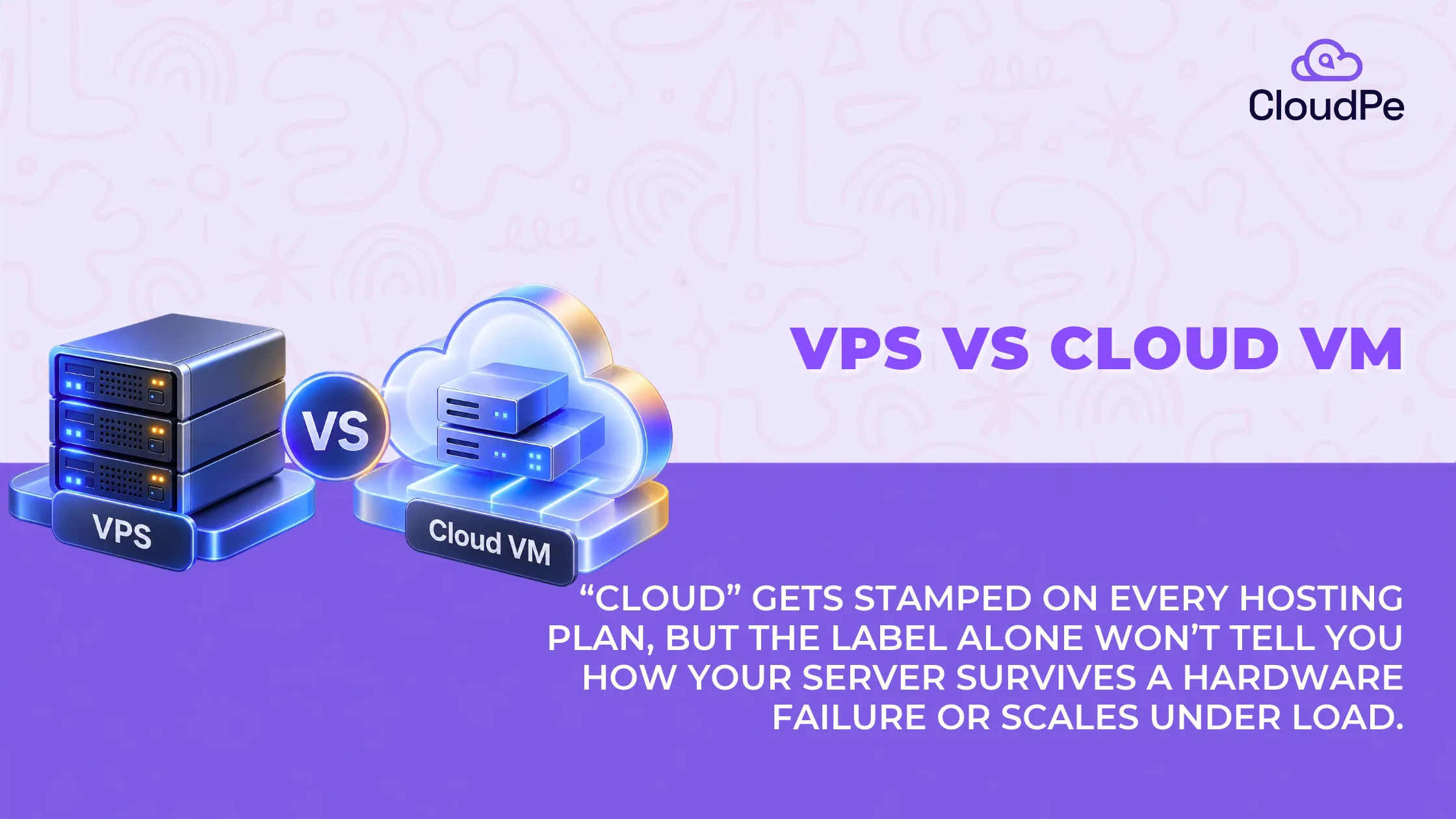
Open any hosting page and the word “cloud” is everywhere: cloud VPS, cloud hosting, and cloud servers. Sometimes it describes a genuine difference in infrastructure. Other times, it is simply a product label.
That makes the VPS vs VM comparison harder than it needs to be.
The distinction starts with what the terms mean. A virtual machine (VM) is a technology that creates an isolated computing environment. A virtual private server (VPS) is a hosting product that providers sell to customers. A VPS running on a full hypervisor is therefore a VM, but not every VM is a VPS.
The bigger differences emerge when looking beyond the virtual machine itself. Storage architecture, host failure recovery, scaling options, and billing determine how the infrastructure behaves in practice.
This article compares traditional VPS hosting with cloud VMs, explains common misconceptions, and shows how to choose the right option for a workload.
VPS vs cloud VM: the key differences
A traditional VPS typically runs on a single physical server and comes with a fixed monthly price. A cloud VM typically runs within a pool of managed servers, with supporting infrastructure for storage, recovery, and scaling.
These are common patterns rather than strict rules. Providers can offer VPS products on cloud infrastructure, and some cloud VMs still depend on a single host at a time.
| Comparison area | Traditional VPS | Cloud VM |
| Infrastructure | Often tied to one physical host | Runs within a pool of managed hosts |
| Storage | Often local to the host | Usually network-attached |
| Billing | Typically a fixed monthly price | Often metered, with separate charges |
| Recovery | Depends on host and storage design | May support restart or migration to another host |
| Scaling | Usually resizing or upgrading a plan | Resizing and adding instances |
| Networking | Often starts with a public IP | Commonly supports private virtual networks |
A cloud VM still runs on one physical host at a time. The broader platform provides the pooled infrastructure, storage, and recovery mechanisms around it.
To understand why these differences matter, it helps to examine how each model works.
How a VPS works and where its limitations begin
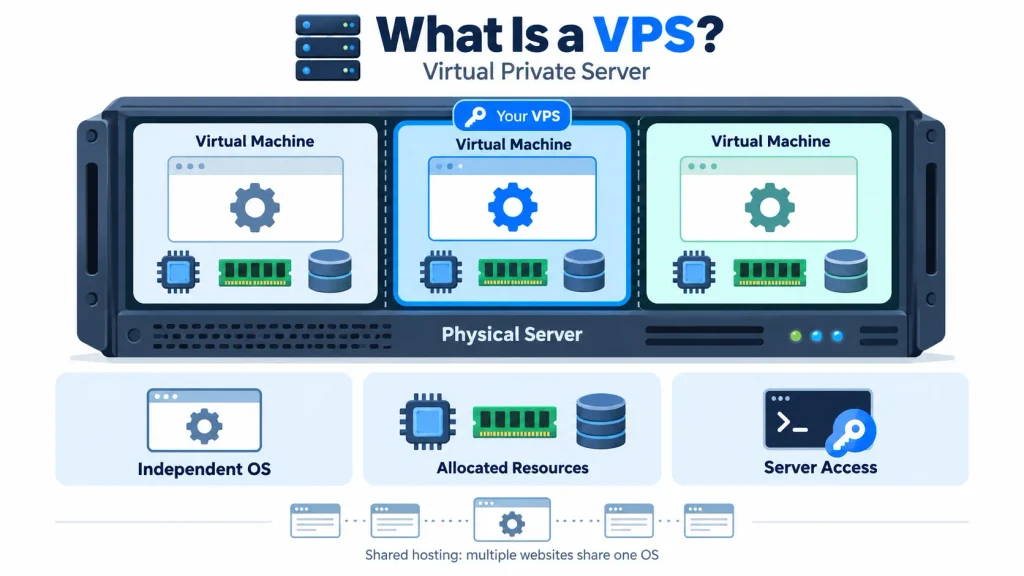
A VPS is a hosting product that provides an operating system, allocated resources and access to a virtual server. Unlike shared hosting, where many websites share one operating system, a full virtual machine gives each customer an independent operating system environment.
One server, split into several virtual machines
A hypervisor divides one physical server into several virtual machines. Each VM receives its own allocation of CPU, memory and storage, and stays isolated from the others.
Common hypervisors include KVM, Xen, Hyper-V and VMware ESXi. They use hardware virtualisation features, so guest operating systems can run at performance that approaches native execution, depending on the workload and configuration.
This is the foundation of a VPS. The provider manages the physical hardware, and the customer manages the operating system and applications inside the allocated environment.
A fixed plan gives a fixed bill
A VPS plan bundles a defined amount of CPU, RAM and storage into one monthly price. That makes budgeting straightforward, because the base cost is known in advance.
For example, CloudPe’s VPS page lists a Starter plan with 1 vCPU, 4 GB of RAM and 30 GB of NVMe storage for ₹930 a month. Compute and storage sit inside that price, and the page lists no egress charge, so the monthly cost is easy to estimate for steady workloads.
A fixed price does not tell the whole story, though. The virtualisation type, storage placement and recovery options decide what the customer actually receives.
Not every VPS is a full virtual machine
Some budget plans use containers, which share the host’s kernel. That matters when an application needs kernel-level control, because VPN modules, kernel changes and some Docker setups may not work on a container plan.
One command shows which type a server is:
systemd-detect-virt
The values kvm, xen or vmware indicate a virtual machine on that platform. The values lxc or openvz indicate a container. The result is a useful check, and compatibility is still worth confirming with the provider before buying.
A traditional VPS depends on its host
A traditional VPS depends on the physical host it runs on. If the host fails and the data sits on a local disk, the service can stay down until the hardware is repaired or the data is restored from a backup.
This is not true of every VPS. Some providers use replicated storage and extra recovery steps. The same CloudPe page describes virtual machines on OpenStack with automated 3x data replication.
So the VPS label alone does not decide resilience. Storage architecture and recovery procedures matter just as much.
Five limits of a VPS
A VPS trades flexibility for simplicity, and the trade has limits. The table lists the five that matter most and what to do about each.
| Limitation | What it means | What to do |
| Capacity is set by the plan | More capacity means a resize or a larger plan, and whether a resize needs a restart varies by provider | Check resize terms before buying |
| The host is a dependency | Recovery depends on storage design, not on the label | Ask where the disk lives and what happens if a host fails |
| Some plans are containers | A shared kernel can block Docker and VPN modules | Run systemd-detect-virt and confirm with the provider |
| The customer runs the server | The provider manages hardware, while the customer manages the operating system and applications | Plan for updates, backups and monitoring |
| A fixed price does not shrink | Idle capacity is still paid for | Size the plan to steady demand |
Need predictable monthly hosting?
Explore VPS plansHow cloud VMs work, and their limitations
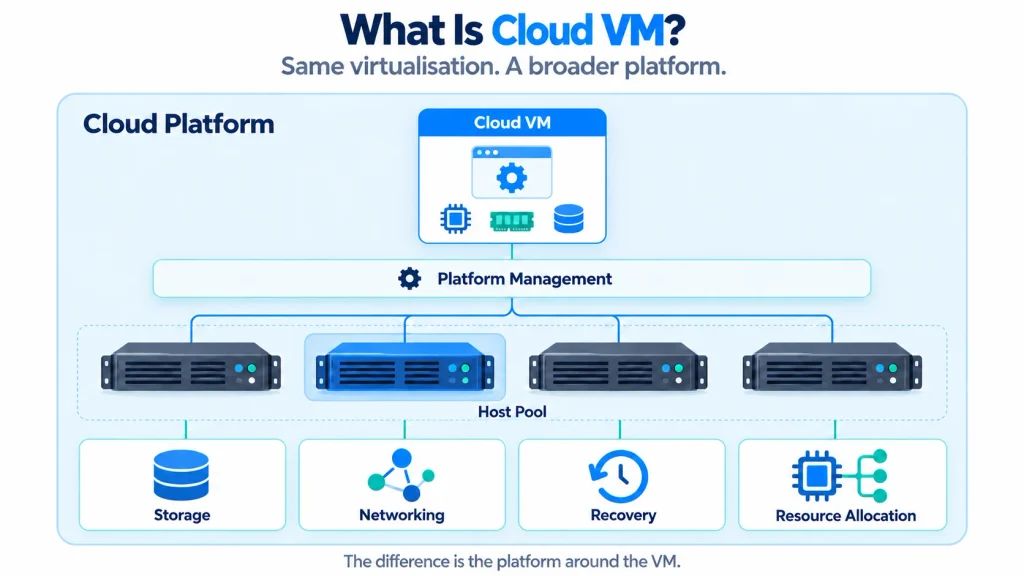
A cloud VM uses the same fundamental virtualisation technology as a VPS. The difference lies in the platform surrounding the virtual machine.
Instead of relying solely on the capabilities of one physical server, a cloud platform manages a pool of hosts and provides services for storage, networking, recovery, and resource allocation.
A cloud VM can restart on another host
A cloud platform spreads virtual machines across many physical hosts. When a host fails or needs maintenance, the platform can often restart the VM on another host, and some platforms can live-migrate a running VM between compatible hosts.
This depends on one design choice: the VM’s storage must stay reachable when its host changes. Network-attached storage does this by keeping the data separate from the server that runs the VM, so another host can use the same volume.
Host-level recovery is not full outage protection. A zone failure, a storage disruption or an application fault needs extra safeguards. Providers reflect this in their uptime commitments: 99.99% requires instances spread across multiple zones, while a single instance carries a lower commitment.
Elasticity, failover, and metered billing each have a condition
Cloud platforms offer three capabilities that shape how workloads are run. Each one comes with a condition.
- Elasticity: Capacity can be added or removed as demand changes. Automatic scaling needs policies, monitoring and warm-up time, and it stops at the maximum size and account quotas that have been set.
- Failover: A workload can restart on another host after a failure. Protection against wider outages depends on the availability design.
- Pay-as-you-go billing: Compute bills per hour or per second, while storage, snapshots, networking and outbound traffic are charged separately.
These capabilities add flexibility, and they add operational decisions. Teams must configure scaling rules, understand recovery limits, and track the full cost of a workload.
That suits applications with changing demand. For workloads that run all month, metered billing can cost more, as the worked example below shows.
Network storage trades some speed for durability
A local drive is attached directly to the physical host, while network storage is reached over the network. Neither is better in every case, and the right choice depends on performance, durability and recovery needs.
A local drive offers low-latency access, which helps storage-intensive workloads. Some cloud instances provide temporary local storage, and data on it is lost when the instance is stopped or terminated.
Network storage persists independently of the compute host, and a volume can be detached from one VM and attached to another. The trade-off is a small amount of network latency.
Five limits of a cloud VM
Each strength above has a limit. The table lists the five that matter most and what to do about each.
| Limitation | What it means | What to do |
| Host recovery is not outage protection | A restart on another host does not cover a zone failure | Plan for multiple zones and keep backups |
| Elasticity needs setup | Scaling needs policies, monitoring and warm-up time, and stops at set maximums and quotas | Configure and test before a peak |
| Metered bills add up | Storage, snapshots, networking and outbound traffic bill separately | Estimate every line, not only compute |
| Network storage adds latency | A small delay compared with a local drive | Choose storage by workload |
| Local instance storage is temporary | Data is lost when the instance stops or terminates | Keep durable data on network volumes or backups |
Get a VM deployed in minutes
Try CloudPeVPS vs cloud VM: comparing performance and reliability
The main differences between a VPS and a cloud VM are not necessarily found inside the virtual machine. They emerge from the infrastructure, storage, networking, and commercial model around it.
| Area | Traditional VPS | Cloud VM |
| Architecture | Often one host, sometimes with local disk | Pooled hosts, usually with network storage |
| Failure handling | Depends on storage and recovery design | May support restart or migration to another host |
| Scaling | Resize or upgrade the plan | Resize or add instances |
| Billing | Usually a fixed monthly rate | Metered billing with potentially separate charges |
| Networking | Often a public IP and server-level firewall | Commonly includes private networking and security groups |
| Kernel control | Full control on a hypervisor-based VM; limited on containers | Typically full guest OS control |
These are typical patterns, not guaranteed features. Provider architecture and plan terms should always be checked before making a decision.
Architecture and storage determine performance
A traditional VPS with local NVMe storage can provide low-latency access and a relatively simple setup. A cloud VM with network-attached storage can offer greater portability and independent storage management.
Both can use fast NVMe hardware underneath. The difference is how that hardware is connected, managed, and exposed to the workload.
Performance also depends on CPU allocation, memory, storage throughput, network conditions, and competing workloads. A cloud VM is not automatically faster than a VPS simply because it runs on a cloud platform.
For performance-sensitive applications, benchmark results under representative workloads provide a more reliable basis for comparison.
Reliability depends on recovery architecture
A physical host failure can affect a VPS that depends on that host and its local disk. A cloud platform may restart the VM elsewhere if the storage and recovery systems support it.
A VPS using replicated storage can also offer recovery capabilities, narrowing the practical difference between the two models.
Neither approach removes the need for backups. Replication can copy accidental deletions or corrupted data, while host recovery does not necessarily protect against a wider zone outage.
Reliability therefore depends on the complete design: storage redundancy, recovery procedures, backups and the application’s ability to tolerate disruption.
Scaling options shape workload growth
Both VPS and cloud VM environments can support vertical scaling, which increases the resources available to an existing machine.
Cloud platforms also commonly support horizontal scaling, where additional VMs are created to handle more demand. Autoscaling groups can add or remove instances based on configured metrics and policies.
However, horizontal scaling is not exclusive to cloud VMs. It can also be implemented using VPS instances, load balancers, and external orchestration tools.
The practical difference is often how easily the provider’s platform supports these operations and integrates them with the rest of the infrastructure.
Resize behaviour also varies. Some changes require a restart, while others can be applied without one. This should be checked before relying on scaling for production workloads.
Networking and security affect exposure
Traditional VPS plans have often provided a public IP address and a firewall configured within the server. Cloud platforms commonly offer private virtual networks, security groups and network-level access controls.
Private networking allows services to communicate without exposing every component directly to the internet. Security groups and firewalls help restrict traffic to the ports and sources that need access.
The distinction is becoming less pronounced as VPS providers add more networking features.
CloudPe’s VPS plans list a free VPC, custom security groups and firewalls. This is another example of why product labels alone are not enough to judge capabilities.
Four common myths about VPS and cloud VMs
VPS and cloud VM comparisons often rely on broad assumptions about performance, reliability, and cost. These assumptions can make one infrastructure model appear better before its actual capabilities are examined.
The reality is more nuanced. The underlying architecture, storage design, resource allocation, and billing model matter more than the product label. Below are four common assumptions are worth examining before choosing a provider.
Myth 1: A cloud VM is always faster than a VPS
Performance depends on the resources allocated to a VM, the processor, storage, network and workload. The word “cloud” does not guarantee better performance.
For example, AWS burstable instances provide a baseline level of CPU performance and use CPU credits to support higher utilisation. Under sustained workloads, performance depends on the instance’s configuration and available credits. Meanwhile, a well-provisioned VPS with local NVMe storage may deliver strong performance for storage-intensive applications.
What matters instead: Compare CPU allocation, sustained performance, storage IOPS, network throughput, and application latency. Benchmark both environments against the same workload before deciding.
Myth 2: Cloud infrastructure guarantees better uptime
Cloud platforms can provide pooled infrastructure, replicated storage and recovery mechanisms. These features can help workloads recover from individual host failures, but they do not eliminate downtime.
Availability depends on how the infrastructure is configured. A cloud VM running on a single instance does not automatically provide the same resilience as an application deployed across multiple availability zones. Likewise, a VPS backed by replicated storage may offer stronger recovery capabilities than a VPS that depends entirely on a single host.
An uptime SLA also does not guarantee uninterrupted application availability. For example, AWS defines different availability commitments for individual EC2 instances and deployments spanning multiple availability zones.
What matters instead: Evaluate the provider’s storage redundancy, host recovery process, backup policy, and SLA. For critical applications, assess whether the complete architecture can tolerate host, storage, and zone-level failures.
Myth 3: Scaling a cloud VM always requires downtime
Cloud VMs are often associated with flexible scaling. However, increasing resources does not always happen instantly or without interruption. Some changes require a reboot, instance resizing, or workload migration. The process depends on the provider, instance type, and configuration.
A VPS may also support resource upgrades, depending on the provider’s infrastructure and plan.
What matters instead: Check which resources can be scaled, whether changes require downtime, and if the provider supports vertical scaling, horizontal scaling, or automated scaling for the workload.
Myth 4: A cloud VPS is a completely different server technology
The terms VPS and cloud VM are often presented as separate technologies, but they overlap.
A VPS is a virtual server offered as a hosting product. A cloud VM is a virtual machine provisioned through a cloud platform. Both can use hypervisors to run isolated operating systems on shared physical hardware.
The meaningful differences usually lie in how the infrastructure is managed. A traditional VPS may use local storage and fixed monthly pricing, while a cloud VM may use network-attached storage, metered billing and integrated scaling tools. However, these are common patterns, not universal rules. A VPS can also run on cloud infrastructure and use replicated storage.
What matters instead: Look beyond the product name. Check where the storage resides, how host failures are handled, which scaling options are available and how the bill is calculated.
Understanding these differences makes it easier to evaluate providers on their actual capabilities rather than their marketing terminology.
Unsure which infrastructure fits your workload? Talk to the team about sizing and pricing.
Contact CloudPeChoosing the right infrastructure for your workload
The right choice depends on workload behaviour, downtime tolerance, operational skills and budget. A simple, predictable workload may not need the additional capabilities of a cloud platform. A distributed application with variable demand may benefit from them.
Workloads suited to a traditional VPS
A VPS is a practical option when an application needs predictable resource allocation and does not require extensive infrastructure automation.
Common use cases include:
- Websites and small web applications
- Development and staging environments
- Game servers and self-hosted services
- Small databases with manageable resource requirements
- VPN servers, where the virtualisation environment supports the required networking capabilities
A VPS can also suit workloads that run continuously and have relatively stable resource requirements.
The key is to verify that the plan provides the necessary kernel access, storage performance, backups, and recovery options.
Workloads suited for cloud VMs
A cloud VM becomes more attractive when the application needs infrastructure flexibility or depends on multiple interconnected services.
Typical use cases include:
- Applications with significant traffic fluctuations
- Systems that add instances as demand grows
- Distributed applications using private networking
- Workloads that need automated recovery across compatible hosts
- Applications integrated with managed databases, queues or other cloud services
These capabilities can reduce the effort required to manage infrastructure at scale.
However, the benefits depend on configuration. Autoscaling, high availability and multi-zone recovery do not happen automatically simply because an application runs on a cloud VM.
A practical infrastructure decision checklist
The following checklist connects workload requirements to the infrastructure model that may suit them best.
| Decision factor | A VPS may fit when… | A cloud VM may fit when… |
| Traffic pattern | Demand is relatively steady | Demand changes significantly |
| Downtime tolerance | A short outage is manageable | The application requires a designed recovery strategy |
| Budget | A predictable monthly bill is important | Variable billing and additional services are acceptable |
| Operational skills | The team can manage a server directly | The team can manage cloud services or use managed offerings |
| Data location | The provider offers the required region | The cloud region meets the required location constraints |
Data location deserves particular attention when regulatory obligations apply. Requirements depend on the type of data, the organisation and the applicable rules.
For example, India’s payment-system data localisation requirements can apply to covered payment system providers, while the Digital Personal Data Protection framework has its own provisions governing personal data and cross-border transfers. Businesses should confirm which obligations apply to their specific workloads rather than assuming that one location rule covers every type of data.
Ultimately, the decision should reflect the infrastructure requirements of the application, not the popularity of a particular hosting label.
Ready to get started? Get the most secure VM and VPS.
Try CloudPeConclusion
The VPS vs cloud VM comparison is less about two different virtualisation technologies and more about how infrastructure is provisioned, managed and priced.
A VPS often offers simplicity and predictable monthly costs. A cloud VM can provide greater flexibility through pooled infrastructure, network-attached storage, scaling tools and recovery options.
Neither is automatically faster, cheaper or more reliable. Those outcomes depend on the provider’s architecture, the workload, and the services included in the plan.
Before choosing, verify three things: the virtualisation type, the storage and recovery design, and the complete monthly cost. A provider that explains these details clearly offers a stronger basis for decision-making than one that relies on the label alone.
Frequently Asked Questions
Is a VPS the same as a VM?
A VPS is a hosting product, while a VM is a virtualisation technology. A VPS running on a full hypervisor is a VM, but not every VM is sold as a VPS. Some budget VPS plans use containers instead of full virtual machines.
What does VPS stand for?
VPS stands for virtual private server. It is a hosting environment that provides allocated resources and an operating system, typically with administrative access. Unlike shared hosting, a full VM has its own guest operating system.
Is a VPS better than a VPN?
They serve different purposes. A VPS provides a server for running applications, while a VPN creates an encrypted network connection. A VPS can host a VPN server if the underlying virtualisation environment supports the required functionality.
Is a VPS good for hosting websites?
Yes. A VPS can be suitable for websites, applications, and staging environments that need more control than shared hosting provides. It offers dedicated resources and often predictable monthly pricing, but it also requires you to manage the server.
Can a VPS run Docker or a VPN?
It depends on the virtualisation type and the provider’s restrictions. A KVM-based VPS generally offers its own kernel and supports a broader range of configurations. A container-based plan shares the host kernel and may restrict Docker or VPN functionality. Check the environment and provider documentation before purchasing.