What does virtual machine mean?
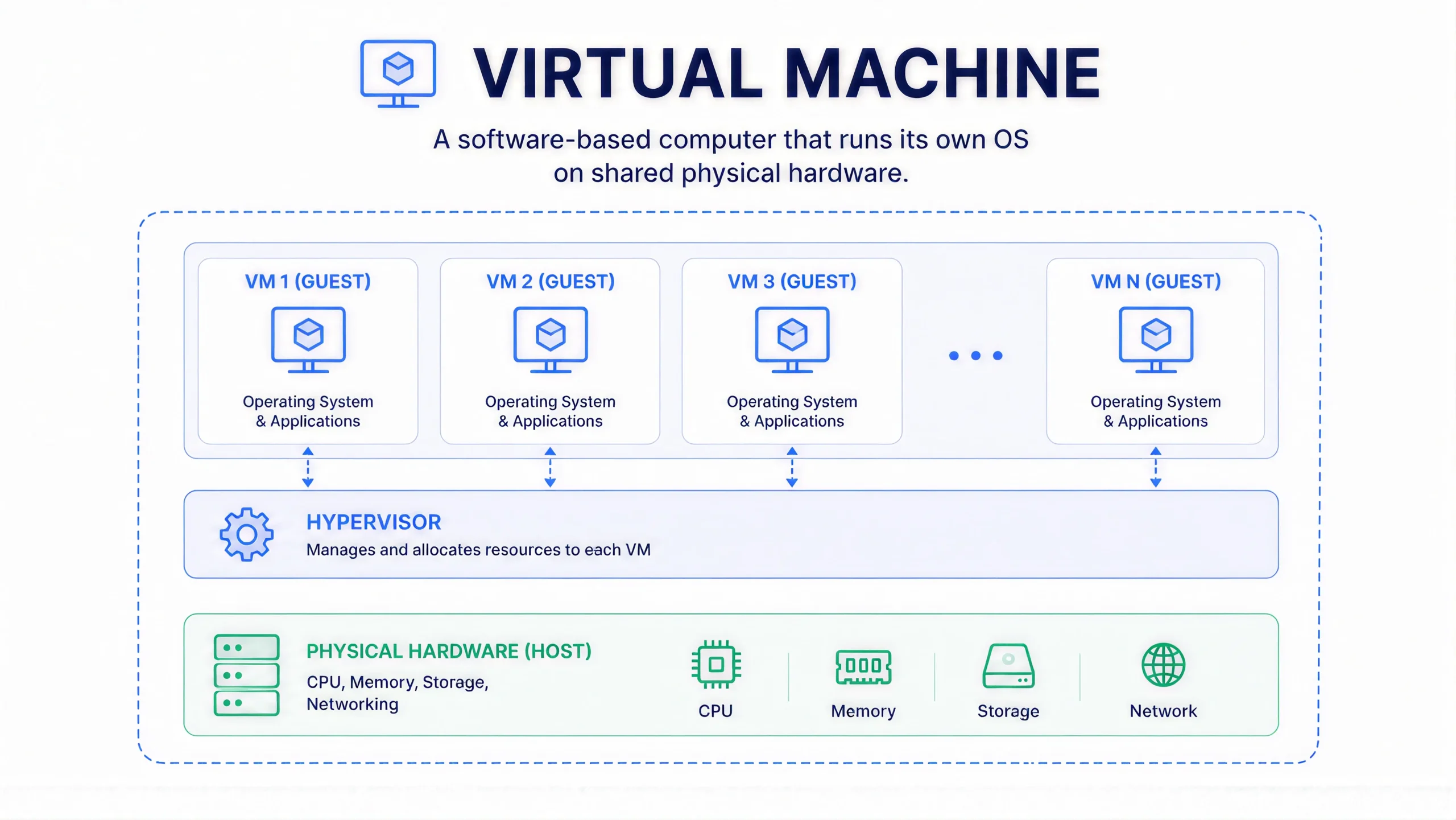
A virtual machine, or VM, is a software version of a computer. It runs on top of a physical machine but behaves like a separate one, complete with its own operating system, memory, and storage.
“Virtual” here just means “not physical, but working the same way.” A VM has no chassis, no fan, no power button. It is a file. Once you switch it on, it acts exactly like the real computer it stands in for.
What is a virtual machine?
A virtual machine is an isolated computing environment that runs its own operating system (OS) and applications on shared physical hardware. It behaves like a full, standalone computer, but it is really a set of files sitting on someone else’s server.
Three terms come up constantly when people talk about VMs:
- Host: The physical machine. The actual server sitting in a data centre or on your own premises.
- Guest: The virtual machine itself, the OS running inside that host.
- Hypervisor: The software layer that separates the host’s hardware from the guest and manages how resources get shared between them.
One host can run several guests at once, each isolated from the others. If one guest crashes or picks up malware, the rest keep running without interruption.
How does a virtual machine run?
A VM runs on virtualised resources. A hypervisor takes CPU, memory, storage, and networking from the host and divides them among guest VMs. Each guest behaves as though it has its own dedicated hardware. It has no idea it is sharing.
| Hypervisor type | Where it runs | Typical use |
| Type 1 (bare-metal) | Directly on the host’s hardware, with no OS underneath | Data centres, cloud platforms, production workloads |
| Type 2 (hosted) | On top of an existing OS, as an application | Desktop testing, local development, running a second OS on your laptop |
When is a virtual machine needed?
A virtual machine is needed to run a workload in its own OS environment without buying dedicated physical hardware for it. In practice, that covers a wide range of everyday IT scenarios.
- Testing and development: Developers spin up VMs to test code across different OS versions without touching their main system.
- Running legacy applications: Old software that will not run on a current OS can keep running inside a VM configured for its original environment.
- Server consolidation: Instead of ten underused physical servers, one may run ten VMs on two or three, and put the freed-up capacity to better use.
- Disaster recovery: A VM snapshot lets a business restore a working system fast after a hardware failure.