What is a firewall?
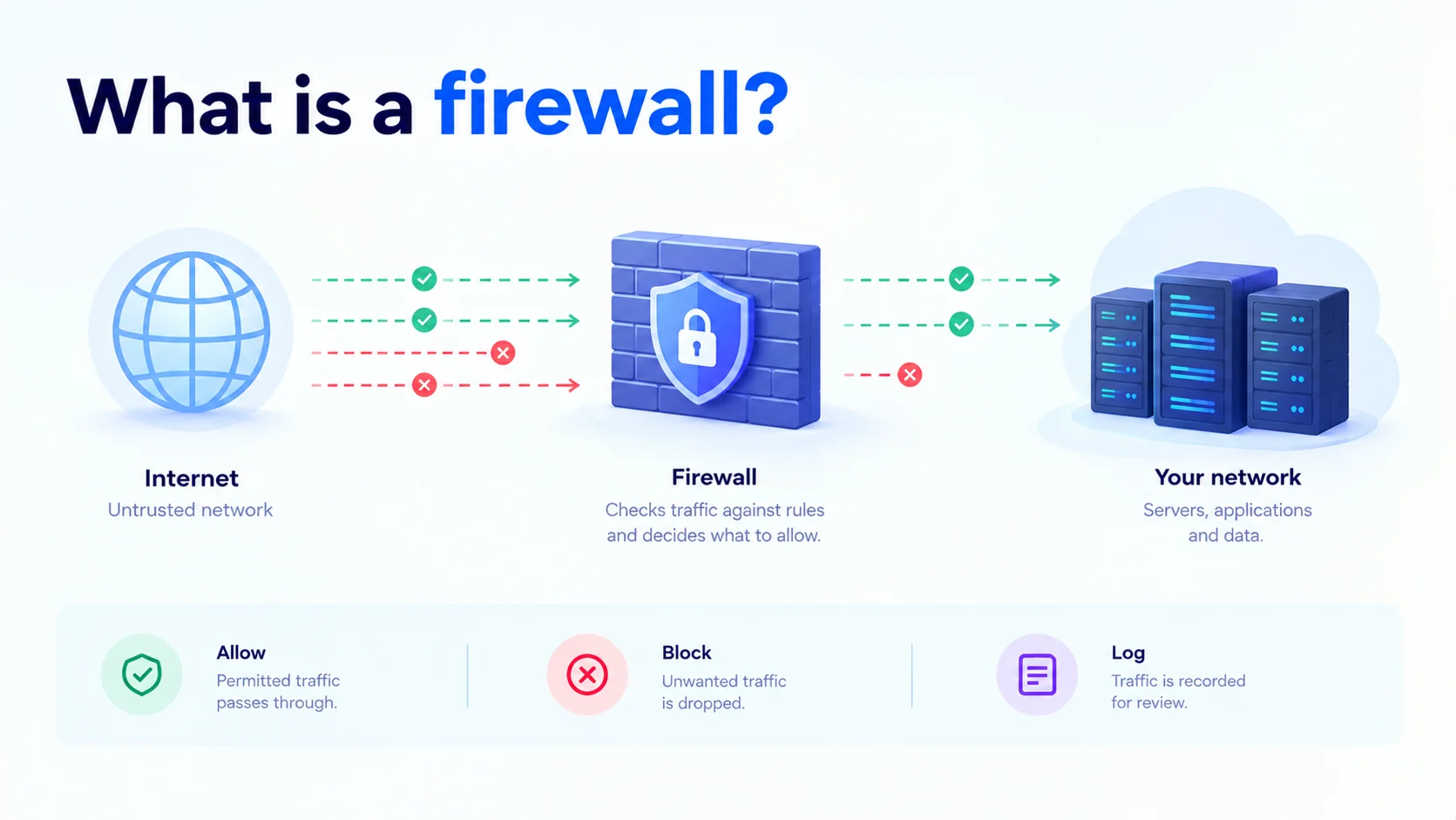
A firewall is a security system that monitors and filters network traffic based on a set of rules. It sits between a trusted network, like your servers, and an untrusted one, like the internet, and decides what is allowed in and what is blocked.
Think of it as a security guard at the entrance of a building. The guard checks who is arriving, compares them against a list, and only lets in the people who are allowed.
How a firewall works
Every piece of data on a network travels in small units called packets. Each packet carries details such as where it came from, where it is going, and which port and protocol it uses.
A firewall checks these details against its rules and takes one of three actions:
- Allow: The traffic matches a rule that permits it, so it passes through.
- Block (deny): The traffic matches a rule that forbids it, so it is dropped.
- Log: The traffic is recorded so you can review it later.
A simple rule might say: “Allow traffic to port 443 (HTTPS) from anywhere, and block everything else.” Many firewalls follow a “deny by default” approach, where anything not explicitly allowed is blocked.
Types of firewalls
- Packet-filtering firewall: The most basic type. Checks each packet’s source, destination, port, and protocol. Fast, but it does not understand the wider context of a connection.
- Stateful firewall: Tracks active connections and remembers their state. It can tell if a packet belongs to an existing, legitimate conversation. This is the most common type today.
- Application-layer firewall (proxy firewall): Inspects the actual content of the traffic, such as web requests. Can block harmful requests that a basic firewall would let through.
- Next-generation firewall (NGFW): Combines stateful filtering with deeper features, like intrusion prevention, application awareness, and threat detection.
- Web application firewall (WAF): Protects web applications specifically by filtering HTTP traffic and blocking attacks like SQL injection and cross-site scripting.
Hardware vs software vs cloud firewalls
| Type | What it is | Best for |
| Hardware firewall | A physical device placed at the edge of a network | Offices and on-premises data centers |
| Software firewall | A program running on a single server or computer | Protecting individual machines |
| Cloud firewall | A firewall delivered as a service in the cloud | Cloud servers, scalable and easy to manage |
Cloud firewalls are the usual choice for cloud workloads because you can set and change rules in a dashboard, without touching any hardware.
A simple example
On a Linux server, you can set basic firewall rules using ufw:
# Deny all incoming traffic by default
sudo ufw default deny incoming
# Allow SSH, HTTP, and HTTPS
sudo ufw allow 22
sudo ufw allow 80
sudo ufw allow 443
# Turn the firewall on
sudo ufw enable
This blocks everything except the ports your web server and remote access need.
What a firewall can and cannot do
A firewall helps protect against:
- Unauthorized access to your servers
- Port scanning and probing
- Many types of network-based attacks
- Unwanted outbound connections from infected machines
A firewall does not protect against:
- Phishing, where a user is tricked into giving up a password
- Malware that a user downloads and runs on their own
- Stolen or weak passwords
- Large DDoS attacks that flood your connection before traffic even reaches the firewall
A firewall is one layer of defense. Our cyber security entry covers how the layers fit together.
Firewall best practices
- Deny by default: Allow only the ports and sources you need.
- Restrict admin access: Limit SSH and remote desktop to trusted IP addresses.
- Review rules regularly. Remove old rules that are no longer needed.
- Keep firewall software updated. Patches fix known weaknesses.
- Log and monitor traffic. Unusual patterns can be an early warning.
- Use more than one layer. Combine firewalls with strong passwords, MFA, and regular updates.
Firewalls in the cloud
In a cloud environment, firewalls are often set up as security groups or network rules attached to your servers. You define which ports and IP addresses can reach each server, and the rules apply instantly. This works well alongside load balancing, where traffic is first filtered, then spread across healthy servers. Firewall rules are also part of the shared security responsibility in cloud computing: the provider secures the underlying infrastructure, and you decide who can reach your servers.
A well-configured firewall is one of the simplest ways to reduce risk on your servers. CloudPe’s cloud infrastructure includes configurable firewall rules and built-in DDoS protection in India-based data centers, so you control who can reach your workloads from the start.