What is cloud storage?
Cloud storage is a way of saving data on remote servers, managed by a third-party provider, instead of on a local hard drive or in-house server. Data is accessed over the internet, and the provider is responsible for the physical hardware, keeping it running, and making sure it stays available.
How cloud storage works
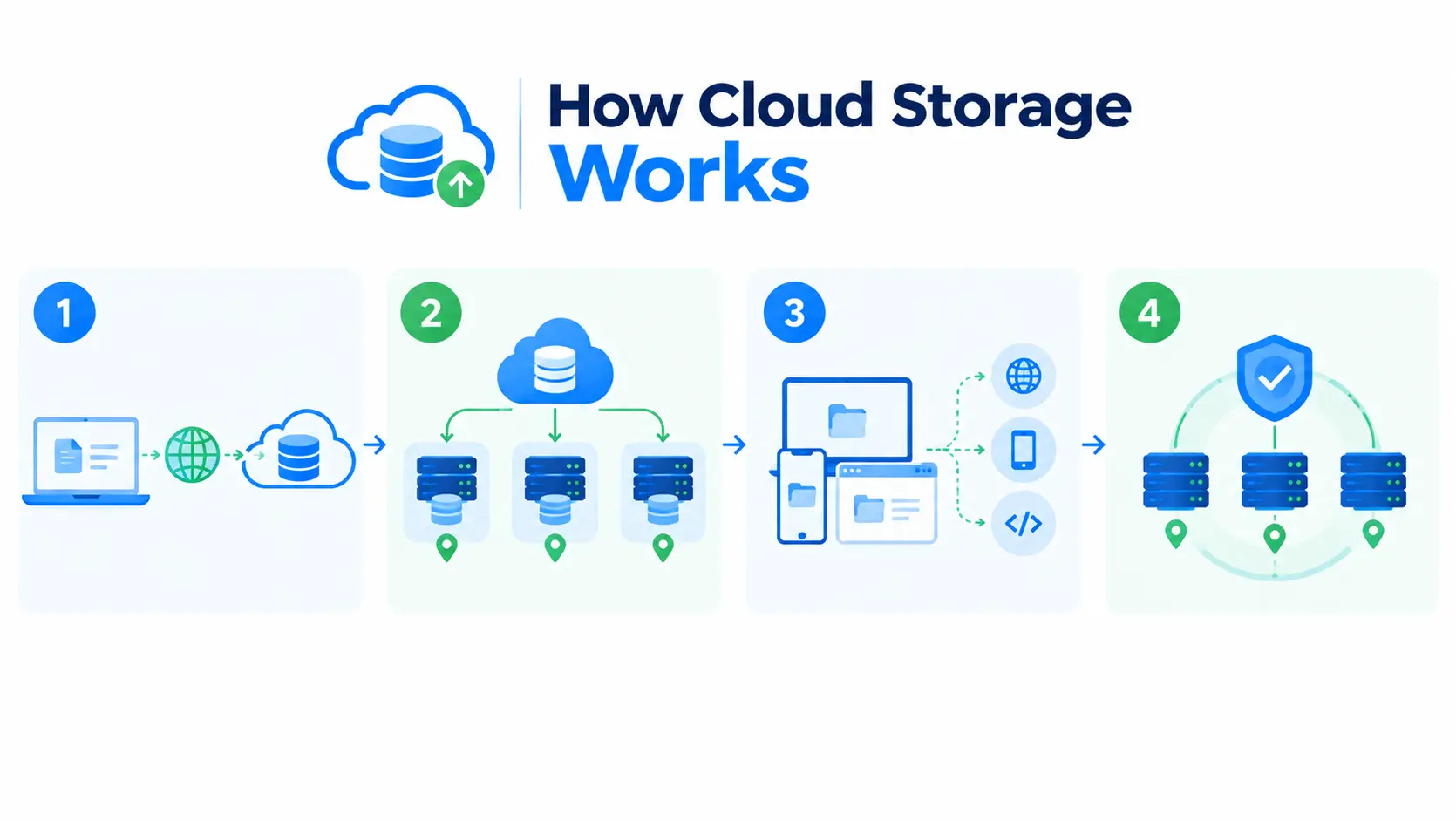
The following explains how cloud storage works:
- Data is sent from your device to the provider’s servers, usually over the internet.
- The provider spreads that data across multiple physical machines, often in multiple locations, rather than keeping it on a single disk.
- You access the data on demand, through a web interface, an app, or an API.
- The provider handles the hardware, redundancy, and uptime, so you don’t have to maintain any physical equipment yourself.
Where cloud storage came from
Here’s a roadmap of where cloud storage became from
- 1961: Computer scientist John McCarthy predicted that computing would one day be sold as a utility, the same way electricity or water is. Cloud storage is essentially that prediction realized decades later.
- 1967: IBM virtualized operating systems, allowing multiple users to share the same physical computer resource. This is the direct technical ancestor of how cloud providers let many customers share the same underlying infrastructure today.
- 1969: J.C.R. Licklider described an “intergalactic computer network,” a vision of global access to a shared storage system, long before the infrastructure to build one existed.
- 2006: Amazon Web Services launched, and this is when “the cloud” entered everyday vocabulary. The ideas were decades old by this point, but AWS gave people something concrete they could actually rent and use.
Types of cloud storage
Below are the types of cloud storage:
- Block storage: splits data into fixed-size blocks, best suited for databases and workloads needing fast, low-latency access.
- File storage: organizes data in a familiar folder-and-file structure, easy to navigate and share across users.
- Object storage: stores data as whole objects with rich metadata, built for massive scale, like backups and media files.
Cloud storage vs local storage
| Cloud storage | Local storage | |
| Where data lives | Remote servers, managed by a provider | On your own device or in-house server |
| Access | Over the internet, from anywhere | Only from the device or network it’s on |
| Maintenance | Handled by the provider | Managed by you or your IT team |
| Scalability | Scale up or down on demand | Limited by your own hardware |
| Upfront cost | Usually pay-as-you-go | Requires buying hardware upfront |
| Availability during outages | Depends on internet access and provider uptime | Available as long as your local hardware works |
Common use cases
Below are the common use cases of cloud storage:
- Backups: keeping copies of important data safe outside your own premises.
- File sharing and collaboration: letting multiple people access and edit the same files from different locations.
- Application data: storing the data behind websites and apps, without managing physical servers.
- Disaster recovery: restoring data quickly if local systems fail or are lost.
- Media and content delivery: storing and serving large files like images, video, and other media at scale.
Things to consider
Here is the list of things to consider when choosing a cloud storage provider:
- Cost: most providers charge based on usage, so cost can shift as your storage needs grow or shrink.
- Security responsibility: cloud storage typically works on a shared responsibility model, the provider secures the infrastructure, but you’re still responsible for how you configure access and permissions.
- Latency: since data travels over the internet, access speed depends on your connection and the provider’s network.
- Vendor lock-in: moving large amounts of data from one provider to another can be costly and time-consuming, so it’s worth thinking about early.