Applications that handle frequent database queries, large data transfers, or sustained processing need consistent compute and storage performance. When CPU resources are shared unpredictably or storage becomes a bottleneck, application response times can suffer.
Dedicated CPU virtual machines and NVMe storage address different parts of this problem. Dedicated CPU allocation helps provide predictable compute capacity, while NVMe SSDs offer high storage throughput and low latency. Together, they can support databases, business applications, APIs, and other performance-sensitive workloads.
However, not every cloud provider offers the same combination. Some provide dedicated vCPUs with local NVMe storage, while others offer compute-optimised VMs with NVMe-backed persistent volumes. Teams running a Windows virtual machine must also verify operating system support and licensing.
This blog compares cloud providers and explains what to evaluate before selecting a dedicated CPU VM with NVMe storage.
What are dedicated CPU VMs with NVMe storage?
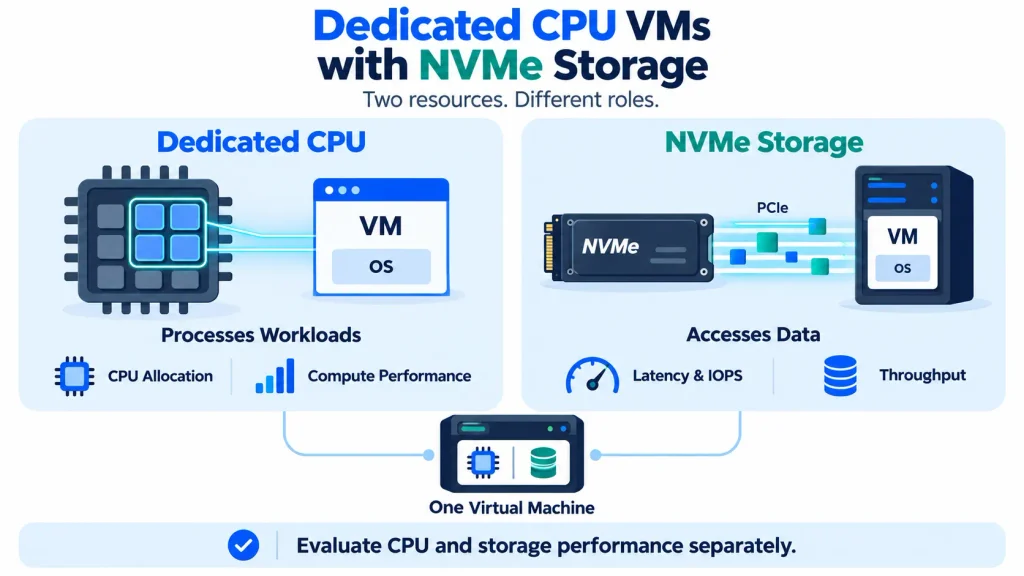
A dedicated CPU VM combines allocated compute resources with storage designed for fast data access. However, CPU allocation and storage performance must be evaluated separately because they serve different purposes.
How dedicated CPU resources work
Cloud virtual machines use virtual CPUs (vCPUs) to execute application instructions. The way those vCPUs map to physical CPU resources depends on the provider’s architecture and allocation policy.
A shared vCPU may compete with other workloads for physical CPU time. A dedicated vCPU arrangement aims to provide more predictable access to compute resources.
This distinction matters for applications that need sustained processing capacity, such as database servers, transaction-processing systems, and build environments.
Before selecting a plan, verify whether the provider offers dedicated physical CPU threads, dedicated cores, or another form of reserved CPU allocation. The term dedicated CPU is not used identically across all cloud platforms.
What NVMe storage adds to VM performance
NVMe is a storage protocol designed for solid-state drives. It uses PCIe to communicate with storage devices and supports parallel queues that help SSDs handle multiple operations efficiently.
Compared with conventional storage configurations, NVMe can provide:
- Lower storage latency for suitable workloads
- Higher input/output operations per second (IOPS)
- Greater data throughput
- Faster handling of frequent reads and writes
These benefits can help databases, transactional applications, analytics systems, and development pipelines that repeatedly access disk data.
However, actual performance depends on the underlying storage architecture, workload pattern, volume configuration, and provider limits. An NVMe label alone does not guarantee a particular IOPS or throughput level.
Dedicated CPU vs dedicated vCPU
These terms should not be treated as interchangeable without checking the provider’s documentation.
A provider may advertise dedicated vCPUs while defining the allocation in terms of physical CPU threads. Another may offer reserved compute resources within a virtualised infrastructure.
The important questions are whether CPU resources are shared, what performance limits apply, and whether the allocation remains consistent under sustained load.
For production workloads, review the provider’s CPU allocation policy and test performance under realistic conditions before committing to a configuration.
Need help choosing the right VM?
Talk to expertsWhich cloud providers offer dedicated CPU VMs with NVMe?
Several providers advertise combinations of compute-focused virtual machines and NVMe storage. Their offerings differ in CPU allocation, storage architecture, operating system support, and billing.
The following providers are useful starting points for comparison. Confirm the exact configuration and current availability before deployment.
CloudPe
CloudPe offers cloud virtual machines with NVMe storage and general-purpose, CPU-intensive, and memory-optimised configurations. Its published VM information also lists Windows images and options for resizing resources.
The CPU-intensive plans are worth evaluating for applications that need more compute capacity relative to memory. The platform also offers NVMe storage tiers with published performance limits and different resilience characteristics.
For example, CloudPe’s published pricing lists the following Windows CPU-intensive configurations:
| Configuration | vCPU | RAM | Listed monthly price |
| a.cpu1.8g | 4 | 8 GB | ₹3,138 |
| a.cpu1.16g | 8 | 16 GB | ₹5,981 |
| a.cpu1.32g | 16 | 32 GB | ₹12,375 |
| a.cpu1.64g | 32 | 64 GB | ₹28,990 |
These prices are published examples and may change. The plans list 30 GB of NVMe storage; additional storage may be charged separately. Check the current CloudPe pricing page for the latest rates.
Best suited for evaluation: Teams looking for compute-focused VMs, NVMe storage, Windows support, and hourly or monthly billing.
Important distinction: CloudPe advertises reserved CPU and memory resources. Confirm the precise CPU allocation policy if dedicated physical cores or threads are a strict requirement.
CloudTechtiq
CloudTechtiq advertises Windows and Linux VPS hosting in India, with KVM virtualisation and NVMe SSD storage. Its cloud server offering also describes AMD EPYC-based compute, local NVMe, and hourly billing. CloudTechtiq VPS hosting and cloud servers.
For teams that need a Windows virtual machine, its Windows and Linux hosting options make it a candidate for further evaluation.
Before choosing a plan, verify whether the specific configuration offers dedicated CPU allocation, how its NVMe storage is provisioned, and whether the required Windows Server edition and licence are included.
Best suited for evaluation: Businesses seeking Windows or Linux VPS hosting with NVMe storage and Indian data centre options.
CloudNx
CloudNx advertises dedicated-vCPU compute instances running on bare-metal NVMe infrastructure, with availability in Mumbai and EU West. Its documentation describes dedicated vCPUs, NVMe root disks and volumes, and hourly or monthly billing. CloudNx compute.
The provider’s published compute offering is Linux-focused. Teams that require Windows Server should confirm support before considering it for a Windows workload.
CloudNx also publishes pricing in Indian rupees and offers per-minute billing. Its current configuration and pricing pages should be checked for regional availability, resource limits, and applicable GST.
Best suited for evaluation: Linux workloads that prioritise dedicated-vCPU allocation, NVMe storage, and usage-based billing.
How to compare these providers
| Requirement | CloudPe | CloudTechtiq | CloudNx |
| NVMe storage | Listed | Listed | Listed |
| Windows VM options | Listed | Windows hosting advertised | Confirm availability |
| Dedicated CPU allocation | Verify exact allocation policy | Verify plan-level terms | Dedicated vCPUs advertised |
| India availability | India regions listed | Mumbai and Noida advertised | Mumbai listed |
| Billing | Hourly/monthly options | Hourly options advertised | Hourly/monthly, per-minute billing |
| What to verify | CPU allocation and storage tier | Dedicated CPU terms and licence | Windows support if required |
Note: This is a feature-based shortlist, not a ranking. The best fit depends on whether dedicated CPU allocation, Windows compatibility, local NVMe, or persistent storage is the primary requirement.
| Get dedicated CPU VMs with NVMe. | Try CloudPe |
What should you compare before choosing a provider?
A suitable VM should meet the workload’s compute and storage requirements without introducing unnecessary costs or operational limitations.
CPU allocation and compute performance
Start with the workload’s CPU demand. Applications that process many concurrent requests may need more cores, while some workloads benefit more from higher per-core performance.
Compare:
- Number of vCPUs and CPU allocation policy
- CPU generation and architecture
- Sustained performance under load
- RAM available to the VM
- Ability to resize CPU and memory
Avoid choosing a VM based on vCPU count alone. Two instances with the same number of vCPUs may deliver different performance because of their underlying processors and allocation policies.
NVMe storage performance and persistence
Storage capacity is only one part of the decision. Review the performance limits and durability model as well.
Important factors include:
- IOPS: How many read and write operations storage can handle.
- Throughput: How much data storage can transfer per second.
- Latency: How quickly a storage operation completes.
- Persistence: Whether data remains available after a VM stops or is recreated.
- Recovery: Whether snapshots, backups, replication, or other recovery options are available.
Also distinguish between local NVMe and NVMe-backed persistent storage.
Local NVMe is physically attached to the host and can offer high performance, but data persistence and recovery depend on the platform’s design. Persistent NVMe-backed volumes may be managed separately from the VM, allowing data to survive VM replacement or resizing, depending on the provider.
For databases and business applications, storage recovery and backup policies are as important as raw performance.
Windows virtual machine support
Windows-dependent applications require more than a VM with sufficient CPU and storage resources.
Before deployment, check:
- Supported Windows Server versions
- Whether a Windows image is available
- Licensing and activation charges
- Remote Desktop access and security controls
- Compatibility with required applications and drivers
- Backup, recovery, and domain integration options
Windows licensing can affect the total cost. Compare complete configurations rather than assuming a Linux VM’s advertised price applies to Windows.
Pricing, bandwidth, and scaling
The base VM price may not include every resource required by the workload.
Check the cost of additional NVMe capacity, snapshots, backups, public bandwidth, IP addresses, and support. Confirm whether billing is hourly, per-minute, or monthly, and whether a minimum charge applies.
Live resizing can also be useful when application requirements change. However, verify which resources can be changed without downtime and whether storage upgrades require a separate migration.
The most economical VM is one that meets performance requirements without paying for unused CPU, memory, or storage.
Which workloads benefit from dedicated CPU VMs with NVMe?
Dedicated compute and fast storage can help workloads that need consistent processing capacity and frequent data access.
Databases and transaction-heavy applications
Databases often perform repeated reads and writes while processing queries and transactions. NVMe storage can reduce storage latency and improve I/O performance when the workload is storage-bound.
Dedicated CPU allocation may also help maintain more predictable processing performance under sustained demand.
The actual benefit depends on query design, indexes, RAM, concurrency, and the database engine. A faster disk cannot compensate for inefficient queries or insufficient memory.
Business applications and ERP systems
ERP, accounting, inventory, and other business applications may combine database operations with background processing and user requests.
A VM with predictable CPU resources and suitable NVMe storage can support these workloads, particularly when several services run on the same server.
For applications that depend on Windows Server or Microsoft-specific components, verify OS compatibility and licensing before deployment.
Development, testing, and CI/CD
Build servers and test environments can perform frequent file operations, dependency installation, compilation, and artifact generation.
NVMe storage can help reduce I/O bottlenecks, while suitable CPU resources can improve parallel build performance. Teams that create temporary environments may also benefit from hourly billing and fast provisioning.
Choose the configuration based on the number of concurrent jobs, build duration, and storage requirements rather than using the same size for every pipeline.
APIs and high-traffic web applications
APIs and web applications need sufficient compute capacity to process requests while accessing application data, logs, and databases.
Dedicated CPU resources can help provide more consistent performance under sustained load. NVMe storage can benefit workloads that frequently read or write data.
However, response times also depend on application code, database performance, network latency, caching, and request volume. The VM configuration should be evaluated alongside the wider application architecture.
How to choose the right VM configuration
The ideal configuration depends on the workload’s resource profile and performance target.
| Requirement | What to prioritise |
| Sustained CPU-heavy processing | Suitable CPU allocation, core count, and sustained performance |
| Database workloads | NVMe IOPS, throughput, RAM, and recovery options |
| Windows-dependent software | Windows Server image, licensing, and application compatibility |
| Variable resource demand | Flexible billing and straightforward resizing |
| Business-critical applications | Backups, recovery, availability, and support |
| Frequent file and build operations | NVMe performance and adequate storage capacity |
Start by measuring CPU utilisation, memory consumption, storage latency, and I/O activity. Use those measurements to identify the actual bottleneck.
If CPU usage remains high while storage latency is low, additional compute capacity may help. If storage queues and I/O wait are high, a faster storage tier or changes to the data access pattern may be more useful.
This approach avoids paying for a larger VM when the workload needs a different resource configuration.
Get secure VMs with NVMe, optimised compute, and live scaling.
Try CloudPeConclusion
Dedicated CPU VMs with NVMe storage can help applications that need predictable compute capacity and fast data access. However, providers differ in how they allocate CPU resources, provision NVMe storage, support Windows, and handle data recovery.
Before selecting a provider, verify the CPU allocation policy, storage performance, persistence model, operating system support, and complete pricing. For production workloads, test the configuration under realistic conditions.
The right VM is not simply the one with the most vCPUs or the fastest advertised storage. It is the one that meets the workload’s performance, reliability, and budget requirements.
Frequently Asked Questions
What is a dedicated CPU virtual machine?
A dedicated CPU VM is a virtual machine configured to provide a defined allocation of CPU resources. The exact meaning varies by provider, so check whether the plan guarantees dedicated physical cores, CPU threads, or another form of reserved compute capacity.
Is NVMe storage better than a standard SSD for cloud VMs?
NVMe can provide high IOPS, low latency, and strong throughput for compatible workloads. The improvement depends on the underlying hardware, storage architecture, and workload pattern. Compare published performance limits rather than relying on the NVMe label alone.
Can a Windows virtual machine use dedicated CPU resources and NVMe?
Yes, where the provider offers Windows images on a suitable compute and storage configuration. Confirm that the specific plan supports the required Windows Server version, CPU allocation, NVMe storage, and licensing arrangement.
Does dedicated CPU mean the entire physical CPU belongs to one VM?
Not necessarily. A provider may allocate dedicated CPU cores, hardware threads, or another defined share of compute resources. Check its allocation policy to understand what is reserved and how performance is managed.
What is the difference between local NVMe and persistent NVMe storage?
Local NVMe is attached to the physical host and can provide high performance, but its persistence depends on the provider’s design. Persistent NVMe-backed storage is managed to retain data independently of the VM’s lifecycle, subject to the provider’s terms. Check backup and recovery provisions for either option.
How much does a dedicated CPU VM with NVMe cost?
Pricing depends on CPU allocation, RAM, storage capacity, operating system, and billing duration. CloudPe, CloudTechtiq, and CloudNx publish different compute and storage configurations. Compare equivalent plans and include Windows licensing, additional volumes, backups, and bandwidth where applicable.
Which VM configuration is best for database workloads?
A database VM needs enough CPU and RAM to support its query patterns, along with storage that meets its IOPS, throughput, and latency requirements. The right configuration depends on the database engine, data size, concurrency, and recovery requirements. Benchmarking with a representative workload is the most reliable way to choose.