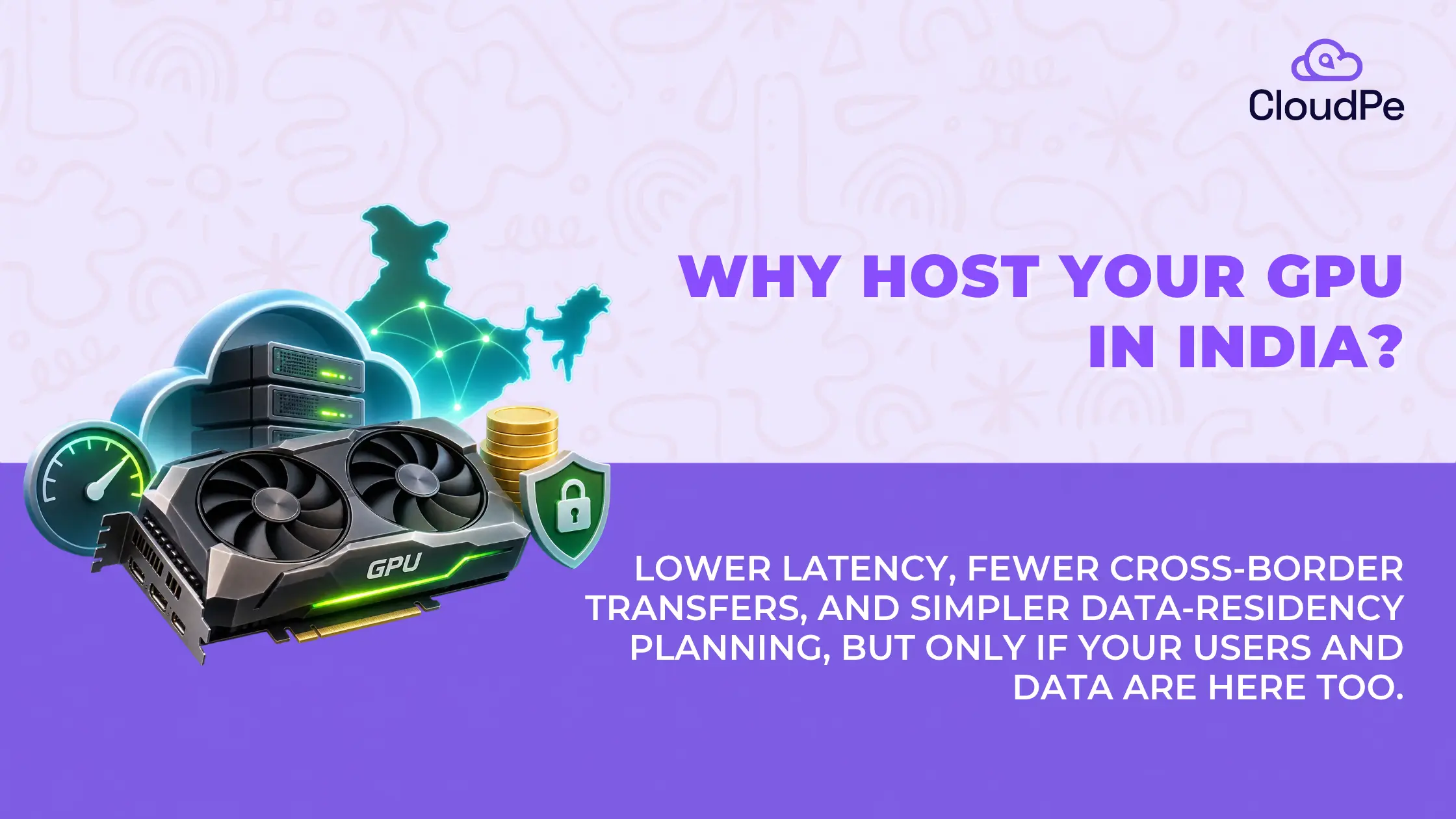
You’re building an AI application for Indian customers. Your model is ready, you’ve selected a GPU, and now you need somewhere to run it.
You could rent GPU infrastructure from an overseas data centre or choose a provider offering cloud GPUs in India. Both options give you access to computing power without purchasing expensive hardware.
So, does the location really matter?
More than you might expect.
A GPU hosted thousands of kilometres away may perform exactly the same calculations as one located in India. But the distance between your application, its users, and its data can affect response times. Cloud pricing, data transfer charges, and regulatory requirements also enter the picture.
This is why choosing GPU as a Service (GPUaaS) involves more than comparing GPU models and hourly prices.
For Indian businesses developing AI models, real-time video analytics, financial applications, or rendering workloads, hosting GPUs locally can offer practical advantages.
Let’s look at how GPUaaS works, why location matters, and when choosing an Indian GPU cloud makes sense.
What is GPU as a Service (GPUaaS)?
GPU as a Service is a cloud computing model that lets businesses rent graphics processing units on demand instead of purchasing and maintaining physical GPU servers.
A GPU performs many calculations simultaneously, making it particularly useful for AI training, machine learning inference, scientific simulations, and graphics rendering.
With GPUaaS, you access these resources through cloud-based virtual machines, containers, or dedicated GPU servers.
The cloud provider manages the underlying hardware, power, cooling, and physical infrastructure. You use the allocated GPU resources to run your applications.
For example, suppose you’re developing an image recognition application.
Instead of purchasing a physical GPU server, you can rent a GPU-enabled cloud instance, install your machine learning framework, and start processing images.
You can also increase or reduce resources as your requirements change, subject to the provider’s available capacity and service terms.
This is particularly useful when your computing requirements are unpredictable or when you need powerful hardware for a limited period.
Why is GPU as a Service growing in India?
India’s AI ecosystem is expanding beyond research and experimentation.
Businesses are applying machine learning to financial services, healthcare, manufacturing, customer support, video analytics, and language processing.
All these applications require computing resources, but the amount varies significantly.
A company running a small recommendation model may need modest GPU capacity. Another company developing a large language model may require multiple high-memory accelerators working together.
Purchasing dedicated infrastructure for every project can be expensive and difficult to scale.
This is one reason on-demand GPU computing has become increasingly relevant.
INDIA’S AI INFRASTRUCTURE INVESTMENT
| ₹10,371.92 Cr approved IndiaAI Mission outlay | 38,000+ GPUs reported under IndiaAI compute infrastructure |
Sources: Ministry of Electronics and Information Technology / PIB, March 2024; Office of the Principal Scientific Adviser, IndiaAI Mission overview. These figures describe the government programme, not the entire commercial GPU market.
The IndiaAI Mission was approved in March 2024 with the aim of expanding AI compute access, supporting indigenous models, and helping startups and researchers develop AI applications.
India’s Office of the Principal Scientific Adviser subsequently reported an AI compute ecosystem comprising more than 38,000 GPUs through public-private partnerships.
These initiatives reflect growing demand for accessible AI infrastructure within the country.
How does GPU as a Service work?
GPUaaS follows a relatively straightforward process.
You select a GPU configuration, provision the environment, deploy your software, and use the allocated computing resources.
The exact infrastructure depends on the provider and the workload.
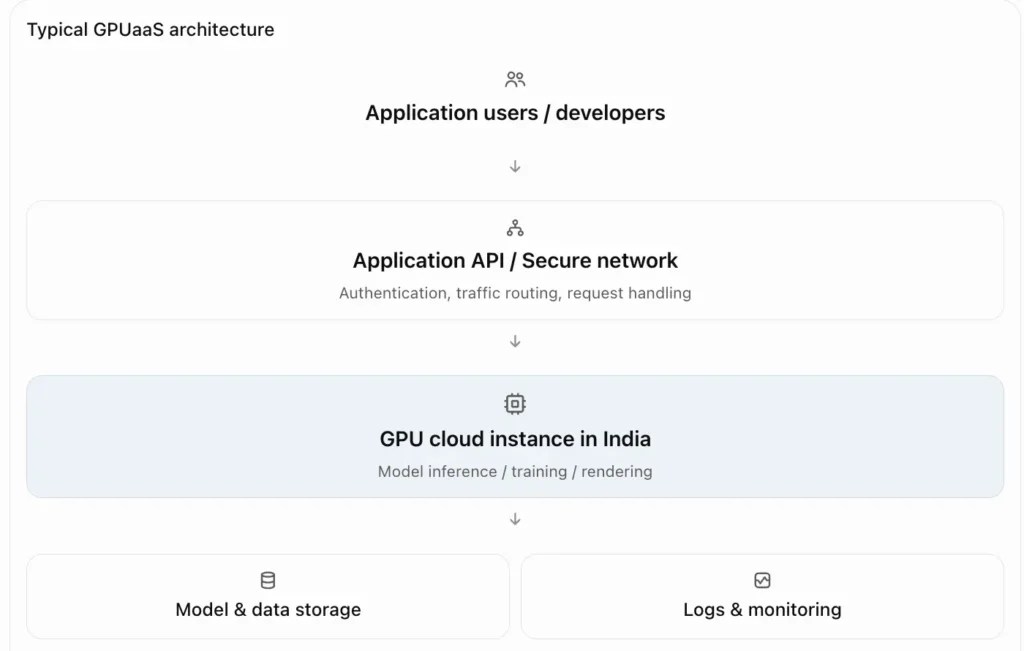
For AI workloads, GPU instances commonly use software such as CUDA, PyTorch, TensorFlow, or inference-serving tools.
The deployment process may involve installing GPU drivers, configuring the runtime, loading model files, and exposing the application through a secured API.
Once the application is running, you pay according to the cloud provider’s billing model.
The more interesting question is what changes when that infrastructure is hosted in India instead of overseas.
1. Lower network latency for Indian AI applications
Latency is one of the strongest reasons to consider hosting GPU workloads locally.
Consider a customer support chatbot serving users in Mumbai.
When someone sends a message, the application may process it through a backend service, forward it to a language model running on a GPU, and return the generated response.
If the model is hosted overseas, requests may travel across international networks before reaching the inference server.
Hosting the application and model closer to Indian users can reduce this network travel time.
However, GPU location is only one part of overall application latency.
Network latency vs AI processing time
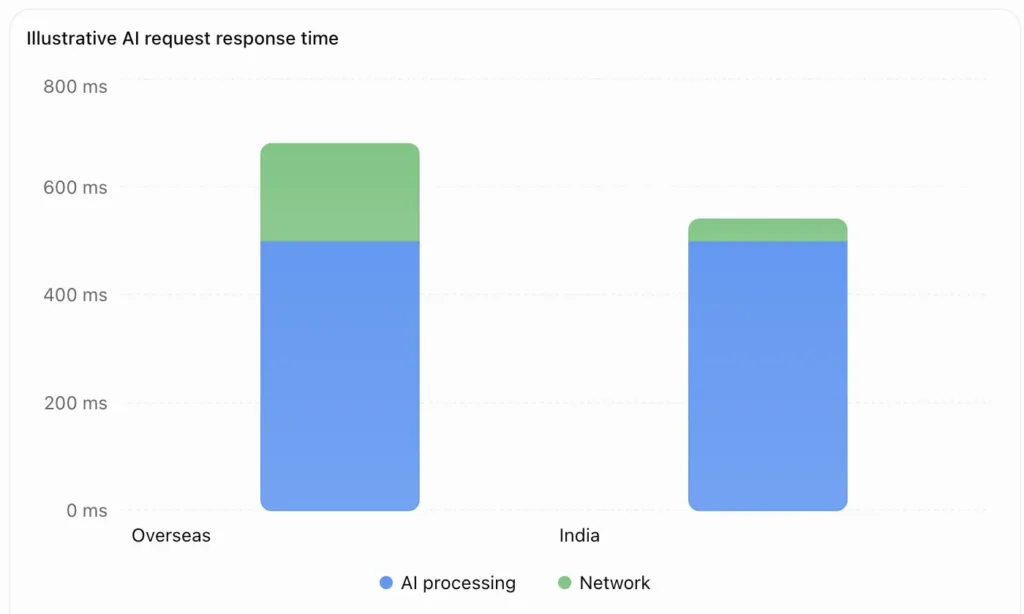
Suppose an AI request takes 500 milliseconds to process.
If network communication adds another 180 milliseconds, the total response time becomes approximately 680 milliseconds.
Reducing network latency to 40 milliseconds would bring the total to approximately 540 milliseconds, assuming processing and all other conditions remain unchanged.
This example is hypothetical, but it demonstrates an important point: faster GPUs are not the only way to improve application response times.
Network proximity can also matter, particularly when an application makes repeated requests.
For real-time video analytics, voice assistants, interactive AI applications, and live image processing, latency may directly affect the user experience.
For batch training jobs that run for several hours, network latency is usually less important than compute performance and data transfer efficiency.
| ⭐The takeaway: Hosting GPUs in India can reduce latency for Indian users, but the actual improvement must be measured through realistic network and application tests. |
2. Better control over GPU cloud costs
GPU infrastructure is expensive to purchase and operate.
A business building its own GPU server must consider the accelerator, CPU, RAM, storage, networking, power supply, cooling, maintenance, and eventual hardware replacement.
GPUaaS replaces much of this upfront capital expenditure with usage-based spending.
But whether an Indian GPU cloud is cheaper than an overseas option depends on the full cost of running the workload.
GPU rental is only one part of the bill
Consider two GPU instances with similar specifications.
One is hosted in India and the other overseas.
The overseas instance might have a lower hourly rental price. But if your application regularly transfers large datasets between Indian infrastructure and the remote GPU, those transfers may add costs.
You also need to consider model storage, persistent disks, backup storage, software licences, and support.
| Cost component | What you should compare |
| GPU compute | Hourly or monthly rental rate |
| GPU memory | Available VRAM for the model |
| CPU and RAM | Included resources or separate charges |
| Storage | Capacity, performance and persistent disk pricing |
| Data transfer | Internet egress and inter-region transfer |
| Billing | Hourly usage, minimum charges and commitments |
| Software | Driver support and commercial licences |
| Operations | Support, backups, monitoring and availability |
A provider advertising the lowest GPU hourly rate may not deliver the lowest cost per inference or training run.
For occasional workloads, hourly billing can be particularly useful because you avoid paying for a dedicated GPU that remains unused.
For production AI inference running continuously, monthly or committed-use arrangements may offer better value, depending on the provider.
The correct comparison is total cost per completed job, per inference request, or per generated token, not just hourly rental cost.
3. Data residency and regulatory considerations
For some Indian businesses, GPU location is not simply a performance or cost decision.
AI applications may process financial records, customer information, operational data, or other sensitive datasets.
Depending on the organization and the type of information involved, regulations or contractual obligations may affect where data must be stored or processed.
What do Indian regulations actually require?
There is no blanket rule that every Indian business must host all its AI workloads within India.
However, specific requirements apply in particular circumstances.
For example, the Reserve Bank of India’s April 2018 directive requires covered payment system providers to store their payment system data in India, subject to the directive’s stated treatment of foreign transaction legs.
Separately, CERT-In’s 2022 cybersecurity directions require covered entities to maintain specified ICT system logs securely for a rolling 180-day period within Indian jurisdiction.
This makes infrastructure planning especially important for regulated AI workloads.
Does hosting a GPU in India guarantee compliance?
No.
An Indian GPU instance is only one component of the application.
You also need to consider where training datasets, model inputs, logs, backups, snapshots, monitoring data, and outputs are stored.
For example, a model may run on an Indian GPU while its application sends sensitive request logs to an overseas monitoring service.
That architecture may still require additional compliance review.
The practical benefit of choosing local infrastructure is that it can make data-location planning and operational oversight more straightforward.
But compliance depends on the entire system and the requirements applicable to the organization, not merely the GPU server’s physical location.
4. Local GPU hosting can simplify data-intensive workflows
AI applications often depend on large volumes of data.
Training datasets may contain thousands of images, millions of records, or extensive video footage.
Moving these datasets between geographically distant regions can take time and create additional transfer costs.
Suppose a manufacturing company in Pune collects video footage from industrial cameras.
The company wants to analyze that footage using a computer vision model.
One option is to transfer the video to an overseas GPU server for processing.
Another is to keep the application and its GPU infrastructure within India.
The second approach may reduce unnecessary long-distance transfers, especially if the data collection, storage, and analytics systems are also hosted locally.
This can be valuable for:
- Computer vision applications processing large image datasets.
- Video analytics systems handling multiple camera feeds.
- Research projects working with sizable training datasets.
- Enterprise AI applications connected to local databases.
- Rendering workloads involving large project files.
Of course, the benefits depend on the location of the original data.
If the datasets and users are primarily overseas, hosting GPUs in India may offer little advantage and could introduce extra transfers.
5. GPUaaS makes AI infrastructure easier to scale
AI projects rarely follow a predictable resource usage pattern.
During development, you may need a GPU for only a few hours each day.
During model training, you might need multiple accelerators for an extended period.
After deployment, inference traffic may increase or decrease depending on user demand.
GPUaaS allows businesses to adjust capacity without repeatedly purchasing physical hardware.
There are three common deployment approaches.
| GPUaaS model | Suitable for | Consideration |
| On-demand GPU | Development, testing, irregular training | Flexible but standard rates may be higher |
| Reserved or committed GPU | Predictable, continuous workloads | Longer-term financial commitment |
| Interruptible GPU capacity | Fault-tolerant batch processing | Jobs may be interrupted |
The actual models available vary by GPU cloud provider.
For example, an AI startup may begin with one GPU while validating its model and later deploy multiple inference instances as customer demand increases.
However, adding GPU capacity is not always instantaneous. Hardware availability, instance quotas, GPU memory requirements, and software architecture can all affect scaling.
A reliable GPUaaS provider should clearly explain capacity availability and provisioning conditions.
Which AI workloads benefit most from GPU hosting in India?
The advantage of local GPU infrastructure depends heavily on how your application operates.
AI chatbots and language models
When a chatbot serves Indian customers, keeping the application and inference infrastructure close together can reduce network overhead. GPU memory and token generation performance still determine much of the response time.
Real-time video analytics
Surveillance analytics, industrial monitoring, and video processing can benefit from reduced network delay and avoiding repeated international transfers of video data.
Financial and regulated AI applications
Local deployment can support data-location planning for applicable regulatory requirements, provided the entire architecture is reviewed.
Rendering and media production
Studios working with large assets may benefit from keeping project storage and GPU rendering infrastructure geographically close, especially when transferring files frequently.
AI research and model training
Indian research teams can access GPU capacity without purchasing dedicated clusters. For large training jobs, GPU performance and high-speed interconnects matter more than user-facing latency.
How to choose the right GPU for your workload
Not all GPUs are designed for the same type of computation.
An accelerator suited to image recognition may not be the best option for training a large language model.
For example, NVIDIA’s L4 GPU provides 24 GB of GPU memory, 300 GB/s memory bandwidth, and a 72 W maximum TDP, making it relevant to compatible inference, video, and visualization workloads.
Large-model training may require accelerators with significantly higher memory capacity, bandwidth, and multi-GPU connectivity.
Before choosing an instance, consider the following:
- GPU memory: Can the model, activations, and runtime data fit within the available VRAM?
- Compute performance: Does the accelerator support the operations and precision formats your software needs?
- Memory bandwidth: Can the GPU move model data quickly enough for your workload?
- Software compatibility: Are the correct drivers, frameworks, and container runtimes supported?
- Scalability: Can you access additional GPUs when the workload grows?
- Price-performance: What is the cost per completed job or inference result?
A GPU with a lower rental price may deliver worse overall value if it takes substantially longer to complete the task.
Benchmarking your actual model is the most reliable way to compare options.
How to evaluate GPU as a Service providers in India
Once you have identified the GPU requirements, the next step is choosing the infrastructure provider.
Don’t base the decision entirely on the advertised hourly rate.
Ask where the data centre is located, whether the GPU is dedicated or shared, and how resources are allocated.
Check whether your preferred operating system, CUDA version, machine learning frameworks, and deployment tools are supported.
Also review how the provider handles backups, support, monitoring, maintenance, and hardware failures.
GPUaaS provider evaluation checklist
Evaluation progress
- Indian data centre location verified
- Required GPU model and VRAM available
- Pricing, billing minimums and transfer charges clear
- GPU drivers and software framework supported
- Private networking and security controls available
- Monitoring, backup and recovery options understood
- Scaling capacity and availability confirmed
- Technical support and SLA reviewed
For production applications, ask about service-level commitments and recovery procedures before deployment.
A cloud GPU can be powerful, but reliability also depends on storage, networking, power redundancy, and operational support.
When might an overseas GPU region be a better choice?
Hosting in India offers several potential advantages, but it isn’t automatically the right decision for every project.
An overseas region may be more appropriate when your users and datasets are located outside India.
It may also provide access to a particular GPU model, larger cluster capacity, or specialized infrastructure that is not available locally.
For example, a research team training a model across hundreds of GPUs may prioritize high-bandwidth interconnects and reliable cluster availability over geographic proximity.
Similarly, an animation studio delivering work primarily to international customers may find overseas infrastructure convenient if its project storage and collaborators are already based there.
The key is to evaluate the complete workflow.
| Decision factor | India-hosted GPU | Overseas-hosted GPU |
| Indian end users | Potential latency advantage | May add network delay |
| Data already stored in India | Can reduce cross-border transfers | May require international transfers |
| Local data-location obligations | Can simplify architecture planning | Requires closer compliance review |
| GPU availability | Depends on local inventory | Depends on region and provider |
| Pricing | Must be compared by workload | Must be compared by workload |
| International users | Depends on network location | Could be more suitable |
Neither option guarantees better performance, pricing, or reliability.
The right answer depends on the workload and supporting infrastructure.
Conclusion
For businesses developing AI applications primarily for Indian users, hosting GPU infrastructure locally can be a sensible choice.
It may help reduce network latency, minimize unnecessary international data transfers, and simplify planning around applicable data residency requirements.
GPUaaS also allows teams to access specialized hardware without making a large upfront investment.
But location alone doesn’t determine the success of an AI deployment.
GPU specifications, model compatibility, storage throughput, network architecture, reliability, and pricing all matter.
If your users, applications, and datasets are concentrated in India, an Indian GPU cloud is worth benchmarking first. Compare actual inference performance, total cost, and operational requirements before committing.
The goal is not simply to rent a powerful GPU. It’s to build an AI environment that performs reliably, scales with demand, and remains economical as your application grows.
This example is hypothetical, but it demonstrates an important point: faster GPUs are not the only way to improve application response times.
Network proximity can also matter, particularly when an application makes repeated requests.
For real-time video analytics, voice assistants, interactive AI applications, and live image processing, latency may directly affect the user experience.
For batch training jobs that run for several hours, network latency is usually less important than compute performance and data transfer efficiency.
| ⭐The takeaway: Hosting GPUs in India can reduce latency for Indian users, but the actual improvement must be measured through realistic network and application tests. |
2. Better control over GPU cloud costs
GPU infrastructure is expensive to purchase and operate.
A business building its own GPU server must consider the accelerator, CPU, RAM, storage, networking, power supply, cooling, maintenance, and eventual hardware replacement.
GPUaaS replaces much of this upfront capital expenditure with usage-based spending.
But whether an Indian GPU cloud is cheaper than an overseas option depends on the full cost of running the workload.
GPU rental is only one part of the bill
Consider two GPU instances with similar specifications.
One is hosted in India and the other overseas.
The overseas instance might have a lower hourly rental price. But if your application regularly transfers large datasets between Indian infrastructure and the remote GPU, those transfers may add costs.
You also need to consider model storage, persistent disks, backup storage, software licences, and support.
| Cost component | What you should compare |
| GPU compute | Hourly or monthly rental rate |
| GPU memory | Available VRAM for the model |
| CPU and RAM | Included resources or separate charges |
| Storage | Capacity, performance and persistent disk pricing |
| Data transfer | Internet egress and inter-region transfer |
| Billing | Hourly usage, minimum charges and commitments |
| Software | Driver support and commercial licences |
| Operations | Support, backups, monitoring and availability |
A provider advertising the lowest GPU hourly rate may not deliver the lowest cost per inference or training run.
For occasional workloads, hourly billing can be particularly useful because you avoid paying for a dedicated GPU that remains unused.
For production AI inference running continuously, monthly or committed-use arrangements may offer better value, depending on the provider.
The correct comparison is total cost per completed job, per inference request, or per generated token, not just hourly rental cost.
3. Data residency and regulatory considerations
For some Indian businesses, GPU location is not simply a performance or cost decision.
AI applications may process financial records, customer information, operational data, or other sensitive datasets.
Depending on the organization and the type of information involved, regulations or contractual obligations may affect where data must be stored or processed.
What do Indian regulations actually require?
There is no blanket rule that every Indian business must host all its AI workloads within India.
However, specific requirements apply in particular circumstances.
For example, the Reserve Bank of India’s April 2018 directive requires covered payment system providers to store their payment system data in India, subject to the directive’s stated treatment of foreign transaction legs.
Separately, CERT-In’s 2022 cybersecurity directions require covered entities to maintain specified ICT system logs securely for a rolling 180-day period within Indian jurisdiction.
This makes infrastructure planning especially important for regulated AI workloads.
Does hosting a GPU in India guarantee compliance?
No.
An Indian GPU instance is only one component of the application.
You also need to consider where training datasets, model inputs, logs, backups, snapshots, monitoring data, and outputs are stored.
For example, a model may run on an Indian GPU while its application sends sensitive request logs to an overseas monitoring service.
That architecture may still require additional compliance review.
The practical benefit of choosing local infrastructure is that it can make data-location planning and operational oversight more straightforward.
But compliance depends on the entire system and the requirements applicable to the organization, not merely the GPU server’s physical location.
4. Local GPU hosting can simplify data-intensive workflows
AI applications often depend on large volumes of data.
Training datasets may contain thousands of images, millions of records, or extensive video footage.
Moving these datasets between geographically distant regions can take time and create additional transfer costs.
Suppose a manufacturing company in Pune collects video footage from industrial cameras.
The company wants to analyze that footage using a computer vision model.
One option is to transfer the video to an overseas GPU server for processing.
Another is to keep the application and its GPU infrastructure within India.
The second approach may reduce unnecessary long-distance transfers, especially if the data collection, storage, and analytics systems are also hosted locally.
This can be valuable for:
- Computer vision applications processing large image datasets.
- Video analytics systems handling multiple camera feeds.
- Research projects working with sizable training datasets.
- Enterprise AI applications connected to local databases.
- Rendering workloads involving large project files.
Of course, the benefits depend on the location of the original data.
If the datasets and users are primarily overseas, hosting GPUs in India may offer little advantage and could introduce extra transfers.
5. GPUaaS makes AI infrastructure easier to scale
AI projects rarely follow a predictable resource usage pattern.
During development, you may need a GPU for only a few hours each day.
During model training, you might need multiple accelerators for an extended period.
After deployment, inference traffic may increase or decrease depending on user demand.
GPUaaS allows businesses to adjust capacity without repeatedly purchasing physical hardware.
There are three common deployment approaches.
| GPUaaS model | Suitable for | Consideration |
| On-demand GPU | Development, testing, irregular training | Flexible but standard rates may be higher |
| Reserved or committed GPU | Predictable, continuous workloads | Longer-term financial commitment |
| Interruptible GPU capacity | Fault-tolerant batch processing | Jobs may be interrupted |
The actual models available vary by GPU cloud provider.
For example, an AI startup may begin with one GPU while validating its model and later deploy multiple inference instances as customer demand increases.
However, adding GPU capacity is not always instantaneous. Hardware availability, instance quotas, GPU memory requirements, and software architecture can all affect scaling.
A reliable GPUaaS provider should clearly explain capacity availability and provisioning conditions.
Which AI workloads benefit most from GPU hosting in India?
The advantage of local GPU infrastructure depends heavily on how your application operates.
AI chatbots and language models
When a chatbot serves Indian customers, keeping the application and inference infrastructure close together can reduce network overhead. GPU memory and token generation performance still determine much of the response time.
Real-time video analytics
Surveillance analytics, industrial monitoring, and video processing can benefit from reduced network delay and avoiding repeated international transfers of video data.
Financial and regulated AI applications
Local deployment can support data-location planning for applicable regulatory requirements, provided the entire architecture is reviewed.
Rendering and media production
Studios working with large assets may benefit from keeping project storage and GPU rendering infrastructure geographically close, especially when transferring files frequently.
AI research and model training
Indian research teams can access GPU capacity without purchasing dedicated clusters. For large training jobs, GPU performance and high-speed interconnects matter more than user-facing latency.
How to choose the right GPU for your workload
Not all GPUs are designed for the same type of computation.
An accelerator suited to image recognition may not be the best option for training a large language model.
For example, NVIDIA’s L4 GPU provides 24 GB of GPU memory, 300 GB/s memory bandwidth, and a 72 W maximum TDP, making it relevant to compatible inference, video, and visualization workloads.
Large-model training may require accelerators with significantly higher memory capacity, bandwidth, and multi-GPU connectivity.
Before choosing an instance, consider the following:
- GPU memory: Can the model, activations, and runtime data fit within the available VRAM?
- Compute performance: Does the accelerator support the operations and precision formats your software needs?
- Memory bandwidth: Can the GPU move model data quickly enough for your workload?
- Software compatibility: Are the correct drivers, frameworks, and container runtimes supported?
- Scalability: Can you access additional GPUs when the workload grows?
- Price-performance: What is the cost per completed job or inference result?
A GPU with a lower rental price may deliver worse overall value if it takes substantially longer to complete the task.
Benchmarking your actual model is the most reliable way to compare options.
How to evaluate GPU as a Service providers in India
Once you have identified the GPU requirements, the next step is choosing the infrastructure provider.
Don’t base the decision entirely on the advertised hourly rate.
Ask where the data centre is located, whether the GPU is dedicated or shared, and how resources are allocated.
Check whether your preferred operating system, CUDA version, machine learning frameworks, and deployment tools are supported.
Also review how the provider handles backups, support, monitoring, maintenance, and hardware failures.
GPUaaS provider evaluation checklist
Evaluation progress
- Indian data centre location verified
- Required GPU model and VRAM available
- Pricing, billing minimums and transfer charges clear
- GPU drivers and software framework supported
- Private networking and security controls available
- Monitoring, backup and recovery options understood
- Scaling capacity and availability confirmed
- Technical support and SLA reviewed
For production applications, ask about service-level commitments and recovery procedures before deployment.
A cloud GPU can be powerful, but reliability also depends on storage, networking, power redundancy, and operational support.
When might an overseas GPU region be a better choice?
Hosting in India offers several potential advantages, but it isn’t automatically the right decision for every project.
An overseas region may be more appropriate when your users and datasets are located outside India.
It may also provide access to a particular GPU model, larger cluster capacity, or specialized infrastructure that is not available locally.
For example, a research team training a model across hundreds of GPUs may prioritize high-bandwidth interconnects and reliable cluster availability over geographic proximity.
Similarly, an animation studio delivering work primarily to international customers may find overseas infrastructure convenient if its project storage and collaborators are already based there.
The key is to evaluate the complete workflow.
| Decision factor | India-hosted GPU | Overseas-hosted GPU |
| Indian end users | Potential latency advantage | May add network delay |
| Data already stored in India | Can reduce cross-border transfers | May require international transfers |
| Local data-location obligations | Can simplify architecture planning | Requires closer compliance review |
| GPU availability | Depends on local inventory | Depends on region and provider |
| Pricing | Must be compared by workload | Must be compared by workload |
| International users | Depends on network location | Could be more suitable |
Neither option guarantees better performance, pricing, or reliability.
The right answer depends on the workload and supporting infrastructure.
Conclusion
For businesses developing AI applications primarily for Indian users, hosting GPU infrastructure locally can be a sensible choice.
It may help reduce network latency, minimize unnecessary international data transfers, and simplify planning around applicable data residency requirements.
GPUaaS also allows teams to access specialized hardware without making a large upfront investment.
But location alone doesn’t determine the success of an AI deployment.
GPU specifications, model compatibility, storage throughput, network architecture, reliability, and pricing all matter.
If your users, applications, and datasets are concentrated in India, an Indian GPU cloud is worth benchmarking first. Compare actual inference performance, total cost, and operational requirements before committing.
The goal is not simply to rent a powerful GPU. It’s to build an AI environment that performs reliably, scales with demand, and remains economical as your application grows.
The right compute choice should make your AI application faster, more efficient, and more economical—not simply give it the most impressive hardware specifications.
Frequently Asked Questions
1. Is there a GPU as a Service provider in India?
Yes. GPUaaS is available through cloud infrastructure providers operating in India. These services allow businesses to rent GPU-enabled computing resources for AI training, inference, rendering, and other accelerated workloads. Available GPU models and pricing vary by provider.
2. Is GPU as a Service cheaper in India?
Not necessarily. GPU prices depend on the accelerator, configuration, provider, billing terms, and capacity. Indian hosting may reduce some international data transfer costs, but you should compare total workload costs rather than hourly rental prices.
3. Who uses GPU as a Service?
AI startups, software developers, research institutions, animation studios, healthcare technology companies, financial service providers, and manufacturing organizations use GPUaaS for compute-intensive workloads.
4. Why is CUDA used in GPU computing?
CUDA is NVIDIA’s parallel computing platform and programming model. It allows compatible applications to perform computations on NVIDIA GPUs and supports many AI and scientific computing frameworks.
5. Does GPUaaS in India guarantee data compliance?
No. Indian hosting can help with data-location requirements, but regulatory compliance depends on the applicable rules and the complete architecture, including logs, storage, backups, and data transfers.
6. Can I use GPUaaS for large language model inference?
Yes. GPUaaS can support language model inference, provided the selected GPU has sufficient memory and performance for the model, context length, and expected concurrency.
7. Is GPU mining dead in 2026?
GPU mining still exists for some cryptocurrencies, but Ethereum switched from proof-of-work to proof-of-stake in September 2022, ending Ethereum GPU mining. GPUaaS for AI and rendering is a separate market with different infrastructure requirements.
8. What is a GPU as a Service Agreement?
A GPUaaS agreement describes the commercial and operational terms of using rented GPU infrastructure. It may define billing, resource allocation, service availability, data handling, acceptable use, support, and termination conditions.