H100 and H200 are the same chip. Same Hopper die, same tensor cores, same compute. Basically Nvidia built a GPU which is the same on all aspects, just bigger memory pool and bolted it onto the same silicon. Once you see it that way, the whole decision gets simpler. This isn’t “which GPU is better.” It’s “does your workload need more memory than 80GB, or not.”
In this blog we have talked in detail about these two GPUs. Based on how your training runs and your inference bill, you can decide which one to rent in India right now.
TL;DR
H100 and H200 have identical compute. The H200 adds 76% more memory (141GB HBM3e vs 80GB HBM3) and 43% more bandwidth (4.8 TB/s vs 3.35 TB/s). That shows up as roughly 45% faster inference on memory-bound workloads like 70B+ LLM serving, and close to zero difference on anything that fits comfortably in 80GB. CloudPe rents H200 at Rs. 300/hour in Mumbai, on-demand, single GPU, no 8-GPU minimum. H100 costs less to rent almost everywhere. Pay for the memory only if your workload actually uses it.
What is the difference between H100 and H200 GPU
If you open the spec sheet for both cards side by side both are identical. The CUDA core count. tensor core count, peak FP8 and FP16 throughput all are the same. If you’re comparing these two chips on compute alone, there’s nothing to compare.
| Spec | H100 (SXM) | H200 (SXM) |
|---|---|---|
| Architecture | Hopper | Hopper |
| Memory | 80GB HBM3 | 141GB HBM3e |
| Memory bandwidth | 3.35 TB/s | 4.8 TB/s |
| MIG partition size | Up to 10GB | Up to 16.5GB |
| TDP | Up to 700W | Up to 700-1000W |
| NVLink | 900 GB/s | 900 GB/s |
| Compute (FP8/FP16) | Identical | Identical |
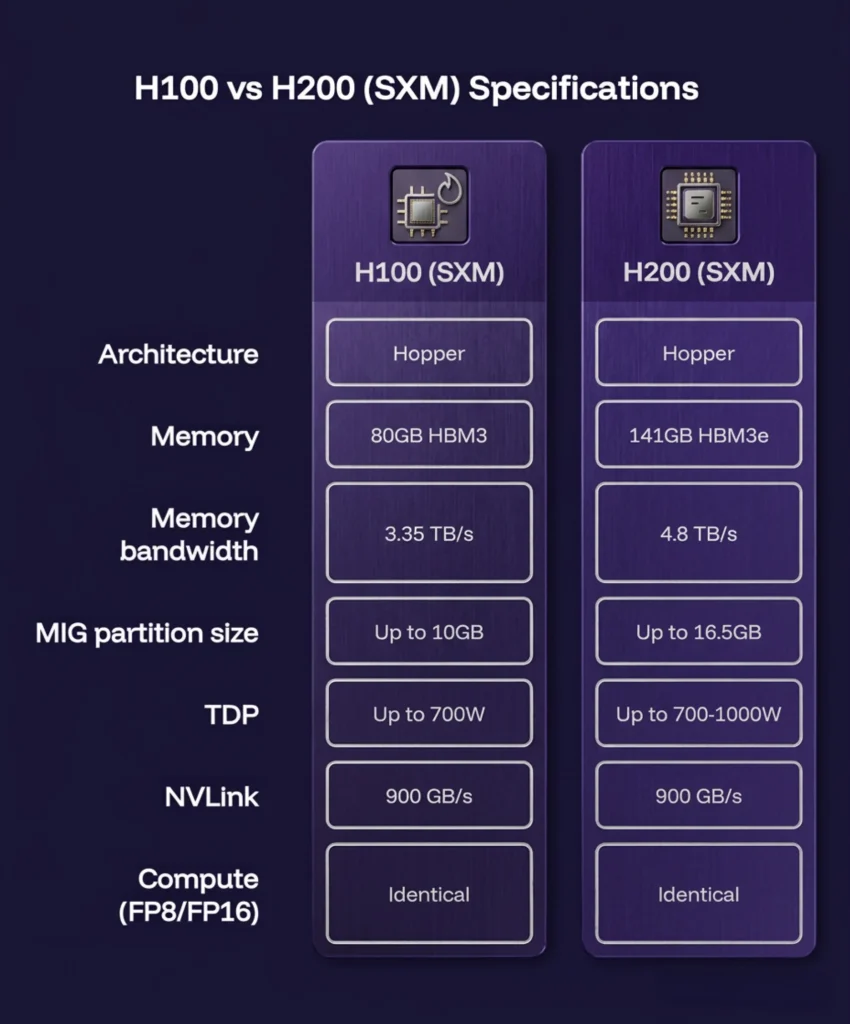
Everything that separates these two cards comes from the memory column. H200 carries 76% more of it, and moves it 43% faster. That’s the entire upgrade. You could pull an H100 out of a server rack and drop an H200 into the same slot because there are no other technical or hardware changes.
Now sit with it for a second, because it changes what question you should be asking. You’re not choosing between a faster GPU and a slower one. You’re choosing between a GPU with more headroom and one with less, at a price difference that reflects exactly that gap and nothing more.
Is the H200 GPU more powerful than H100?
Not in the way people usually mean “more powerful.” Raw compute is identical on both chips. H200 pulls ahead only on workloads bottlenecked by memory, not compute, and a lot of modern AI work quietly is exactly that.
The problem H100 runs into
Serving a large language model means holding its weights in memory, plus whatever context and cache the request needs.
- A 70B parameter model at standard precision needs close to 140GB just for the weights
- That’s already past what one H100 (80GB) can hold
- Teams work around it by splitting the model across two H100s using tensor parallelism
That workaround adds a second GPU, adds networking overhead between the two cards, and adds real engineering time to get right.
What H200 removes
The same 70B model fits on a single H200, with room to spare. No splitting, no cross-GPU communication tax, no extra engineering.
That’s not H200 being a faster chip. That’s H200 removing a problem H100 never had the memory to avoid in the first place.
The number, and the caveat that comes with it
On MLPerf’s Llama 2 70B inference benchmark, H200 delivers roughly 45% higher throughput than H100, commonly cited as 31,700 tokens/sec on H200 vs 21,800 on H100.
What this looks like on an actual workload
Take a team serving a 70B parameter model in production. On H100, that model doesn’t fit on one GPU, so it gets split across two using tensor parallelism. That means two GPUs billed instead of one, plus the latency cost of the two cards talking to each other over NVLink for every request. On H200, the same model sits on a single card. Fewer GPUs billed, no cross-GPU chatter for that model, and the throughput gain from bandwidth on top of it.
Run the cost comparison and the H200’s per-hour premium starts looking smaller. Two H100s at, say, $3/hr each is $6/hr for the pair. One H200 at $4/hr, even with a meaningful premium built in, is cheaper before you’ve counted the latency and complexity you also avoided. This is the calculation that gets skipped when people compare hourly rates side by side without asking how many GPUs each rate actually buys you for the workload in question.
The actual gap actually between H200 and H100
The actual gap between H200 and H100 GPUs is the memory and bandwidth. Here is how it can affect businesses.
MIG partitions
Multi-Instance GPU splits one physical GPU into up to seven isolated slices, each running its own workload.
| H100 | H200 | |
| Max slices | 7 | 7 |
| Memory per slice | Up to 10GB | Up to 16.5GB |
What that 6.5GB gap means in practice, for a team running inference on five or six mid-size models at once, none large enough to justify a dedicated GPU each:
- On H100’s 10GB partitions, a lot of those models don’t actually fit once you account for runtime overhead sitting alongside the model weights
- On H200’s 16.5GB partitions, the same models fit with room to spare
- The practical difference isn’t a benchmark number. It’s whether your multi-tenant setup needs seven GPUs or can run on one
Bandwidth under load: when 4.8 TB/s matters and when it doesn’t
| Workload | Saturates H100’s 3.35 TB/s? | Feels the H200 upgrade? |
|---|---|---|
| Small models, short context | No | No |
| Long-context inference | Yes | Yes |
| Large-batch training | Yes | Yes |
| Big sequential/serving requests | Yes | Yes |
3.35 TB/s vs 4.8 TB/s only matters when you’re actually moving that much data. On small models with short context windows, this number looks impressive on a spec sheet and does nothing for your workload.
Where the two are identical
Standard training jobs on models that fit inside 80GB run the same speed on both cards. No benchmark, no exception. If your workload lives here, H200’s extra memory is a spec you’re paying for and never touching.
H200 vs H100 price in India
CloudPe: Rs. 300/hour, on-demand, single GPU, Tier-4 data centre.
What’s included:
- 16 vCPUs
- 128GB RAM
- 250GB NVMe storage
- Single GPU allowed
Know more about H200 GPU
Explore CloudPe H200Compare that to the hyperscalers:
| Provider | Single-GPU rental? | Cost |
|---|---|---|
| CloudPe | Yes | Rs. 300/hour (~$3.60) |
| AWS | No — 8-GPU bundle only | $80-110/hr per node |
| Azure | No — 8-GPU bundle only | $80-110/hr per node |
| Google Cloud | No — 8-GPU bundle only | $80-110/hr per node |
Most hyperscalers won’t rent you a single H200 at all. You buy the full 8-GPU node whether you need eight GPUs or not.
CloudPe’s GPU lineup starts from Rs. 14,500/month across the L4, RTX Pro 6000, and H200 line. The H200 hourly rate sits at the higher end, for teams who need the memory and are willing to pay for it specifically.
Global on-demand pricing, at a glance
| Tier | Rate |
|---|---|
| H200, specialised clouds | $2.43-4.50/hr |
| H200, hyperscalers | Up to $13.78/hr |
Why INR billing actually matters here
- Hyperscaler quotes are all in dollars. Bill increases with the exchange rate, on top of what you already agreed to pay
- Most hyperscalers add egress and data transfer charges that only show up on the invoice, not the quote
- CloudPe bills in INR and the best part is what’s on the pricing page is what lands on your invoice, no forex line item, no currency risk, no egress.
See current H200, RTX Pro 6000, and L4 pricing on CloudPe’s GPU cloud page
Check pricingShould you buy or rent?
Run the math before you commit to hardware.
| Buying (8-GPU H200 server) | Renting (8x H200) | |
| Upfront cost | $300,000-400,000 | None |
| Extra costs | Power, cooling, networking, team | Included |
| Monthly cost at full use | — | ~$23,000 |
| Breakeven point | 14-16 months of round-the-clock use | — |
That breakeven is the optimistic case, where nothing sits idle. Almost nobody actually runs that close to 100% utilisation for over a year.
Rent if:
- Your usage is variable
- You’re still validating a workload
- You want to scale up or down monthly without carrying depreciation risk
Buy only if:
- You can commit to near-constant use for 18+ months
- You already have the physical infrastructure to run it
Two examples to make it concrete:
- A startup running fine-tuning jobs three weeks a month, idle the fourth: nowhere near the utilisation that makes buying work. Renting means paying for exactly the hours used, and skipping the idle month entirely.
- A lab running an 8-GPU cluster nonstop for two years on a fixed training pipeline: this is the profile where the purchase math flips, and even then, only once power, cooling, and a maintenance team are accounted for separately from the hardware cost.
| ⭐Recommended read: NVIDIA H200 GPU pricing |
Which one should you choose?
Here are quick pointers on whether you should choose H100 or H200 GPU.
Choose H100 GPU if:
- Your models fit comfortably within 80GB
- You’re running standard training, not memory-bound inference
- Budget matters more than headroom you’re not using yet
- You’re not serving anything above roughly 40-50B parameters on a single GPU
Choose H200 GPU if:
- You’re serving 70B+ models and want to avoid splitting across GPUs
- You’re running long-context inference or large-batch workloads
- You need bigger MIG partitions for multi-tenant serving
- Memory bandwidth, not compute, is the actual bottleneck slowing you down
If you’re not sure which category you’re in, check your model size and context length against 80GB before you look at the price. The GPU decision follows from that number, not the other way around. A 13B model with a 4K context window and a 70B model with a 100K context window are not the same decision wearing different sizes; one comfortably ignores everything the H200 offers, the other is exactly what it was built for.
Should you wait for the Blackwell B200 GPU instead?
For most production workloads right now, no. B200 GPU is a real generational jump on paper, and it’s not vapourware; it’s shipping and rentable today. But it costs meaningfully more per hour, draws more power, and the software stack around its FP4 precision is still maturing. Unless your workload specifically needs frontier-scale training or FP4 inference at large scale, H200 is the more practical choice for anything you’re putting into production this year.
This also isn’t the last time this exact debate plays out. Another GPU with more memory will launch, another model will need every bit of it, and the same argument happens again. It always comes down to the same question: does your workload actually need what you’re paying extra for, or does it just sound like it should on a spec sheet.
Not sure which GPU fits your workload?
Talk to usH200 vs A100 and H200 vs B200, briefly
A quick comparison between H200 vs A100 and B200
| vs A100 | vs B200 | |
|---|---|---|
| Verdict | Not a close call | Worth revisiting in 6 months, not today |
| Where it wins | H200 — more memory, more bandwidth, HBM3e | B200 — throughput and FP4 precision at scale |
| Trade-off | A100 only makes sense if cost matters more than memory and speed | B200 costs more to rent and needs infrastructure for higher power draw |
Bottom line:
- A100 is two generations behind; you’re trading real performance to save money.
- Outside frontier-scale training, H200 still gives the better cost-to-performance balance today.
Conclusion
H200 isn’t a better H100. It’s a different tool for a specific problem: models and context windows that no longer fit in 80GB. If that’s your problem, the extra memory pays for itself in fewer GPUs and less time fighting a limit that shouldn’t exist for your workload in the first place. If it’s not your problem, you’re paying a premium for a spec you’ll never use, and H100 stays the smarter buy.
Check your own numbers before the spec sheet convinces you either way. Price your actual workload, not the marketing on either side of this comparison.
Frequently Asked Questions
Is H200 more powerful than H100?
Not in raw compute. Both use the same Hopper architecture and tensor cores. H200 is faster in practice because it has 76% more memory and 43% more bandwidth, which speeds up memory-bound tasks like LLM inference on large models.
What is the difference between H100 and H200 GPU memory?
H100 has 80GB of HBM3. H200 has 141GB of HBM3e, a newer, faster memory standard. Bandwidth goes from 3.35 TB/s to 4.8 TB/s alongside it.
Is H100 better than H20?
Yes, on nearly every metric. The H20 is a reduced-spec GPU built for a specific export-restricted market, with lower memory bandwidth and compute than H100.
Can H200 run Llama 70B on a single GPU?
Yes. H200’s 141GB fits a 70B parameter model on one GPU. H100 often needs two GPUs and tensor parallelism to serve the same model.
What is the H200 GPU price in India?
CloudPe rents H200 at Rs. 300/hour on-demand in Mumbai, single GPU, including 16 vCPUs, 128GB RAM, and 250GB NVMe.
Should I choose H100 or H200 for fine-tuning?
If your base model and dataset fit inside 80GB, H100 works and costs less. If you’re fine-tuning a 70B+ model or working with long context windows, H200’s extra memory often ends up cheaper overall, since it avoids the multi-GPU split H100 would need for the same job.