If you are pricing out an NVIDIA L4 GPU for an AI or video workload in India, here is the short answer. Buying one costs roughly ₹2.3 lakh to ₹4.9 lakh depending on the vendor. Renting one costs roughly ₹35 to ₹85 an hour, depending on the platform. Which path makes sense for you depends almost entirely on how many hours a year you will actually run the card.
This blog breaks down both paths in detail. It covers the real landed price of buying in India, current rental rates, where the break-even point actually sits, and a few things most price guides skip. Like, whether the L4 fits in a normal server, what a 24GB card can realistically run, and how GST credit and IndiaAI Mission subsidies change the math.
What is the NVIDIA L4 GPU?
The NVIDIA L4 Tensor Core GPU is a data centre accelerator built on the Ada Lovelace architecture, positioned as the successor to the widely deployed T4. It is a universal accelerator for video, AI, virtualised desktop, and graphics workloads across the enterprise, cloud, and edge optimised for inference at scale rather than large-scale training.
Technical Specification of L4 GPU
Architecture and compute
- GPU architecture: NVIDIA Ada Lovelace (AD104)
- 7,680 CUDA cores, 240 fourth-generation Tensor Cores, 60 third-generation RT Cores
- Base clock 795 MHz, boost clock 2,040 MHz
Memory
- 24GB GDDR6 on a 192-bit interface, 300 GB/s bandwidth
- ECC memory supported
Performance
| Precision | Throughput |
| FP32 | 30.3 TFLOPS |
| TF32 Tensor Core | 120 TFLOPS |
| FP16 / BF16 Tensor Core | 242 TFLOPS |
| FP8 Tensor Core | 485 TFLOPS |
| INT8 Tensor Core | 485 TOPS |
Form factor, power, and interface
- Maximum power consumption: 72W
- Single-slot, low-profile (HHHL), passive cooling with no onboard fans
- PCIe 4.0 x16
- Dimensions: 16.8 cm × 6.88 cm
Media and software features
- NVENC and NVDEC engines with AV1 encode and decode support
- NVIDIA vGPU support, DLSS 3, NEBS Ready
- DirectX 12, OpenGL 4.6; CUDA, TensorRT, and the full NVIDIA AI Enterprise stack
NVIDIA L4 GPU price in India
Here is the number you came for.
| Range | |
| Buy (hardware only) | ₹2.3 lakh – ₹4.9 lakh |
| Rent (per hour) | ₹35 – ₹85 |
| Break-even point | roughly 1,800-2,000 active hours a year |
A few things worth knowing before you decide:
- If you will run the card fewer than about 5 to 6 hours a day on average, renting almost always costs less.
- If you need it running most of the day, every day, buying starts to win.
- The exact break-even hour count depends on which vendor you buy from and which platform you rent from. CloudPe’s L4, for example, runs ₹35.86 an hour. We work through the real math further down, and you can plug in your own numbers using the calculator in this article.
L4 GPU purchase price in India
The NVIDIA L4’s global list price sits around $2,500 (₹239,528). Almost nobody in India pays that exact number. By the time GST, import duty, and a distributor’s margin are added, actual quotes run higher and vary a fair amount by seller.
Indian pricing currently breaks into three rough tiers:
- Budget resellers: from around ₹2.34 lakh
- Standard suppliers: around ₹2.64 lakh
- Enterprise vendors: up to ₹4.9 lakh, usually bundled with warranty and support
Buying the L4 is only part of the cost. A full 1U or 2U server build to actually run it, including chassis, CPU, RAM, and networking, typically adds another ₹6.5 lakh to ₹10 lakh or more on top of the card itself.
GST and import duty on L4 GPU imports
The gap between the $2,500 sticker price and the ₹2.3-4.9 lakh Indian quote isn’t mostly customs duty; it’s more often the 18% IGST, the distributor’s margin, and logistics costs stacked on top.
Most GPU servers and accelerators, correctly classified under HSN 8471, qualify for 0% Basic Customs Duty under India’s ITA-1 agreement. The IGST charged at import, 18%, is fully recoverable as input tax credit for GST-registered businesses. This is the main reason the quoted price rarely matches the raw import math people expect.
The catch is classification. Some vendors classify GPU cards differently (HSN 8473 or 8543), which can carry different duty treatment, and customs authorities occasionally dispute declared values on high-value imports. Ask your vendor which HSN code they’re importing under, request a GST-compliant invoice, and confirm with your accountant that your business is eligible to claim the IGST credit before you budget the full sticker price as a fixed cost.
* Note: This reflects general customs and GST rules as of 2026 and isn’t tax advice; duty classification and ITC eligibility can vary by case, so confirm specifics with an accountant before budgeting.*
Total cost of buying: setup and maintenance
Here’s the full picture as one section: one-time setup cost, then ongoing costs, so there is a clear view of the whole financial commitment, not just the card price.
One-time setup cost:
| Line item | Cost (₹) |
| L4 card (standard supplier tier) | 2,64,000 |
| Server chassis, CPU, RAM, networking (1U/2U build) | 6,50,000 – 10,00,000 |
| Total landed setup cost | ~9,14,000 – 12,64,000 |
Ongoing / maintenance costs (annual, on-prem):
| Line item | What it covers |
| Datacentre/rack space (on-prem) | Physical hosting, if not run in an existing office server room |
| Cooling | Sustained airflow infrastructure to keep the card within thermal limits |
| Electricity | Continuous power draw, card plus server plus cooling overhead, not just the 72W card itself |
| Manpower | Someone to manage, monitor, and maintain the hardware; this isn’t a “set it and forget it” purchase |
These recurring costs don’t show up in the purchase price, but they run for as long as the hardware is in service, and they’re a real part of what “buying” actually costs versus renting, where all of this is bundled into the hourly rate.
* Note: Exact figures for datacentre, cooling, and manpower costs vary too widely by location and setup to state as a fixed number here; treat this as a checklist of costs to price out for your specific environment, not a fixed line item.*
L4 GPU cloud rental price in India
Renting sidesteps the import and hardware questions altogether. You pay by the hour, and the provider deals with GST, customs, and the server build. Rates vary quite a bit depending on whether you rent from an Indian-hosted platform or an international marketplace.
Indian-hosted platforms typically charge more per hour than bare international marketplaces. In exchange, you get local support, INR billing, and data that stays inside the country, which matters for regulated workloads.
| Provider | Hourly rate | Monthly rate | Notes |
| CloudPe | ₹35.86 | ₹26,180 | Also offers H200 and RTX Pro 6000. GST-compliant INR billing, no egress fees, data stays in India by default. |
| E2E Networks | ~₹49 | – | |
| JarvisLabs | from ₹35.64 | – | |
| AceCloud | ~₹56 (on demand) | from ₹36,730 (reserved 1-GPU plan) | |
| RunPod / Vast.ai | ₹25-37 ($0.29-$0.44) | – | Billed in USD. No local support. Data typically leaves India. |
| AWS / Google Cloud | ₹60-72 ($0.70-$0.85) | – | Fully managed hyperscaler instance, billed in USD, broader support. |
If data residency or compliance is a factor for your business, an Indian-hosted platform is usually the safer default over an international marketplace. CloudPe’s support responds in under 2 hours, which matters if a production inference workload goes down.
Rent NVIDIA L4 at ₹35.86 per hour.
Get StartedBuy vs rent: work out your break-even point
The math is simple once you know two numbers: what the L4 costs to buy, and what it costs to rent per hour.
To calculate your payback horizon:
Break-Even Hours = Landed Purchase CostHourly Rental Rate
Example calculation:
| Purchase price (after recoverable GST credit) | ₹2,70,000 |
| Rental rate | ₹45/hour |
| Break-even point | 6,000 hours |
That works out to roughly 16.4 hours a day over one year, or 8.2 hours a day over two years, of active compute before buying starts to beat renting.
Other factors that shift this number:
- Hardware depreciation
- Electricity costs
- Cooling overhead
- Server chassis expenses
- The flexibility to scale down when compute demand drops
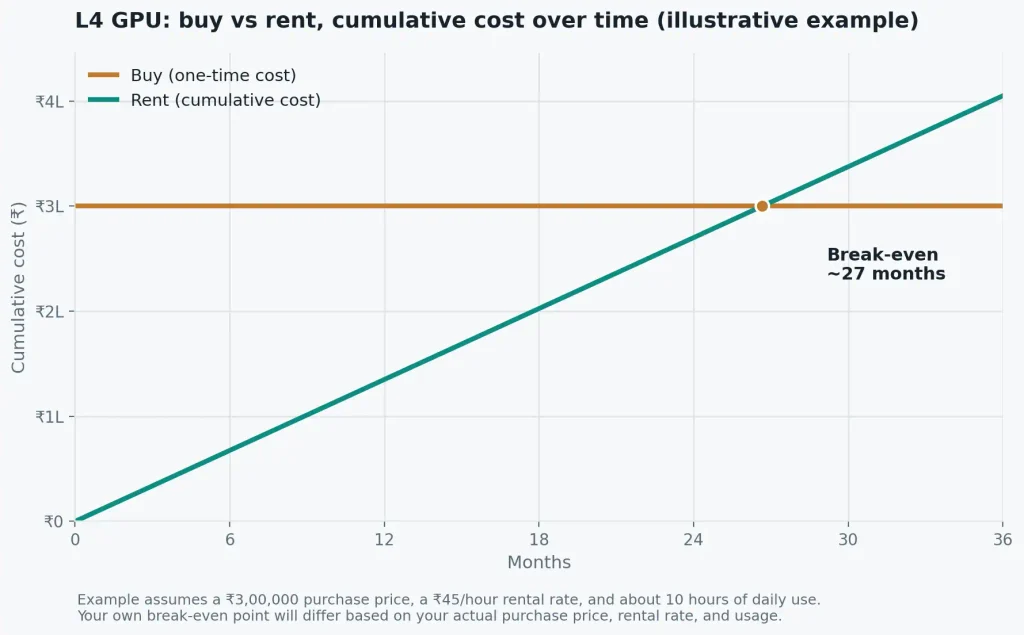
Shown with illustrative example numbers (₹3,00,000 purchase price, ₹45/hour rental rate, ~10 hours of daily use). Swap in your own purchase price and rental rate to see where your break-even point actually falls.
A few things this example doesn’t account for: resale value if you buy, power and cooling costs, and the flexibility of scaling rental usage up or down with demand. Factor those in separately when you finalize a budget.
Calculate the workload before you buy or rent NVIDIA L4
Calculate PricingDoes the L4 work on a desktop or workstation?
Short answer: no, not reliably, even with extra fans pointed at it.
The L4 is a passive card. It has no fan of its own. It is built to sit in a server chassis where strong front-to-back airflow does the cooling for it. Drop it into a standard desktop tower, and it will throttle under load, sometimes badly, because there isn’t enough forced air moving across the heatsink.
- No onboard fan. Cooling depends entirely on chassis airflow.
- 72W TDP. Low power draw, but it still needs airflow to sustain that draw under load.
- Needs a 1U or 2U server chassis built for passive GPU cooling, not a tower PC.
If you’re planning to run this in an existing office server room, check with whoever manages it that the chassis actually supports passive GPU airflow before you buy.
What can a 24GB L4 actually run?
24GB of VRAM and 300 GB/s of memory bandwidth is enough for a specific band of workloads, and not enough for others.
What it handles well:
- Quantized 7B-8B parameter language models, such as Llama 3 8B or Mistral 7B, for inference
- Real-time video encoding and decoding, including AV1 and NVENC
- Image generation and smaller multimodal inference workloads
What it struggles with:
- Unquantized models above roughly 13B parameters
- Fine-tuning or training runs of any real size
- 30B+ parameter inference without aggressive quantization
If your workload is inference on a small to mid-sized model, or video processing, the L4 is well matched. If you’re training models or running large ones, look at the L40S, A100, or H100 instead.
L4 vs L40 vs L40S vs RTX 4090
These names get confused constantly, and the confusion is expensive if you end up buying the wrong card.
| L4 | L40 | L40S | RTX 4090 | |
| VRAM | 24GB GDDR6 | 48GB GDDR6 | 48GB GDDR6 | 24GB GDDR6X |
| Power draw | 72W | 300W | 350W | 450W |
| Form factor | Single-slot, passive | Dual-slot, passive | Dual-slot, passive | 3-4 slot, active fan |
| Best for | High-density inference, video | Graphics and rendering workloads | Large-model fine-tuning, generative AI | Local workstation, raw compute per rupee |
The L4 and L40S are the two you’ll see mentioned in the same breath most often. The L40S has double the VRAM and can handle fine-tuning workloads the L4 can’t, but it draws close to five times the power and costs significantly more, both to buy and to rent.
L4 vs A100 vs H100
If you’re deciding between inference-class and training-class hardware, here is the short version.
| L4 | A100 | H100 | |
| Class | Inference | Training | Training |
| Best for | Running an already-trained model efficiently and cheaply | Training a model from scratch or fine-tuning a large one | Training a model from scratch or fine-tuning a large one, at greater scale |
| Choose if | Serving predictions, running chatbots, or processing video, and your model fits in 24GB | Training or fine-tuning models that need more memory bandwidth and compute than the L4 has | Training or fine-tuning very large models at scale |
For most Indian businesses running inference workloads under 15B parameters, the L4 is enough, and considerably cheaper.
L4 GPU subsidies under the IndiaAI Mission
GST input credit, covered earlier, is one lever that lowers your effective L4 cost. The IndiaAI Mission is the other.
- Up to 40% subsidy on GPU compute costs for eligible users, through the IndiaAI Compute Portal.
- Up to 100% subsidy for a small number of approved foundational model development efforts. Not available for general inference use.
- Eligible applicants: startups, MSMEs, researchers, and academic institutions.
- How to apply: apply through the IndiaAI Compute Portal with end-user registration and a draft bill for review.
- Reference rate: subsidized compute has run around ₹65-67 an hour, though the exact rate depends on which GPU tier you’re allocated.
Neither lever changes the rent-vs-buy decision on its own, but both are worth checking before you finalize a budget.
Where to buy or rent the L4 in India
Buying and renting both come with a few things worth getting right upfront.
If you want to rent:
CloudPe runs L4 instances on Indian infrastructure, alongside H200 and RTX Pro 6000 for workloads that outgrow it later.
- Pricing: ₹35.86 an hour, pay-as-you-go (Monthly and annual subscription available as well)
- No long-term lock-in
- No egress fees
- GST-compliant INR billing
- Data stays in India by default
- Support responds in under 20 minutes
If you are buying:
- Work with an authorized NVIDIA distributor, not a grey-market reseller
- Ask for a GST-compliant invoice
- Confirm warranty terms upfront
- Check whether the quote includes the server chassis, or just the card on its own
Rent and deploy L4 GPU in minutes.
Get StartedConclusion
If you’ll run an L4 for less than about five hours a day, rent it. If you need it running most of the day, every day, buying starts to make financial sense once you’ve accounted for the GST credit and the real landed cost. Either way, test the workload before you commit capital. CloudPe’s L4 instances are the fastest way to do that without a procurement cycle.
Either way, run your numbers through the calculation using the formula mentioned above first. A lot of buy decisions turn out to be rent decisions once the actual hours are counted honestly.
Frequently Asked Questions
1. How much does an L4 GPU cost?
In India, buying one typically runs ₹2.3 lakh to ₹4.9 lakh depending on the seller tier, before factoring in the server build around it. Renting costs roughly ₹35 to ₹85 an hour depending on the platform, with no upfront hardware commitment or maintenance responsibility.
2. Is the L4 GPU good?
Yes, for its intended job. It’s efficient, low-power, and well suited to inference and video transcoding workloads, delivering strong throughput per dollar. It isn’t built for training foundational models or handling very large models that need more memory bandwidth and interconnect speed.
3. Can I claim GST input credit on a GPU purchase?
If you’re a GST-registered business buying for business use, generally yes, the IGST paid at import is recoverable as input tax credit. Basic customs duty often doesn’t apply under India’s ITA-1 rules. Confirm your specific eligibility and HSN classification with your accountant before budgeting.
4. Do I need a special server for the L4?
Yes. It’s a passively cooled card with no onboard fan, built for directional airflow inside a proper chassis. It needs a 1U or 2U server built for passive GPU cooling. Drop it into a standard desktop tower, and it will throttle under load.
5. Can I run Llama 3 8B on an L4?
Yes. A 4-bit quantized version of Llama 3 8B fits comfortably within the L4’s 24GB of VRAM, leaving headroom for context and batch processing. It won’t match a much larger GPU on raw speed, but it handles inference at this model size efficiently.
6. What’s the break-even point for buying vs renting an L4?
Roughly 1,800 to 2,000 active hours a year, though the exact number depends on your specific purchase price and rental rate. Factors like depreciation, electricity, and cooling shift that line further. Use the calculator in this article to work out your own number.