RAM or random access memory helps your CPU to process data and render it on your screen. VRAM does more or less the same thing for GPU. Takes and processes data from GPU workload and renders it on your screen. “Then what is the actual difference between them? I mean to me they both have clearly an identical name, and this is just another fancy term and product to make money.”
This is what I used to think when I came across these terms for the first time. I mean it’s fair though when you are new to the industry especially when you are a developer who is going to work with these technologies day and night.
To understand the difference it is really important to understand each of them individually, and their use-cases. In this blog we will break this down in granules so you know exactly what is the difference between RAM and VRAM.
Quick answer: RAM and VRAM are not the same. RAM is general-purpose system memory managed by the CPU. VRAM is dedicated memory built for the GPU. Adding more RAM does not increase a GPU’s VRAM, and the two are not interchangeable in AI workloads.
What is RAM?
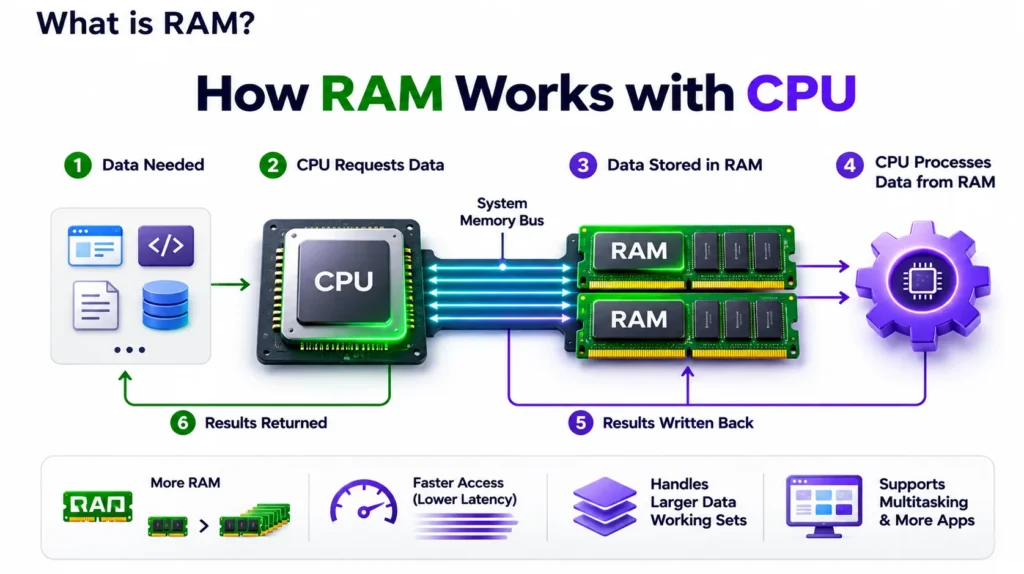
RAM stands for Random Access Memory. It is the system memory used primarily by the CPU and operating system.
Whenever you open applications, load datasets, run Python scripts, or start background services, the system uses RAM to hold information that needs to be accessed quickly.
Think of RAM as the main workspace in an office. The CPU is an employee, and RAM is the desk where documents, tools, and other materials are kept within reach. A larger desk allows the employee to keep more information available without repeatedly retrieving it from storage.
For example, imagine an AI developer working with a dataset containing one million images. Before those images reach the GPU, the CPU may decode, resize, and prepare them. System RAM stores intermediate data and supports the preprocessing pipeline.
More RAM can help handle larger datasets and multiple processes, but it does not automatically increase the GPU’s available memory.
In simple words: RAM is the working memory used by the CPU, operating system, and applications.
What is VRAM?
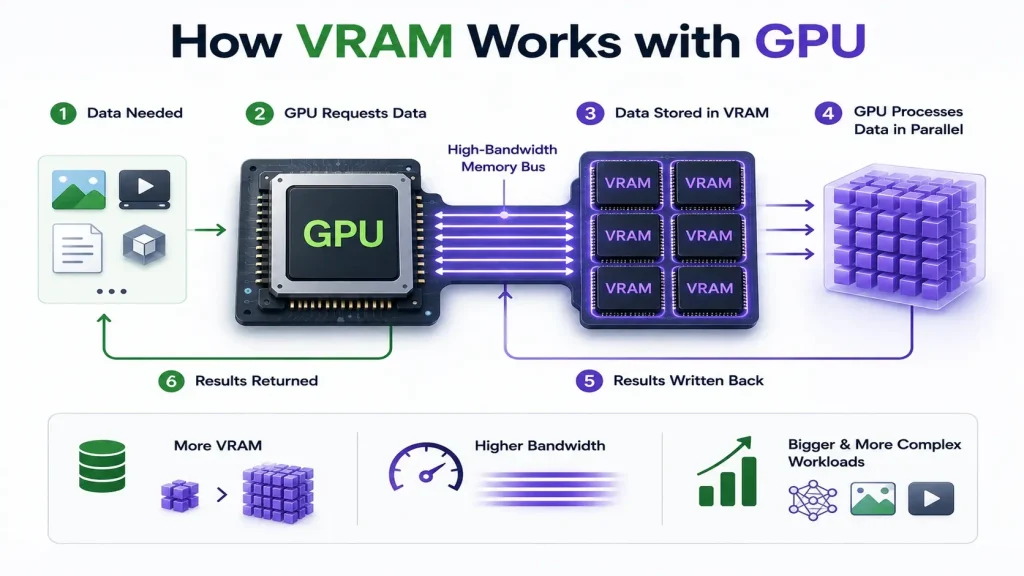
VRAM stands for Video Random Access Memory. In AI computing, it refers to memory used by the GPU.
Despite its name, VRAM is not limited to storing graphics or video. It also stores AI model weights, tensors, activations, gradients, and other data required for GPU calculations.
Think of VRAM as a specialized workspace located directly beside a powerful machine. The GPU performs enormous numbers of mathematical operations. It needs fast access to data without constantly requesting information from the CPU.
Data-center GPUs such as the NVIDIA H200 use high-bandwidth memory for AI workloads. For example, the NVIDIA H200 SXM provides 141 GB of HBM3e memory, while the NVIDIA L4 provides 24 GB of GDDR6 memory. Both are GPU memory, but their capacities and bandwidth differ substantially.
In simple words: VRAM is the memory that holds information the GPU needs to process AI workloads.
RAM vs VRAM: What’s the difference?
| Feature | RAM | VRAM |
| Primary processor | CPU | GPU |
| Main purpose | System and application data | GPU computations |
| Common technologies | DDR4, DDR5 | GDDR6, HBM3e |
| Typical AI usage | Data loading, preprocessing | Model weights, activations |
| Capacity | Often 32 GB–1 TB+ on servers | Depends on GPU |
| Upgrade method | Add supported memory modules | Usually requires a different GPU |
| Performance focus | CPU memory access | High-throughput GPU access |
One important point: both RAM and VRAM are forms of memory, but they are not generally interchangeable. Adding more system RAM does not increase the physical VRAM capacity of a dedicated GPU.
Some integrated GPUs and unified-memory systems (covered below) share memory between the CPU and GPU, but dedicated data-center GPUs generally use separate memory pools.
RAM vs VRAM vs unified memory
A separate question developers run into: what about systems where CPU and GPU share the same memory pool, like Apple Silicon Macs or AMD’s integrated APUs?
In a unified memory architecture, there is no separate dedicated VRAM pool. The CPU and GPU draw from the same physical memory, and the operating system allocates it dynamically between them. This removes the hard VRAM ceiling you get with a dedicated GPU, but it also means that memory is shared, not doubled: using more for one processor leaves less for the other, and total bandwidth is typically lower than dedicated HBM or GDDR6 on data-center GPUs. For small to mid-size model inference, unified memory can work well because it allows large pools (64–192 GB on some systems) to be used for model weights. For heavy training or large-batch serving, dedicated VRAM with high bandwidth still outperforms unified memory.
Deploy VMs, GPUs and more in minutes with CloudPe
Try for freeWhy AI models need so much VRAM
AI models contain parameters, commonly called weights. When an AI model runs on a GPU, these weights usually need to be stored in GPU memory. The larger the model, the more memory it requires.
Suppose you’re running a language model containing 7 billion parameters. If each parameter uses FP16 precision, it requires approximately two bytes.
| 7 billion × 2 bytes = 14 GB |
That means approximately 14 GB of memory is needed just to store the model weights. But the model also requires additional memory for intermediate calculations, attention caches, and runtime overhead.
Let’s compare some theoretical weight requirements.
| Model size | FP16 weights | 4-bit weights |
| 7B parameters | 14 GB | 3.5 GB |
| 13B parameters | 26 GB | 6.5 GB |
| 30B parameters | 60 GB | 15 GB |
| 70B parameters | 140 GB | 35 GB |
These are approximate raw weight sizes. Actual GPU memory requirements are higher because of metadata, quantization overhead, runtime buffers, and other allocations.
This is why a 24 GB GPU may comfortably run some quantized models but struggle with larger models at higher precision.
Why having more RAM doesn’t solve insufficient VRAM
Imagine a server with the following configuration:
- CPU: 32 cores
- System RAM: 256 GB
- GPU: NVIDIA L4 with 24 GB VRAM
- Storage: 2 TB NVMe SSD
Now suppose a developer tries to load a model requiring 40 GB of GPU memory. The server has 256 GB of RAM, so why can’t it load the model?
Because the GPU has only 24 GB of dedicated memory.
Example: Model needs 40 GB of GPU memory
- System RAM: 256 GB available capacity — plenty of system memory, but it is not dedicated GPU memory.
- GPU VRAM: 24 GB / 40 GB required — 24 GB capacity, 16 GB shortfall.
The model may produce an out-of-memory error because the GPU cannot allocate enough memory.
Some AI frameworks support CPU offloading, allowing parts of a model to remain in system RAM. However, transferring information between RAM and VRAM introduces additional overhead and can significantly reduce performance.
Key lesson: Large system RAM cannot automatically compensate for insufficient dedicated GPU memory.
Memory bandwidth: Why capacity isn’t everything
Suppose two GPUs both have 24 GB of VRAM. Does that mean they deliver identical AI performance? Not necessarily.
Memory bandwidth determines how quickly data moves between GPU memory and processing units.
Imagine two warehouses holding the same amount of material. One has a narrow loading entrance, while the other has several high-speed loading lanes. Both can store the same quantity, but the second can supply materials much faster.
For AI workloads, especially large language model inference, memory bandwidth can strongly influence performance.
For example, on theoretical peak bandwidth: the NVIDIA H200 SXM reaches roughly 4.8 TB/s of HBM3e bandwidth, while the NVIDIA L4 reaches roughly 300 GB/s of GDDR6 bandwidth — meaning the H200 has approximately 16 times the memory bandwidth of the L4, although this does not imply 16 times the application performance.
This is why AI developers should evaluate both GPU memory capacity and memory bandwidth when selecting hardware.
| Deploy your AI workloads on Nvidia L4, RTX PRO 6000, H200 and more on CloudPe | Learn more |
How RAM and VRAM work together during AI training
During AI training, RAM and VRAM perform different but connected tasks. Here’s what happens:
- Training data is loaded from storage.
- The CPU prepares batches using system RAM.
- The batches are transferred to GPU VRAM.
- The GPU performs mathematical calculations.
- Model parameters are updated through the training process.
If system RAM is insufficient, data preparation may slow down or fail. If VRAM is insufficient, the GPU may be unable to load the model or process the required batch. Both memory types are essential.
Training vs inference: Different memory requirements
Training generally requires more GPU memory than inference because the system must store additional information used to update model parameters.
During training, VRAM may hold:
- Model weights
- Activations
- Gradients
- Optimizer states
- Temporary calculation buffers
During inference, the model does not normally need to store gradients and optimizer states. Instead, memory is primarily used for model weights, activations, runtime buffers, and — in transformer-based language models — the KV cache.
For example, a model that fits comfortably on a GPU during inference might require substantially more memory for full training. Techniques such as quantization, gradient checkpointing, parameter-efficient fine-tuning, and distributed training can reduce or distribute these requirements.
How to check RAM and VRAM usage
For developers using Linux GPU servers, checking memory usage is straightforward.
To check system RAM:
</>Bash
| free -h |
To check GPU VRAM:
</>Bash
| nvidia-smi |
For continuously updated GPU statistics:
</>Bash
| watch -n 1 nvidia-smi |
The NVIDIA tool displays GPU memory usage, utilization, and other hardware information. For example, if your GPU shows 22 GB of its 24 GB memory allocated, it may have limited headroom for larger batches or additional requests.
However, allocated memory is not necessarily the same as actively used memory, especially with frameworks that cache GPU allocations.
Which matters more when choosing an AI server?
Consider these scenarios.
| AI workload | Memory priority |
| Preparing large datasets | Sufficient system RAM |
| Running large language models | Sufficient VRAM and bandwidth |
| Training deep learning models | Both RAM and VRAM |
| Serving many concurrent AI requests | VRAM, bandwidth, and KV cache capacity |
| CPU-based inference | System RAM |
| Fine-tuning large models | VRAM, with RAM for loading and offloading |
For a GPU hosting provider, it is important to understand the customer’s model size, precision, batch size, and expected concurrency before recommending a server.
A server with 512 GB RAM and 24 GB VRAM may be excellent for CPU-heavy data processing but unsuitable for a large model that requires 80 GB of dedicated GPU memory. Similarly, a powerful GPU with ample VRAM may still experience poor training performance if the server has insufficient RAM for data preparation.
Conclusion
RAM and VRAM are both essential to AI infrastructure, but they solve different problems. RAM supports the operating system, CPU workloads, data preparation, and application processes. VRAM provides the high-speed memory needed by the GPU for AI calculations, model weights, and intermediate data.
More RAM cannot simply replace VRAM, and more VRAM cannot compensate for every system memory bottleneck.
When selecting infrastructure for AI development, the right question is not just how much memory a server has. It is how much RAM and VRAM the workload needs, how quickly that memory can move data, and whether the entire system can support the model efficiently.
Deploy VMs, GPUs and more in minutes with CloudPe.
Try for freeFrequently Asked Questions
Are RAM and VRAM the same thing?
No. RAM is general-purpose system memory used by the CPU for the operating system and applications. VRAM is dedicated memory built for the GPU to store model weights, textures, and other data the GPU processes directly. They are not interchangeable.
Is 32 GB of VRAM overkill?
It depends on the workload. For gaming, yes — most titles use well under 16 GB even at 4K. For AI, no — a 32 GB GPU can struggle to hold a 30B-parameter model at FP16 (around 60 GB) without quantization, so 32 GB is often a practical minimum rather than excess for mid-size model work.
Is 16 GB of VRAM really necessary?
For AI workloads, 16 GB comfortably handles most 7B-parameter models at FP16 and larger models when quantized to 4-bit. For gaming, 16 GB is generally more than current titles need at 1440p, though some developers prefer the headroom for 4K or future-proofing.
How long will 12 GB of VRAM last for AI work?
12 GB can run 7B-parameter models quantized to 4-bit comfortably, and some at FP16 with tight memory management. As models grow and higher-precision formats become more common for quality-sensitive tasks, 12 GB will increasingly limit which models can be loaded without offloading or heavier quantization.
Can adding more system RAM fix a VRAM shortage?
Not directly. Some frameworks support CPU offloading, where parts of a model spill into system RAM, but this adds latency because data has to move between RAM and VRAM repeatedly. It’s a workaround, not a fix — dedicated VRAM capacity is still the limiting factor.