GPU rental prices vary considerably across cloud providers, even when the underlying GPU is the same. For Indian businesses running AI workloads, choosing the right provider can make a significant difference to annual infrastructure expenditure.
With 96 GB of GDDR7 memory and native FP4 support, the NVIDIA RTX PRO 6000 Blackwell is well suited for AI inference, model fine-tuning, and memory-intensive applications. However, deploying these workloads cost-effectively requires careful infrastructure planning.
This article examines RTX PRO 6000 AWS pricing, compares rental rates across Indian cloud providers, breaks down infrastructure expenses based on usage patterns, and explores which deployment options make sense for different workloads.
NVIDIA RTX PRO 6000 Blackwell specifications
The NVIDIA RTX PRO 6000 Blackwell Server Edition is designed for data centre workloads, including AI inference, model fine-tuning, scientific computing, and rendering.
Its 96 GB of GDDR7 memory enables larger AI models to run on a single GPU, potentially reducing the need for multi-GPU deployments and simplifying infrastructure requirements.
| Specification | RTX PRO 6000 Blackwell Server Edition |
| GPU architecture | NVIDIA Blackwell |
| GPU memory | 96 GB GDDR7 with ECC |
| Memory bandwidth | 1,597 GB/s |
| Memory interface | 512-bit |
| CUDA cores | 24,064 |
| Tensor Cores | 5th generation |
| RT Cores | 188 (4th generation) |
| FP4 performance | 4 PFLOPS |
| FP8 performance | 2 PFLOPS |
| FP16/BF16 performance | 1 PFLOP |
| FP32 performance | 120 TFLOPS |
| GPU interface | PCIe Gen 5 x16 |
| Multi-Instance GPU (MIG) | Up to 4 isolated instances |
| NVLink support | No |
| Maximum power consumption | Up to 600W (configurable) |
Performance figures represent theoretical peak capabilities.
For example, a 70-billion-parameter language model requires approximately 70 GB of memory for its weights at 8-bit precision. This makes single-GPU inference possible, depending on context length, KV cache, concurrency and inference engine overhead.
While these GPU specifications remain consistent across providers offering the Server Edition, the supporting CPU, RAM, storage and networking configurations may differ. Understanding these differences is important when comparing cloud instance pricing
RTX PRO 6000 cloud pricing: A quick comparison
Renting RTX PRO 6000 in India can cost anywhere from approximately ₹177 to ₹494 per hour across the providers examined in this article. The difference becomes particularly significant for applications that require continuous GPU availability.
| Provider | Region | Hourly rental cost |
| AWS g7e.2xlarge | US East | ₹302.40 |
| AWS g7e.2xlarge | Mumbai | ₹494.10 |
| CloudPe | India | ₹215.31 |
| E2E Networks | India | ₹236.55 |
| NeevCloud | India | ₹176.80 |
The comparison uses advertised on-demand rates and indicative AWS pricing at an assumed exchange rate of ₹90 per USD. Each configuration contains one RTX PRO 6000 GPU with 96 GB of VRAM, but supporting infrastructure differs.
Note: Prices are subject to change. Refer to the respective providers’ official websites for the latest pricing.
AWS G7e pricing and instance configurations
AWS offers the NVIDIA RTX PRO 6000 Blackwell Server Edition through its Amazon EC2 G7e instance family. These instances range from single-GPU configurations for independent applications to eight-GPU configurations for distributed computing workloads.
G7e instances became available in the AWS Mumbai region in July 2026.
The following table compares the specifications and indicative Linux on-demand pricing across all six G7e instance sizes.
| AWS instance | GPUs | Total VRAM | vCPUs | System RAM | US East/hr | Mumbai/hr |
| g7e.2xlarge | 1 | 96 GB | 8 | 64 GiB | $3.36 | $5.49 |
| g7e.4xlarge | 1 | 96 GB | 16 | 128 GiB | $4.00 | $6.53 |
| g7e.8xlarge | 1 | 96 GB | 32 | 256 GiB | $5.27 | $8.61 |
| g7e.12xlarge | 2 | 192 GB | 48 | 512 GiB | $8.29 | $13.54 |
| g7e.24xlarge | 4 | 384 GB | 96 | 1,024 GiB | $16.57 | $27.07 |
| g7e.48xlarge | 8 | 768 GB | 192 | 2,048 GiB | $33.14 | $54.14 |
Based on these rates, G7e deployments in Mumbai cost approximately 63% more than equivalent configurations in US East.
However, deploying applications outside India solely to reduce infrastructure expenses may introduce additional latency, cross-border data transfer costs, and data hosting considerations.
Single-GPU vs multi-GPU instance pricing
Selecting a larger AWS G7e instance does not always mean receiving more GPU computing capacity. The distinction between single-GPU and multi-GPU configurations is important when determining which instance a workload actually requires.
G7e.2xlarge, G7e.4xlarge and G7e.8xlarge pricing
All three instances contain the same NVIDIA RTX PRO 6000 Blackwell GPU with 96 GB of VRAM. The primary differences are CPU allocation, system memory, and supporting network and storage bandwidth.
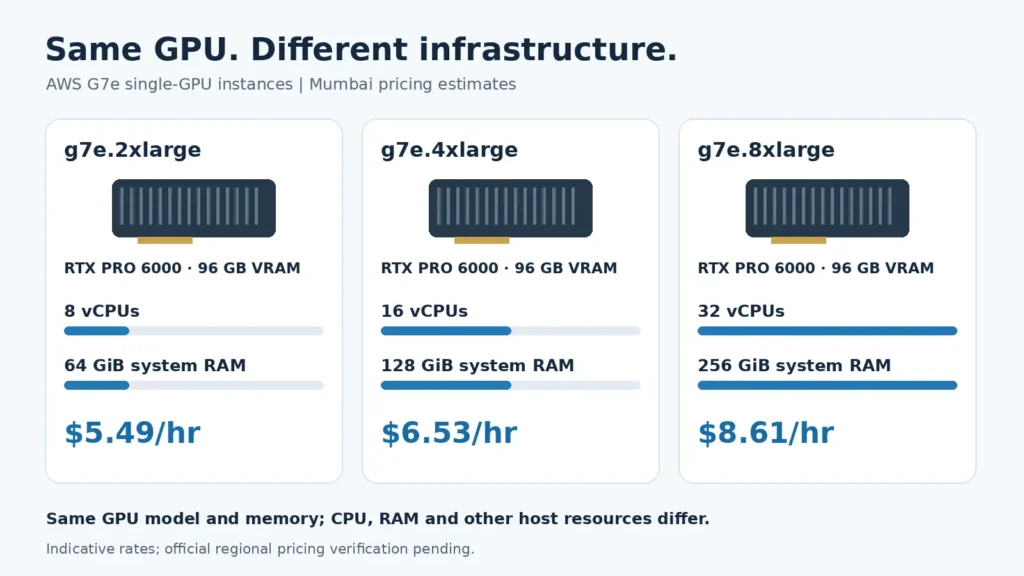
Moving from g7e.2xlarge to g7e.8xlarge increases the estimated Mumbai rental price by approximately 57%, without increasing GPU count or GPU memory.
The additional CPU and system memory can benefit data preprocessing, concurrent inference requests, and CPU-intensive application components. However, workloads already running close to their maximum GPU utilisation may see limited performance improvement.
Infrastructure teams should identify the actual resource bottleneck before moving to a larger instance.
G7e.12xlarge, G7e.24xlarge and G7e.48xlarge pricing
Multi-GPU instances are suitable for workloads that require additional parallel computing capacity or cannot fit within a single GPU’s memory.
The estimated Mumbai rental cost per GPU remains approximately $6.77 per hour across the two-GPU, four-GPU, and eight-GPU configurations.
An eight-GPU g7e.48xlarge instance provides 768 GB of aggregate GPU memory. However, this does not function automatically as a single 768 GB memory pool. Applications must support distributing models or computations across multiple GPUs.
The RTX PRO 6000 does not support NVLink. AWS provides PCIe-based GPU peer-to-peer communication on its multi-GPU G7e instances, along with GPUDirect RDMA support for compatible multi-node configurations.
Actual scaling efficiency depends on the application architecture, GPU communication overhead, and workload distribution.
For containerised applications, our guide on Kubernetes GPU node pools for AI workloads explains how GPU resources can be allocated and managed efficiently.
Deploy dedicated 96 GB RTX PRO 6000 Blackwell GPUs in India.
Try CloudPeRTX PRO 6000 pricing across Indian cloud providers
Indian cloud providers offer RTX PRO 6000 instances with different combinations of CPU, system memory, storage, and billing arrangements.
For businesses evaluating alternative deployments, comparing these configurations alongside AWS provides a clearer picture of what is included in each advertised rate.
Single-GPU instance comparison
The following table showcases a single-GPU instance comparison across providers:
| Specification | AWS Mumbai | CloudPe | E2E Networks | NeevCloud |
| GPU | RTX PRO 6000 | RTX PRO 6000 | RTX PRO 6000 | RTX PRO 6000 |
| GPU count | 1 | 1 | 1 | 1 |
| GPU memory | 96 GB | 96 GB | 96 GB | 96 GB |
| vCPUs | 8 | 64* | 32 | Confirm configuration |
| System RAM | 64 GiB | 170 GB* | 170 GB | Confirm configuration |
| Storage | 1.9 TB local NVMe | 30 GB NVMe* | Confirm configuration | Confirm configuration |
| Hourly rate | ₹494.10 | ₹215.31 | ₹236.55 | ₹176.80 |
| Billing currency | USD reference | INR | INR | INR |
| Commitment options | Available | Available | Available | Available |
AWS vs Indian cloud providers: Monthly and annual costs
Development teams running occasional fine-tuning jobs have different infrastructure requirements from businesses operating production AI applications around the clock.
Two usage scenarios help illustrate how hourly GPU rental rates translate into actual infrastructure budgets.
- Occasional workloads: 100 billable GPU hours per month, suitable for development, testing, batch processing, and intermittent fine-tuning.
- Continuous workloads: 730 billable GPU hours per month, suitable for production inference APIs and applications requiring constant availability.
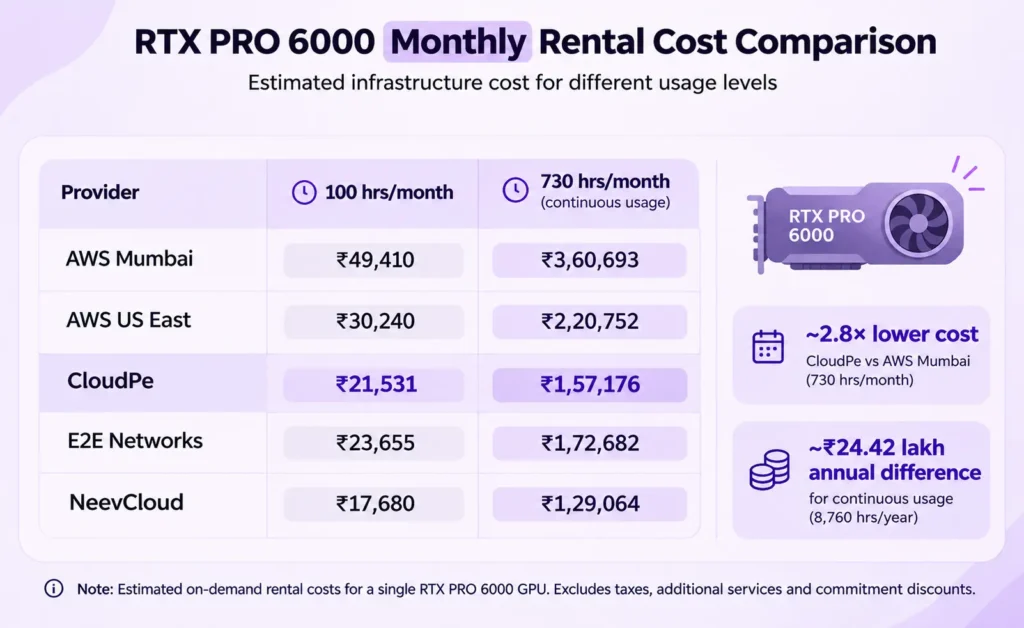
Monthly RTX PRO 6000 rental cost comparison
The graphic below showcases the monthly RTX PRO 6000 rental cost comparison:
Annual RTX PRO 6000 rental cost comparison
The graphic below showcases the annual RTX PRO 6000 rental cost comparison:
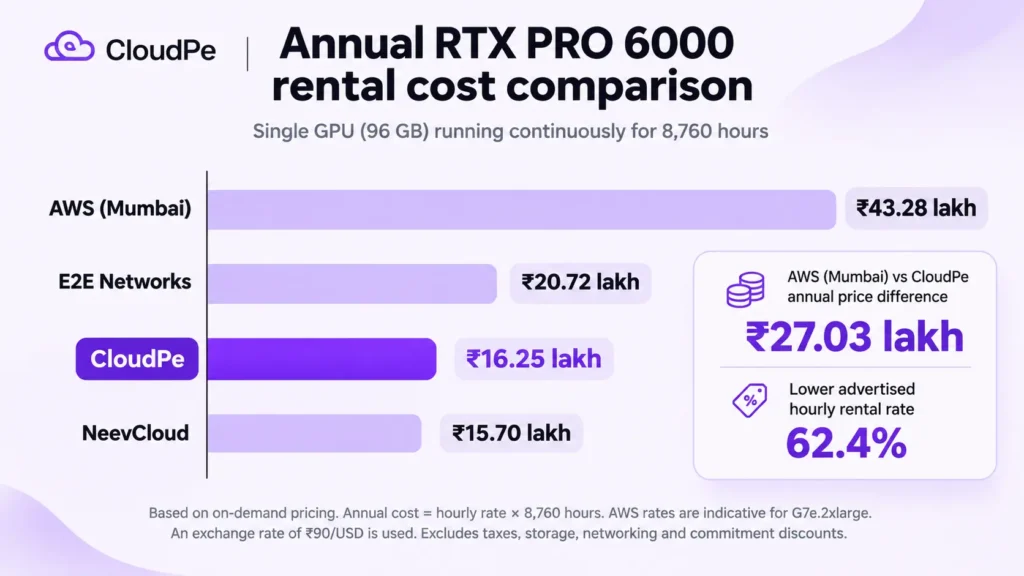
For a continuously running single-GPU deployment, the estimated annual rental expenditure across the India-hosted configurations ranges from approximately ₹15.49 lakh to ₹43.28 lakh.
These figures illustrate the difference in rental expenditure. They do not establish equivalent application performance or total cost of ownership.
For predictable workloads, monthly and annual commitment plans can further reduce costs. These plans should be evaluated separately, with equivalent commitment periods and contractual conditions.
For more comparison info, check the AWS Alternative page.
Additional costs that affect the final GPU cloud bill
Hourly GPU rental represents only part of infrastructure expenditure. Depending on how you deploy an application, storage, networking, software services, and operational requirements can affect the final bill.
Persistent storage and backups
AI applications require storage for model weights, datasets, training checkpoints and application logs.
AWS G7e instances include local NVMe storage. However, instance-store data can be lost when an instance is stopped or terminated. Persistent Amazon EBS storage and snapshots are billed separately.
For Indian cloud providers, verify included storage capacity, persistence model, additional volume pricing, and backup costs before deployment.
Data transfer and networking
Applications that regularly transfer large datasets, generated videos or model checkpoints can incur networking expenses.
AWS data transfer pricing varies by region, traffic direction and the services involved. NAT gateways, load balancers and other networking services may also generate charges.
Indian cloud providers may include data transfer within their rental plans or apply separate bandwidth policies. Businesses should confirm traffic limits, bandwidth allocation and any applicable fair-use conditions.
Technical support and managed services
Production AI applications require reliable infrastructure and timely assistance when technical issues occur.
AWS offers paid support plans with different levels of technical assistance. Indian cloud providers have their own support arrangements, response commitments and managed service options.
Support scope and escalation procedures should be compared alongside infrastructure availability.
Currency conversion and GST
USD-denominated infrastructure expenses can fluctuate when converted into Indian rupees, even if the underlying GPU rental rate remains unchanged.
INR-based billing can simplify budgeting for Indian businesses. However, organisations should confirm the invoicing currency, applicable GST, tax-inclusive expenditure and input tax credit eligibility.
On-demand, Spot and commitment pricing
The billing model should reflect workload predictability and tolerance for interruptions.
| Billing model | Best suited for | Limitation |
| On-demand | Development and variable workloads | Standard rental rates |
| Spot instances | Interruptible batch processing | Availability and interruption risk |
| AWS Savings Plans | Predictable AWS compute usage | Financial commitment |
| Monthly GPU plans | Regular production workloads | Reduced flexibility |
| Annual GPU plans | Stable long-term requirements | Longer contractual commitment |
AWS supports On-Demand, Spot, and Savings Plans for G7e instances. Actual Spot availability and discounted rates depend on the region and configuration.
Idle GPU costs
A provisioned GPU instance can continue generating charges even when it is not processing workloads.
For example, a business running an instance for 730 hours but performing useful GPU computations for only 300 hours still pays for the provisioned duration under standard instance-based billing.
Workload scheduling, inference batching and releasing unused instances can improve infrastructure efficiency without changing providers.
GPU cloud billing checklist
The following expenses should be confirmed across all shortlisted providers before calculating deployment budgets.
| Cost component | What to verify |
| Persistent storage | Included capacity and additional storage rates |
| Backups | Snapshot pricing and retention policies |
| Data transfer | Egress charges, bandwidth limits, and cross-region traffic |
| Public IP addresses | Included or separately billed |
| Technical support | Standard and premium support costs |
| Stopped instances | Which resources remain billable |
| Taxes | GST-inclusive or exclusive pricing |
GPU hourly pricing vs actual workload cost
A lower hourly rental rate does not necessarily result in a lower cost of running an AI application.
For large language model inference, a more meaningful measurement is the cost of generating a defined volume of output tokens while meeting the application’s performance requirements.
Cost per million output tokens
The infrastructure rental cost of generating one million output tokens can be calculated using the following formula:
| Cost per million tokens=Hourly instance cost 1,000,000Output tokens generated per hour |
Consider two hypothetical RTX PRO 6000 deployments running the same AI model under equivalent precision, output quality, and latency requirements.
The following figures are illustrative and do not represent measured performance from any cloud provider.
| Parameter | Instance A | Instance B |
| Hourly rental cost | ₹200 | ₹300 |
| Output tokens per second | 1,000 | 1,800 |
| Output tokens per hour | 36,00,000 | 64,80,000 |
| Cost per million output tokens | ₹55.56 | ₹46.30 |
Although Instance B costs 50% more per hour, it costs approximately 16.7% less per million output tokens.
The difference comes from its higher application throughput, allowing more useful computation to be completed within the same billing period.
Performance metrics to evaluate
Infrastructure teams should benchmark applications under consistent conditions before committing to production deployments.
Relevant performance metrics include:
- Inference throughput: Total output tokens generated per second.
- Time to first token (TTFT): Time taken to generate the first response token.
- Inter-token latency: Time between successive output tokens.
- Concurrent request handling: Number of simultaneous requests supported within acceptable latency limits.
- GPU utilisation: Percentage of available GPU processing capacity being used.
- Model loading time: Time required to initialise an application or inference engine.
- Sustained performance: Application behaviour during prolonged production workloads.
Benchmark tests should use the same model, numerical precision, inference engine, context length, concurrency settings, and latency requirements.
Find the right GPU configuration for production AI
TryWhen AWS or an Indian cloud provider makes more sense
The choice between AWS and Indian cloud providers depends on application dependencies, infrastructure requirements, and operational complexity.
AWS can be a suitable option for businesses already relying heavily on its storage, networking, security, and orchestration services. Moving GPU workloads outside the platform may introduce integration requirements that outweigh the rental cost difference.
Indian cloud providers can be practical alternatives for independent AI applications, self-hosted models, containerised inference services and GPU-intensive batch processing that do not depend heavily on AWS-specific services.
AWS vs Indian cloud providers: Decision framework
The table below showcases the decision considerations one should look for when choosing cloud providers:
| Requirement | Deployment consideration |
| Deep integration with AWS services | AWS G7e instances |
| Independent single-GPU AI inference | Compare regional GPU cloud providers |
| Global application deployment | AWS or a multi-region cloud provider |
| India-specific data hosting | Evaluate India-hosted infrastructure |
| Predictable INR-based expenditure | INR-billed cloud providers |
| Distributed multi-GPU computing | Evaluate GPU interconnect and network specifications |
| Interruptible batch processing | Compare Spot and on-demand alternatives |
| Independent containerised workloads | Evaluate regional GPU platforms |
| Continuous production workloads | Compare commitment terms and workload benchmarks |
India-hosted infrastructure can support location-specific data governance requirements. However, hosting data within India alone does not establish compliance with the DPDP Act, RBI requirements, or SEBI regulations. Applicable obligations must be evaluated independently.
A hybrid cloud approach
Businesses do not necessarily need to migrate their entire infrastructure to access alternative GPU platforms.
Existing applications can remain on AWS while independent AI inference, fine-tuning or batch processing workloads run on another GPU cloud provider.
For example, an application may retain its existing AWS-based backend and database while using a separately hosted GPU inference service accessed through an API.
This approach is particularly relevant when GPU workloads can operate independently. Its feasibility depends on network latency, application security, data transfer requirements and the complexity of managing infrastructure across multiple providers.
What to verify before renting an RTX PRO 6000
Shortlisting a provider is only the first stage of deployment planning. The following checks help determine whether the selected infrastructure can support the intended application.
- GPU allocation: Confirm the exact RTX PRO 6000 edition and whether the GPU is fully dedicated or shared.
- Supporting resources: Verify the included CPU, RAM, and storage configuration.
- Software compatibility: Confirm CUDA, driver, container, and inference framework support.
- Multi-GPU communication: Evaluate PCIe topology and supported GPU communication mechanisms where multiple GPUs are required.
- Deployment availability: Check regional capacity, GPU provisioning availability, and scaling options.
- Workload validation: Run a proof of concept using representative datasets, models, and application traffic.
- Infrastructure reliability: Review service-level agreements, recovery procedures, and technical support commitments.
Conclusion
The availability of RTX PRO 6000 GPUs across different cloud platforms gives businesses greater flexibility in how they deploy AI infrastructure.
AWS remains a relevant option for applications closely connected to its existing services, while Indian cloud providers offer alternatives for workloads that can operate independently.
Rather than treating GPU procurement as a platform-wide decision, businesses can evaluate each workload individually. This creates opportunities to optimise infrastructure expenditure without unnecessary migrations or changes to established application architectures.
Deploy RTX PRO 6000 Blackwell GPUs starting at ₹185.56/hour.
Try CloudPeFrequently Asked Questions
How much does the RTX PRO 6000 cost?
The RTX PRO 6000 Blackwell hardware purchase price varies by GPU edition, supplier, taxes, and availability. Previously reported Indian hardware prices range from approximately ₹14 lakh to ₹19 lakh. Our dedicated RTX PRO 6000 price in India guide covers hardware and rental pricing in greater detail.
How much does a GPU cost on AWS?
AWS GPU rental pricing varies by GPU model, instance configuration, region, and billing plan. RTX PRO 6000 G7e instances have indicative US East on-demand rates starting at $3.36 per hour for one GPU and reaching approximately $33.14 per hour for eight GPUs.
How much does it cost to rent an RTX PRO 6000?
Advertised on-demand RTX PRO 6000 rental rates among the Indian cloud providers examined range from ₹176.80 to ₹236.55 per hour. The final rental expenditure depends on CPU allocation, system memory, storage, billing duration, and additional services required by the application.
Is the RTX PRO 6000 overkill?
The RTX PRO 6000 may be excessive for lightweight AI applications and smaller models with limited memory requirements. Its 96 GB VRAM is better suited for larger language models, high-concurrency inference, complex rendering, and applications that require substantial GPU memory capacity.
How much does an AWS G7e instance cost in India?
Indicative AWS G7e pricing in Mumbai starts at approximately $5.49 per hour for a single-GPU g7e.2xlarge instance. Larger configurations containing eight GPUs cost approximately $54.14 per hour. Actual pricing depends on the operating system, billing arrangement, and additional AWS services selected.