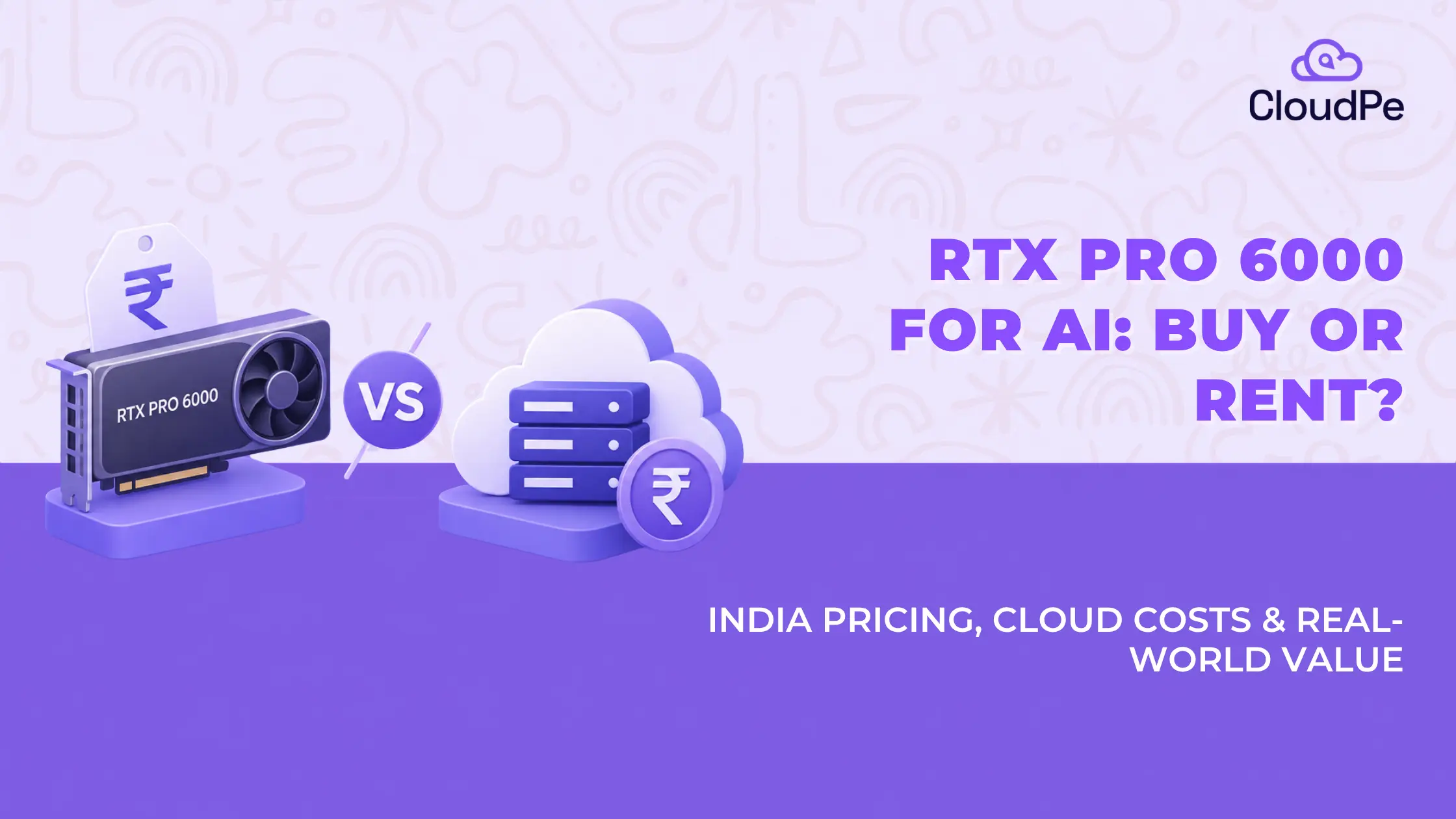
NVIDIA’s RTX PRO 6000 Blackwell is one of the most talked-about GPUs of 2026, and the first thing most people run into is the price. Search for it in India and you’ll see numbers anywhere from ₹14 lakh to ₹19 lakh for a single card. That’s a serious number to commit to, especially before you know exactly how much use you’ll actually get out of it.
In this article we have broken down what the RTX PRO 6000 costs in India, buying it outright and renting it by the hour, so you can work out which one actually fits what you’re building.
RTX PRO 6000 price in India: the quick answer
Buying the card outright costs ₹14,00,000 to ₹19,00,000 in India, before GST and import duty, depending on the variant (Server, Workstation, or Max-Q Edition) and the vendor. Most listings we checked cluster around ₹14 to ₹16 lakh.
Renting it by the hour costs roughly ₹150 to ₹182/hr across India-based cloud providers, or about ₹1,00,000 to ₹1,20,000 a month, depending on how much compute (vCPU and RAM) comes bundled with the GPU.
Which one makes sense for you depends less on the sticker price and more on how much you’ll actually use it. That’s what the rest of this page is for.
Rent RTX PRO 6000, starting @ ₹215.31/hr
Know moreRTX PRO 6000 cloud pricing by provider
We compared real, published, per-hour pricing across the main India-based options, matched to the same GPU (1x RTX PRO 6000, 96GB), so the comparison actually means something instead of just quoting headline rates.
| Provider | Rate | vCPU | RAM |
|---|---|---|---|
| CloudPe | ₹152.49/hr | 64 | 170GB |
| E2E Networks | ₹182/hr | 32 | 170GB |
| JarvisLabs | ₹179/hr | 38 | 160GB |
| AceCloud | ~₹166.6/hr | 16 | 128GB |
Why vCPU and RAM actually matter here
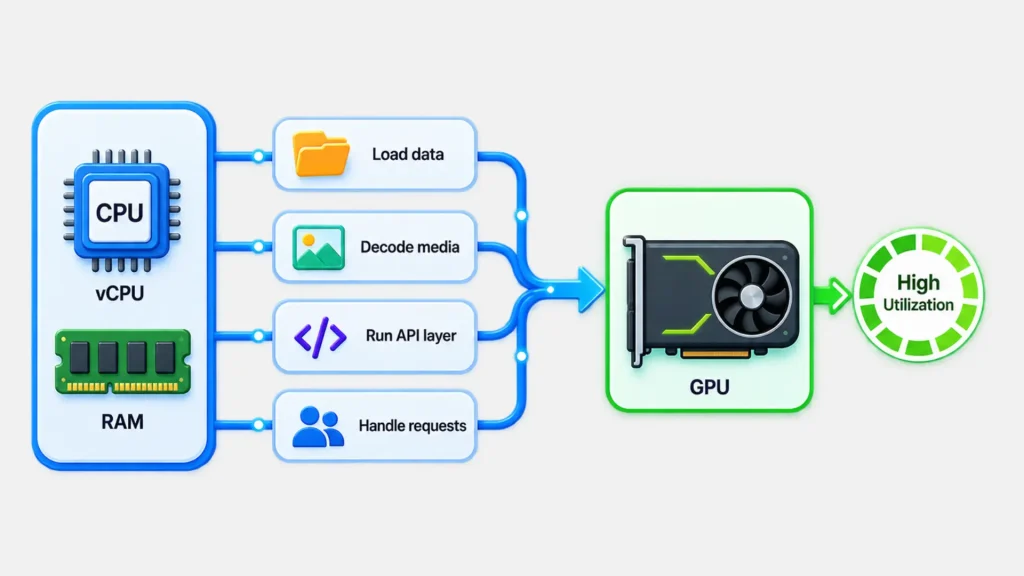
The RTX PRO 6000 is for AI use cases mostly. The GPU handles the heavy compute, model inference, rendering, and the math. But vCPU and RAM handle everything around it: loading data into GPU memory, decoding video or images before they ever touch the card, running the API layer serving your application, handling multiple requests at once.
If the vCPU count is thin, the GPU spends real time sitting idle, waiting on the CPU to feed it work. You’re still paying for that idle GPU-hour. So a provider offering double the vCPU at a lower price is the difference between a GPU running close to its actual capacity and one that’s bottlenecked by everything feeding it.
How is CloudPe cheaper without cutting corners?
Fair question, because in cloud infrastructure, “cheaper” and “cutting corners” often travel together. Two things worth knowing:
- CloudPe runs its own Tier-4 facility on OpenStack infrastructure. It isn’t reselling hyperscaler capacity with a markup on top, which is where a lot of the price difference actually comes from.
- There’s no egress fees or credit-system pricing that makes the final bill different from the quoted rate. The number on the page is close to the number you pay.
On the reliability side:
CloudPe is:
- ISO and SOC 2 certified,
- won CIO Choice’s Best Public Cloud award for 2026, and
- carries a 4.9/5 rating on G2
Cheaper here doesn’t mean unproven.
CloudPe RTX PRO 6000 GPU
Explore detailsRTX PRO 6000 on AWS, Azure, and Google Cloud
We had assumed the big three hyperscalers wouldn’t bother offering a workstation-class card like this. We checked, and we were wrong. Here’s the accurate picture.
| Provider | Offering | India availability | Estimated rate (1 GPU) |
| AWS | EC2 G7e | Live in Mumbai since July 2026 | ~₹385 to ₹420/hr (estimated) |
| Azure | NC RTX PRO 6000 BSE v6 | Not yet in an Indian region | Not applicable in India |
| Google Cloud | G4 VMs | Mumbai access is invite-only preview | Not generally available |
AWS added this GPU through EC2 G7e instances and brought it to the Mumbai region in July 2026, about six weeks before this was published.
- The smallest single-GPU configuration (8 vCPU, 64GB RAM) starts at $3.36/hr in US regions, which converts to roughly ₹321/hr at today’s exchange rate.
- AWS’s Asia Pacific pricing typically runs 20 to 30% above US baseline, which would put Mumbai somewhere around ₹385 to ₹420/hr.
Even at the low end, that’s over double CloudPe’s rate for an eighth of the vCPU.
Azure offers this GPU through its NC RTX PRO 6000 BSE v6 series, but it’s only generally available in West US 2 and Southeast Asia right now. Not India. If data residency is part of why you’re reading this, that matters.
Google Cloud runs it through G4 VMs. The India-region access that exists (via Cloud Run in Mumbai) is explicitly invite-only preview, not open to everyone yet.
Buy vs rent RTX PRO 6000 in India: what actually makes sense
Here’s the question underneath all of this, the one you’re probably already doing the math on: if buying costs ₹14 lakh and renting costs about ₹13.4 lakh a year running nonstop, doesn’t buying eventually win? You’re planning to use this for longer than a year, so why rent at all?
It’s the right question. But that ₹14 lakh number is hiding a lot.
What the ₹14 lakh doesn’t include
- GST and import duty: Some listings run up to ₹19 lakh once these are factored in.
- A chassis or server: To actually house the card. It doesn’t run on its own.
- Power delivery: You need a power delivery built for a 600W card running continuously, not occasionally.
- Cooling infrastructure: This is needed to keep up with that heat, every day, for years.
- Maintenance and failure risk: No manufacturer warranty covers your downtime the way an uptime SLA does.
- Electricity: Running a 600W card 24/7 for a year is a real, ongoing cost that never shows up in the purchase price.
- Depreciation: Blackwell won’t be NVIDIA’s newest architecture in 18 months. Resale value on a purchased card drops fast once the next generation ships.
The utilization problem
Even setting all of that aside, the breakeven math assumes the card runs literally nonstop, every single hour, for over a year straight. Almost no real AI or rendering workload looks like that. Training runs finish. Rendering sprints end. Projects have gaps between them.
If your actual utilization sits around 40 to 50%, which is realistic for most teams, your effective breakeven point roughly doubles. You’re now looking at two-plus years of ownership before buying pulls ahead, and that’s before adding back everything in the list above.
What renting actually buys you, beyond the hourly rate
- Capital stays free: ₹14 lakh not locked into one depreciating asset is ₹14 lakh available for the rest of the business.
- No procurement wait: Renting is live in minutes. Buying means import timelines, delivery, and setup, often weeks.
- Flexibility: If your workload changes and you suddenly need an H200 instead, or four GPUs instead of one, switching is a config change, not a new purchase.
- Maintenance, cooling, and uptime become someone else’s job: backed by an SLA instead of best effort.
So when does buying actually make sense?
Genuinely continuous, multi-year workloads running near full utilization, where you also already have the facility, power, and in-house team to handle maintenance. That’s a real category of buyer, mostly dedicated, large-scale AI infrastructure teams. It’s just a much smaller group than the number of people who land on this page searching the price.
What can you actually run on RTX PRO 6000
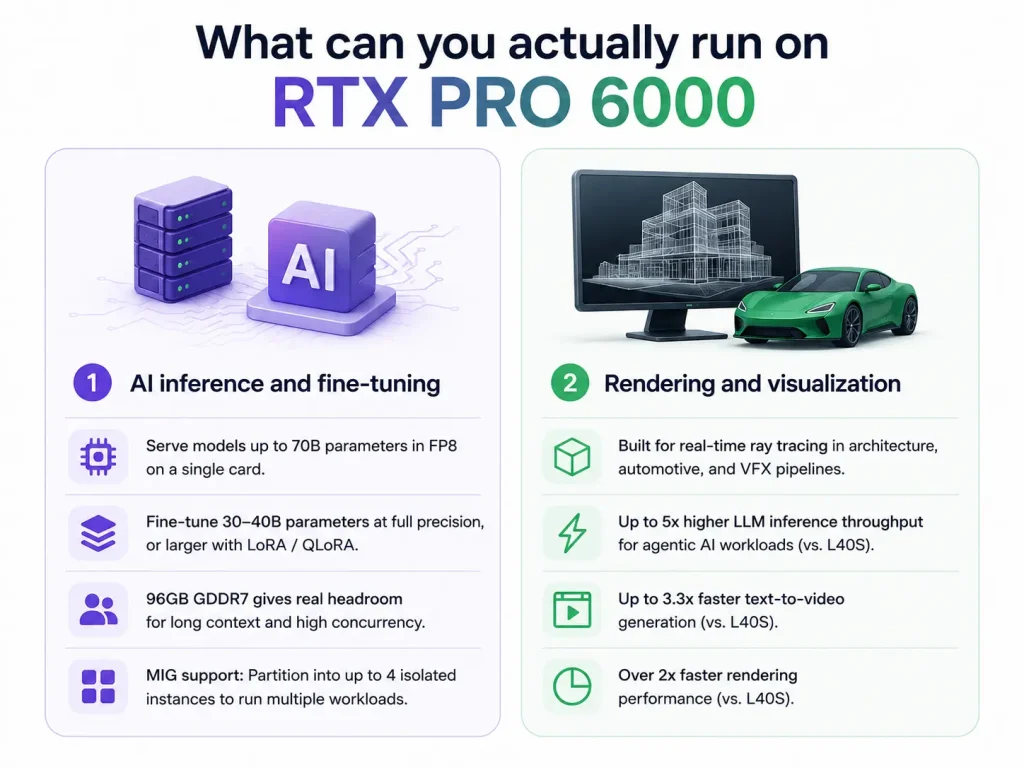
Price only means something relative to what the card can actually do, so here’s the honest technical rundown.
1. AI inference and fine-tuning
96GB of GDDR7 means you can serve models up to 70B parameters in FP8 on a single card, no multi-GPU orchestration needed for most production inference jobs. A 70B model quantized to FP8 fits with real headroom left over, often 25GB or more, which matters if you’re handling long context windows or several concurrent users on the same instance.
For fine-tuning, you’re comfortable up to 30 to 40B parameters at full precision, or larger with LoRA or QLoRA.
One detail worth knowing if you’re running multiple smaller workloads: RTX PRO 6000 supports MIG (Multi-Instance GPU), so a single 96GB card can be partitioned into up to four isolated instances, useful if you’re serving several smaller models or clients off one GPU instead of renting separate cards for each.
2. Rendering and visualization
This is a workstation-class card at heart, not just an AI chip with rendering bolted on. Real-time ray tracing for architecture, automotive design, and VFX pipelines is genuinely where it’s built to perform.
On NVIDIA’s own published benchmarks from the Blackwell launch, measured against the prior-generation L40S: up to 5x higher LLM inference throughput for agentic AI workloads, up to 3.3x faster text-to-video generation, and over 2x faster rendering.
Who should look at a different GPU instead
If you’re running 70B+ models at full FP16 precision, or anything that genuinely needs NVLink for multi-GPU scaling, this isn’t your card. RTX PRO 6000 doesn’t support NVLink, multi-GPU setups run over PCIe instead, and for that class of workload, H200 is the better fit.
If your workload is lighter, inference on smaller models, video analytics, an L4 instance costs a lot less and is probably all you need. CloudPe’s GPU lineup starts at Rs. 14,500 a month if that’s closer to your situation.
RTX PRO 6000 vs RTX 5090, RTX 6000 Ada, A100, and H100
This comparison comes up constantly for a reason, people evaluating RTX PRO 6000 are almost always weighing it against one of these four.
| RTX 5090 | RTX 6000 Ada | A100 80GB | H100 80GB | RTX PRO 6000 | |
| Memory | 32GB GDDR7 | 48GB GDDR6 | 80GB HBM2e | 80GB HBM3 | 96GB GDDR7 |
| ECC memory | No | Yes | Yes | Yes | Yes |
| NVLink | No | No | Yes | Yes | No |
| Best for | Consumer, gaming | Ada-gen inference | Balanced training | Multi-GPU training | Single-GPU inference economics |
- vs RTX 5090: not really the same category. The 5090 is a consumer card, no ECC memory, no MIG support, capped at 32GB. If gaming is the actual goal, the 5090 is the right, cheaper choice. It’s just not built for production AI or rendering work the way RTX PRO 6000 is.
- vs RTX 6000 Ada: a straightforward generational jump. Double the memory, a full architecture generation ahead, and native FP4 precision support Ada doesn’t have.’
- vs A100: more memory (96GB vs 80GB) on a newer architecture, though A100’s HBM memory still edges out RTX PRO 6000 on raw bandwidth. The trade favors RTX PRO 6000 for single-GPU inference that needs the extra memory headroom over raw throughput.
- vs H100: H100 still wins on raw bandwidth and anything that scales across GPUs over NVLink. RTX PRO 6000 wins on single-GPU inference economics; independent benchmarks consistently show lower cost per token for models that fit on one card, since there’s no interconnect cost to pay for.
What to check before you commit to any GPU provider
Whichever provider you land on, and it doesn’t have to be CloudPe, a few things are worth confirming before you sign up for anything:
- Where’s the data actually sitting? If you’re in a regulated industry, BFSI or healthcare, or just want to avoid DPDP compliance headaches, confirm the GPU instance runs from an Indian datacenter, not just that it’s billed in INR.
- What’s missing from the hourly rate? Egress fees, storage costs, and support tiers can turn an attractive number into a surprising bill. Ask what’s included before committing.
- How fast does support actually respond when something breaks mid-training-run at 2am? Ask for a real number, not a reassurance.
- Can you switch GPU types without starting over? Workloads change. Being stuck on one card because switching means re-provisioning everything is a real, hidden cost.
For what it’s worth, this is the exact spec CloudPe was built against: Tier-4 facility in India, ISO and SOC 2 certified, under 2-hour average support response, and no egress fees buried in the fine print. See the full RTX PRO 6000 setup and live pricing.
Still working out whether this is the right card for what you’re building?
Talk to a GPU specialistFrequently Asked Questions
What is the current price of RTX PRO 6000 in India?
Buying outright runs ₹14,00,000 to ₹19,00,000 depending on variant, before tax. Renting by the hour starts around ₹150/hr, with CloudPe at ₹152.49/hr including 64 vCPU and 170GB RAM.
Is the RTX PRO 6000 real, or is it vaporware?
It’s real and shipping. It’s NVIDIA’s Blackwell-generation workstation and server GPU with 96GB of GDDR7 memory, available both as hardware and as an hourly cloud instance across multiple Indian providers.
Is it cheaper to buy or rent an RTX PRO 6000 for AI work?
For most teams, renting. Buying only pulls ahead past roughly 9,000+ hours of genuinely continuous, 24/7 use, or well past two years once realistic utilization and hidden ownership costs are factored in. Most real workloads don’t run that way.
Is RTX PRO 6000 better than the RTX 5090?
Depends on the job. For AI or professional rendering, yes, three times the memory and enterprise-grade ECC the 5090 lacks. For gaming, the 5090 is the better and cheaper choice. They’re not really built for the same buyer.
Can I rent RTX PRO 6000 by the hour in India?
Yes. CloudPe, E2E Networks, JarvisLabs, and AceCloud all offer hourly rental from Indian data centres. Rates and included vCPU/RAM vary meaningfully, so compare the full instance, not just the headline number.
Does RTX PRO 6000 support NVLink for multi-GPU setups?
No. Multi-GPU configurations run over PCIe instead of a dedicated interconnect. That’s fine for most parallel inference workloads, but a real constraint for large distributed training, where H100 or H200 makes more sense.
How much VRAM does RTX PRO 6000 have?
96GB of GDDR7, with ECC support for data integrity on long-running jobs.