What is block storage?
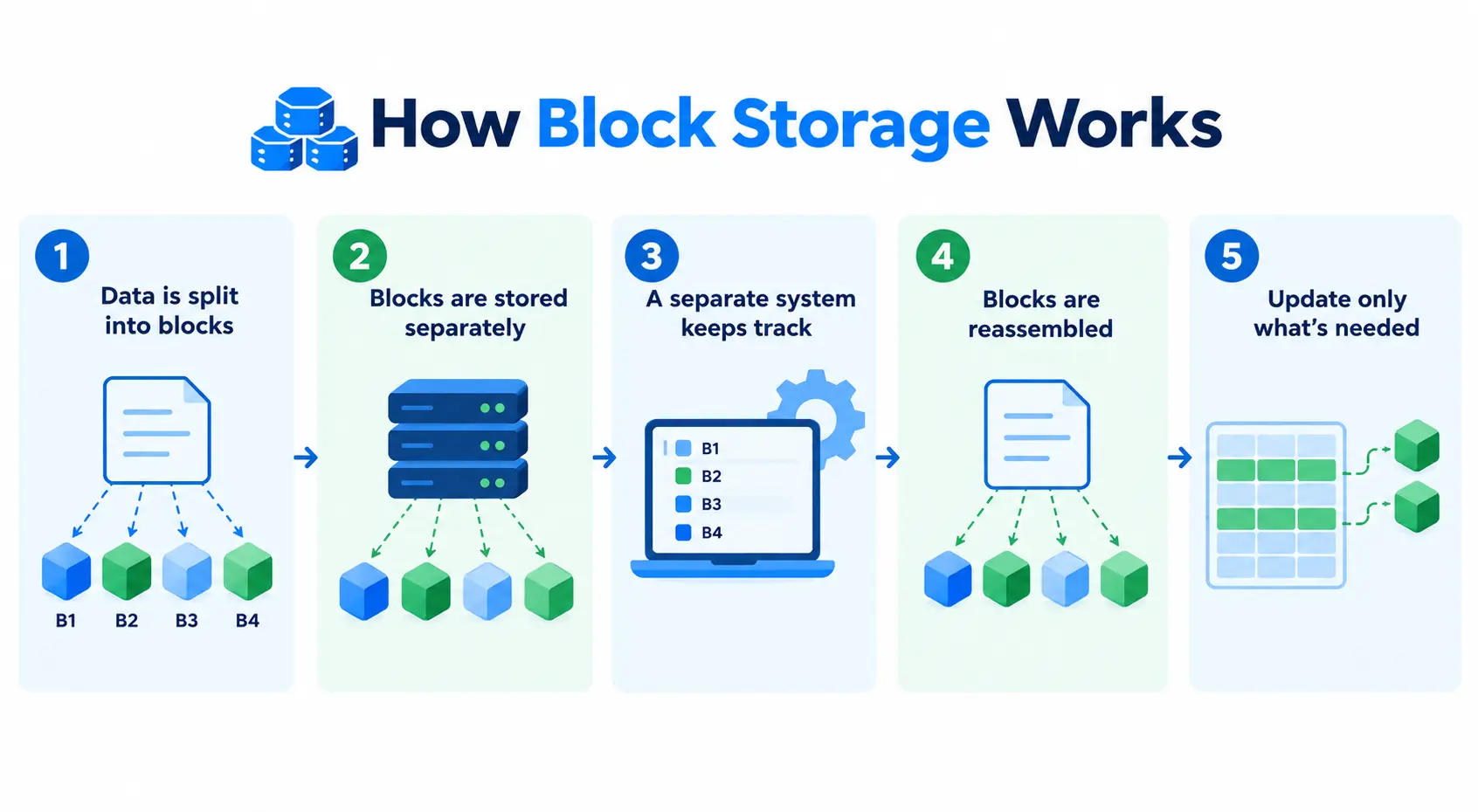
Block storage stores data by splitting it into fixed-size chunks called blocks. Each block gets its own unique address. Instead of saving a file as one whole unit, block storage breaks it apart, spreads the blocks across the storage system, and reassembles them on demand when the data is read.
This sounds more complicated than storing a whole file at once. But it is exactly what makes block storage fast. The storage system does not need to read or write an entire file to update a small part of it. It just touches the specific blocks that changed.
How block storage works
- Blocks are stored independently, with no inherent link to a file or to each other
- A separate system (OS or application) tracks which blocks belong together and their order
- That system reassembles blocks into a full file/dataset on demand
- Small changes (e.g., a few database rows) can update only the relevant blocks
- This selective-update capability is why block storage performs well under frequent, small-change workloads
Reading or writing data means going straight to a block’s address. There is no need to scan through metadata or a file structure first. This direct, low-latency access is why block storage is the standard choice for workloads where speed and responsiveness matter most, like databases and virtual machine disks.
Where block storage came from
Block storage is not a cloud-era invention. It traces back to the 1950s, decades before anyone used the term “cloud computing.”
The mainframe origin
Early IBM mainframes stored data on rotating magnetic platters, divided into tracks and physical sectors. The operating system talked to the disk controller using low-level instructions, effectively saying “read sector 42 at cylinder 10.” That sector-by-sector access is the direct ancestor of block storage as we know it today.
The 1990s disaggregation
For decades, block storage lived inside or directly wired to a single server. This is known as direct-attached storage, or DAS. As companies scaled to hundreds of servers, keeping drives locked inside individual boxes became inefficient. Adding capacity meant physically opening machines one at a time.
In the late 1990s, enterprise IT built storage area networks, or SANs: dedicated, high-speed networks whose only job was to separate compute from raw block storage. A large array of drives sitting in one location could serve hundreds of separate servers, each one behaving as if it had its own local hard drive attached directly to it.
How AWS brought it to the cloud
When AWS launched EC2 virtual machines in 2006, early instances lost all their data if the underlying hardware failed or the instance was stopped, since storage was ephemeral by design. AWS addressed this in 2008 with Elastic Block Store, or EBS. It took the SAN concept from the 1990s, rebuilt it in software, and made mainframe-style raw block devices available on cloud infrastructure. Every major cloud provider now offers some version of the same idea.
Block storage vs object storage vs file storage
Block, object, and file storage all solve the problem of storing and retrieving data, but they organize it in fundamentally different ways.
Block storage splits data into fixed-size blocks with no built-in metadata. Each block is just an address and a piece of raw data. Object storage keeps data as whole objects, each with its own rich metadata, and typically replaces the entire object when something changes. File storage organizes data in a folder-and-file hierarchy, the same structure used for browsing files on a personal computer.
| Aspects | Block storage | Object storage | File storage |
| Structure | Fixed-size blocks, no built-in metadata | Whole objects, each with rich metadata | Folder and file hierarchy |
| Best for | Databases, VM disks, low-latency workloads | Backups, media files, large unstructured datasets | Shared documents, general file access |
| Editing data | Can update small parts of a file directly | Typically replaces the whole object on update | Edits go through the file system, not raw blocks |
| Scalability | Scales well, but with more management overhead | Scales massively, built for huge, growing datasets | Scales less efficiently at very large volumes |
Common use cases
Below are the common block storage use cases:
- Databases: Constant, small reads and writes to specific rows benefit directly from block-level access.
- Virtual machine disks: Cloud VMs typically run on block storage volumes, since an operating system expects to read and write in blocks, the same way a physical hard drive works.
- Boot volumes: The primary disk a server or VM boots from is almost always block storage.
- Low-latency applications: Transactional systems and real-time applications, anything sensitive to delay, perform best on block storage.
- Kubernetes persistent volumes: Block storage typically attaches to a node in a Kubernetes cluster as a persistent volume, one that keeps its data even if the pod using it is restarted or replaced.