What is a Kube-apiserver in Kubernetes
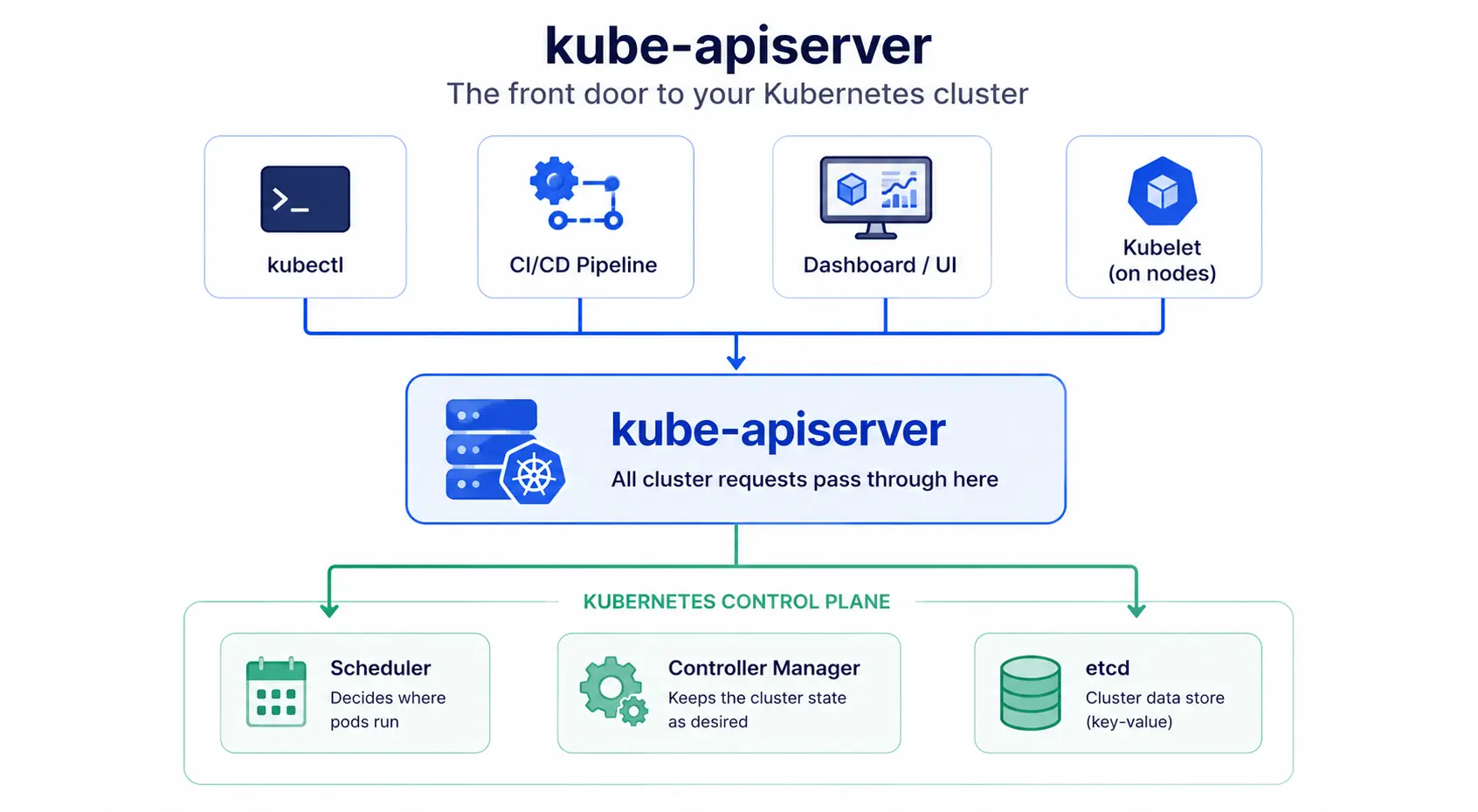
Kubernetes API Server (kube-apiserver) is the component that exposes the Kubernetes API. It’s the front door to your cluster. Every request, whether it comes from kubectl, a CI/CD pipeline, or another Kubernetes component, goes through kube-apiserver first.
It sits at the center of the control plane. Nothing in the cluster talks to etcd (the cluster’s database) directly. Everything goes through kube-apiserver, which validates the request and updates the cluster’s state.
What kube-apiserver actually does
- Handles all API requests: Create a pod, check a deployment’s status, update a config, it all runs through kube-apiserver.
- Validates requests: Checks that what you’re asking for is actually valid before it’s applied.
- Talks to etcd: Reads and writes the cluster’s state to etcd, the key-value store behind Kubernetes.
- Coordinates the control plane: The scheduler, controller manager, and kubelets on each node all communicate through the API server, not with each other directly.
Is kube-apiserver a single point of failure?
No. kube-apiserver is designed to scale horizontally. That means instead of making one server bigger, you run multiple instances of kube-apiserver and balance traffic across them. In a production or highly available cluster, you’ll typically see 3 or more kube-apiserver instances running behind a load balancer.
kube-apiserver vs the Kubernetes API
These two terms get used interchangeably, but they’re not quite the same thing:
| Term | What it is |
| Kubernetes API | The set of rules and endpoints you interact with (what you’re calling) |
| kube-apiserver | The actual running process that implements and serves that API (what answers the call) |
So when you run kubectl get pods, you’re calling the Kubernetes API, and kube-apiserver is the process that processes and answers that call.
How to check or restart kube-apiserver
In most clusters, kube-apiserver runs as a static pod managed directly by the kubelet on the control plane node, not as a regular deployment. That changes how you restart it.
#Check if kube-apiserver is running
kubectl get pods -n kube-system | grep kube-apiserver#View its logs
kubectl logs kube-apiserver- -n kube-system#Restart it (on the control plane node itself)
sudo systemctl restart kubeletRestarting the kubelet causes it to recreate the static pod, which restarts kube-apiserver. You generally shouldn’t need to do this often. If kube-apiserver keeps crashing, check its logs first. It’s usually a config, certificate, or resource issue.
Where it fits in the bigger picture
kube-apiserver doesn’t work alone. It’s one piece of the control plane, alongside etcd (storage), kube-scheduler (assigns pods to nodes), and kube-controller-manager (keeps the cluster’s actual state matching the desired state). If you’re new to these terms, our Kubernetes cluster glossary entry covers how they all fit together.