What Is a Hypervisor?
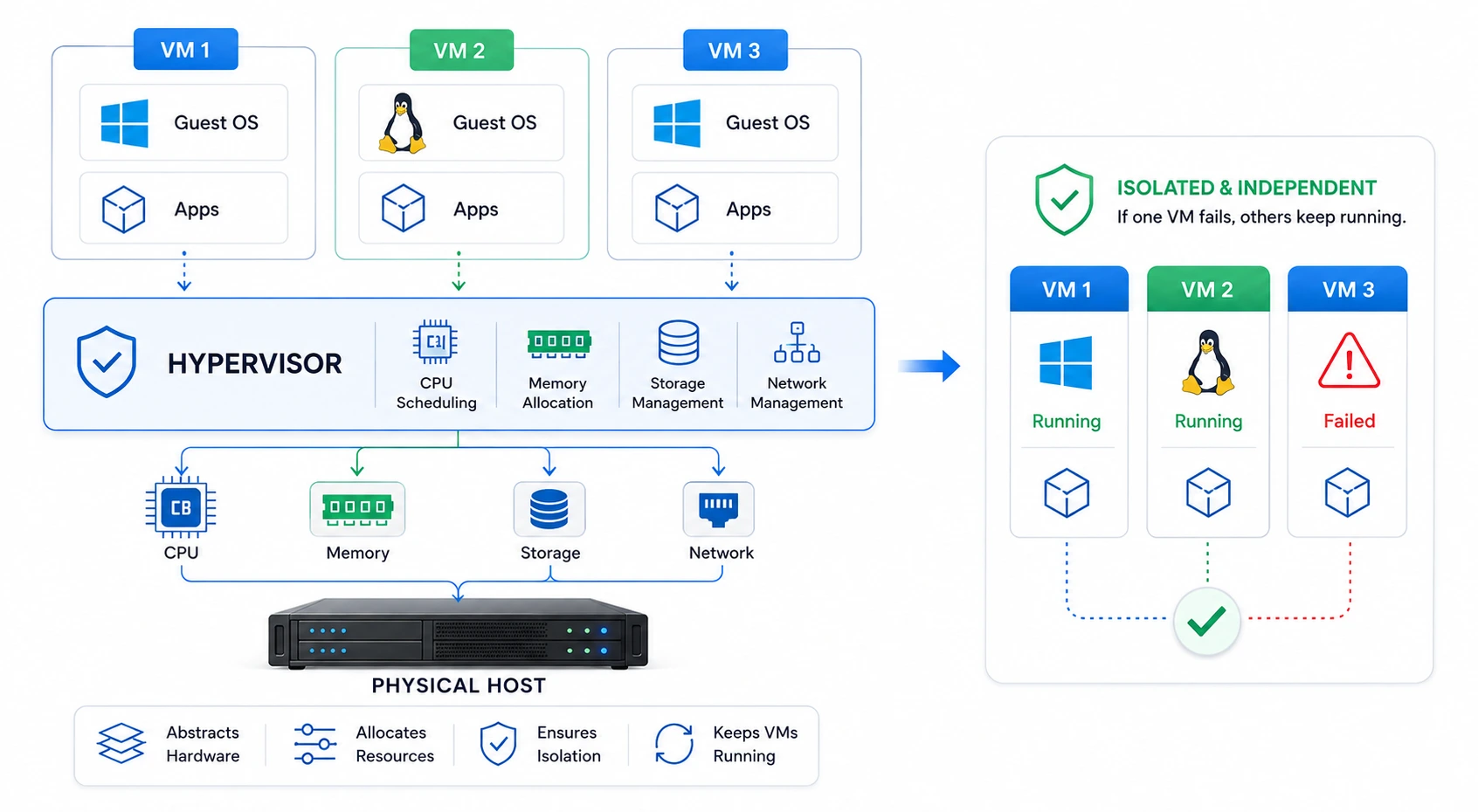
A hypervisor is software (or in some cases, firmware) that creates and manages virtual machines (VMs). It allows a single physical machine to run multiple operating systems at the same time, each isolated from the others. The physical machine is called the “host,” and each virtual machine running on it is called a “guest.”
Hypervisors are also known as Virtual Machine Monitors (VMMs). They form the foundational layer of virtualization technology, making it possible for organizations to run several independent operating environments on one physical server.
How does a Hypervisor work?
A hypervisor sits between the physical hardware and the virtual machines. It abstracts the underlying hardware resources such as CPU, memory, storage, and network interfaces and allocates them to each virtual machine as needed.
Each virtual machine behaves as if it has its own dedicated hardware, even though it is actually sharing physical resources with other VMs on the same host. The hypervisor manages this sharing, scheduling processing time, allocating memory, and directing input/output requests. So that each guest operating system runs independently without interfering with others.
This isolation means that if one virtual machine crashes or experiences an issue, the other virtual machines on the same host typically continue to run unaffected.
Types of Hypervisors
Hypervisors are generally classified into two types:
Type 1 (Bare-Metal Hypervisor): This type runs directly on the host’s physical hardware, without an underlying operating system. It interacts directly with the server’s resources, which generally results in better performance and lower latency. Bare-metal hypervisors are commonly used in enterprise data centers and cloud computing environments.
Type 2 (Hosted Hypervisor): This type runs on top of a conventional operating system, much like any other software application. The host OS manages hardware access, and the hypervisor requests resources through it. Hosted hypervisors are typically used on desktops and laptops for testing, development, or running a secondary operating system alongside the primary one.
Use cases for Hypervisors
Here are some examples of Hypervisor use cases:
Server consolidation: Businesses use hypervisors to run several virtual servers on one physical machine, reducing the number of physical servers needed and lowering hardware, power, and cooling costs.
Cloud computing: Hypervisors are a core component of cloud infrastructure. They allow cloud providers to divide physical servers into multiple virtual machines, which can be allocated to different customers or workloads.
Software testing and development: Developers use hypervisors to create isolated environments for testing software across different operating systems and configurations, without needing separate physical machines for each scenario.
Disaster recovery: Virtual machines can be replicated and stored off-site. In the event of hardware failure, these VMs can be brought online on different hardware, minimizing downtime.
Running legacy systems: Organizations that depend on older software tied to outdated operating systems can run those systems within a virtual machine, without maintaining separate legacy hardware.
Resource optimization: By allowing multiple workloads to share the same physical hardware, hypervisors help maximize the utilization of computing resources, reducing idle capacity.