What is load balancing?
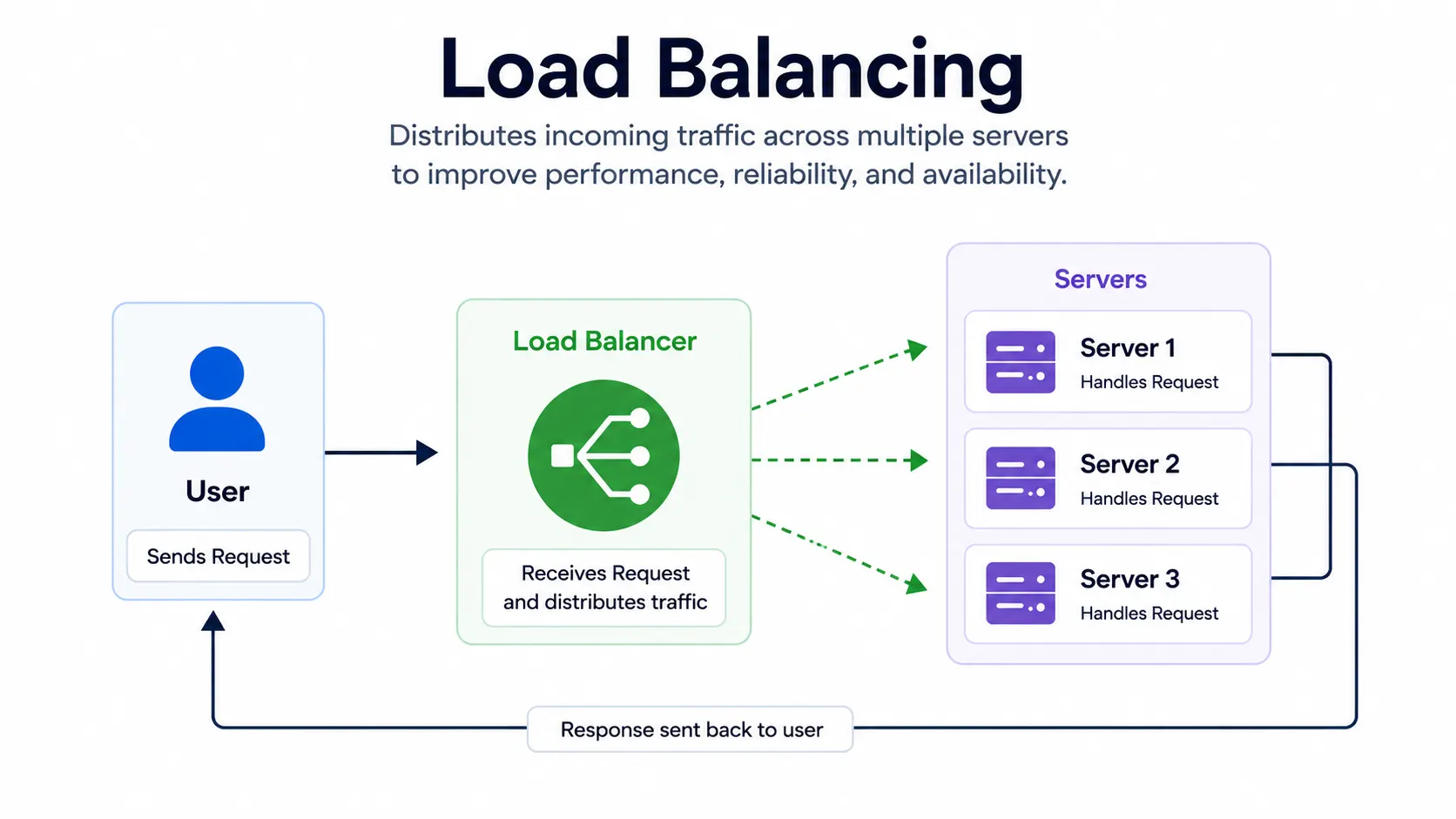
Load balancing is the process of distributing incoming traffic across multiple servers, so no single server gets overwhelmed while others sit idle. Instead of sending every request to one machine, a load balancer spreads that work evenly, keeping your application fast and available even under heavy traffic.
If one server goes down, the load balancer simply stops sending traffic to it and routes everything to the healthy servers instead. Your application keeps running without users noticing anything went wrong.
Note: this article covers load balancing in the context of servers and networking. The same term is also used in electrical engineering, to describe balancing loads across the phases of a power supply, which is a different concept entirely.
Why load balancing matters
Without it, a single server has to handle all your traffic alone. That creates two problems:
- Overload: Too many requests at once can slow the server down or crash it entirely.
- No redundancy: If that one server fails, your entire application goes down with it.
A load balancer solves both. It spreads traffic across multiple servers and keeps working even if one of them fails.
The two main types of load balancers
- Hardware load balancers: Physical devices, typically used in traditional data centers. Reliable, but expensive and harder to scale quickly.
- Software load balancers: Run as software, either on your own servers or as a managed cloud service. Easier to scale, update, and automate, which is why most modern applications use this type.
Layer 4 vs layer 7 load balancing
Load balancers work at different layers of the network, and this changes how smart their routing decisions can be:
| Type | How it decides where to send traffic |
| Layer 4 (transport layer) | Routes based on IP address and port only. Fast, but doesn’t look at the actual content of the request. |
| Layer 7 (application layer) | Reads the actual request, like the URL path or HTTP headers, and routes based on that. Slower, but far more flexible. |
Layer 7 load balancing is what lets you do things like send all /api traffic to one set of servers and all /images traffic to another, using a single load balancer.
A simple example
Say your website gets 10,000 visitors at once, and you’re running it on 4 servers. A load balancer sitting in front of those servers splits that traffic roughly 2,500 requests per server, instead of sending all 10,000 to just one. If one server fails, the load balancer detects it through health checks and redirects its share of traffic to the remaining three.
Common load balancing methods
- Round robin: Sends each new request to the next server in line, in order.
- Least connections: Sends traffic to whichever server currently has the fewest active connections.
- IP hash: Routes a given user to the same server every time, based on their IP address.
Load balancing in Kubernetes
Inside a Kubernetes cluster, this same idea shows up through kube-proxy and Services, which load balance traffic across the pods behind them. Outside the cluster, a cloud load balancer usually sits in front, directing external traffic into the cluster itself.