What is a Cluster in Kubernetes
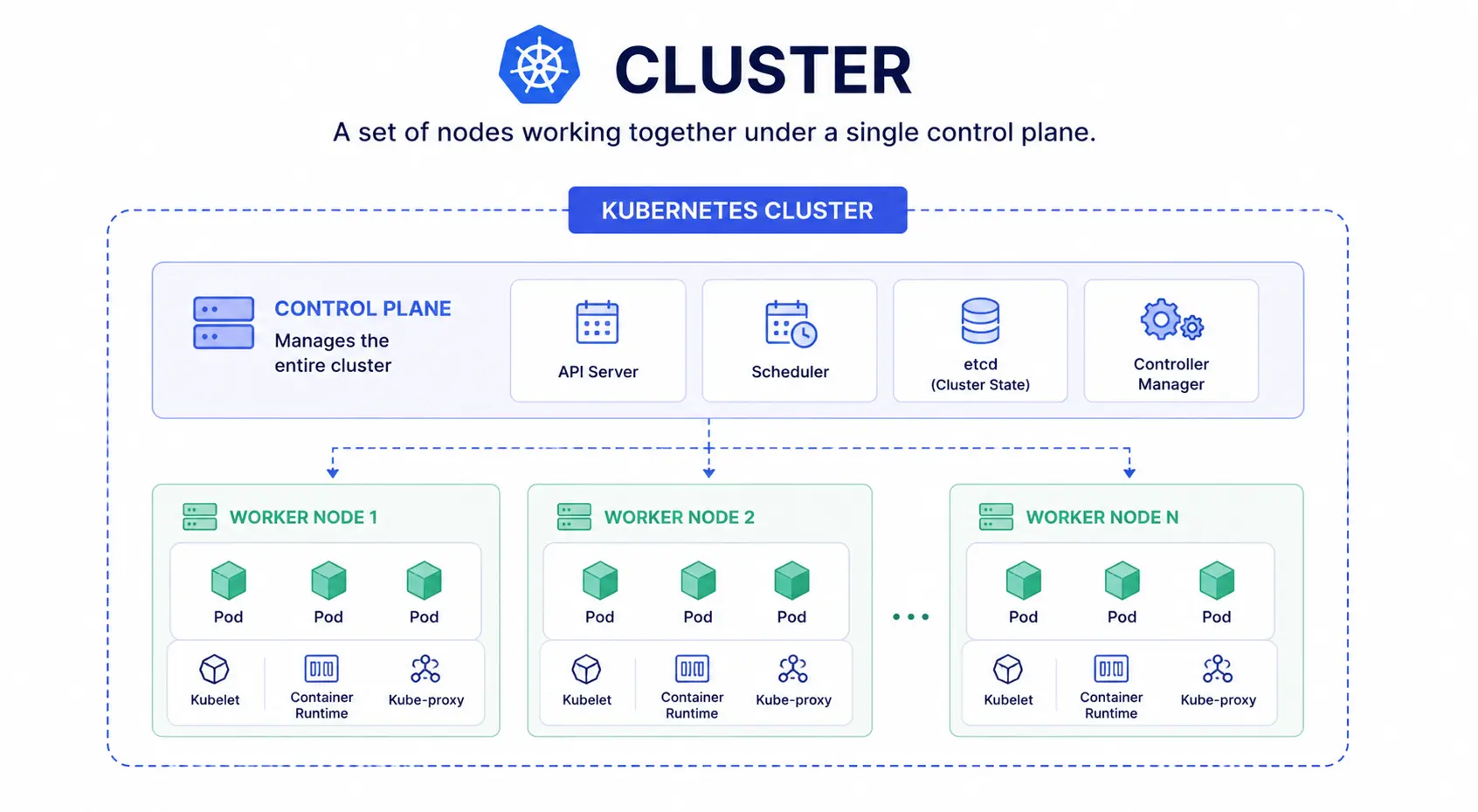
A Kubernetes cluster is a group of machines, called nodes, that work together to run your containerized applications. One node acts as the control plane. It manages the cluster. The rest are worker nodes. They run your actual workloads inside pods.
Think of it like a team. The control plane is the manager. It decides what work needs to happen and where. The worker nodes are the team members who do the work.
What makes up a cluster
Every Kubernetes cluster has two parts:
- Control plane: Makes decisions for the cluster. It schedules pods, tracks the cluster’s state, and reacts when something changes, like a pod crashing.
- Worker nodes: Physical or virtual machines that run your containers inside pods. A cluster needs at least one worker node to function.
A production cluster usually has multiple worker nodes. This way, if one node fails, your application keeps running on the others.
Cluster vs pod vs node
These three terms get confused often. Here’s the simple version:
| Term | What it is |
| Cluster | The whole system: control plane + all nodes |
| Node | A single machine (VM or physical server) inside the cluster |
| Pod | The smallest deployable unit, running one or more containers on a node |
So a cluster contains nodes, and nodes run pods.
Cluster vs Docker
Docker builds and runs individual containers. A Kubernetes cluster manages many containers, across many machines, at scale. You still use Docker (or a similar container runtime) to create the containers. Kubernetes decides where those containers run, restarts them if they fail, and scales them up or down based on demand.
Types of clusters
There are two types of clusters
- Single-node cluster: One machine acts as both control plane and worker node. Used for learning and local testing, usually with tools like Minikube.
- Multi-node cluster: Multiple worker nodes, with the control plane on a separate machine. This is the standard setup for production.
What is cluster management and autoscaling
Running a cluster means keeping nodes healthy, applying updates, and scaling resources as traffic changes. Most teams use a managed Kubernetes service to handle this instead of doing it manually.
A cluster autoscaler is a common tool here. It automatically adds or removes worker nodes based on how much load your applications need, so you’re not paying for idle capacity or running short during traffic spikes.
Running Kubernetes yourself means managing all of this: nodes, autoscaling, upgrades, and uptime. CloudPe’s managed Kubernetes handles the control plane and scaling for you, so your team can focus on the application, not the infrastructure under it.