What is object storage?
Object storage stores data as complete, self-contained units called objects, rather than breaking files into blocks or organizing them in folders.
Each object bundles three things together:
- the actual data,
- a chunk of metadata describing it, and
- a unique identifier used to retrieve it later.
That flat, ID-based structure is what lets object storage scale to massive amounts of data without slowing down.
If you’ve ever uploaded a file to o a cloud object storage provider or an S3-compatible bucket, you’ve used object storage, even if you never thought about it that way.
How object storage works
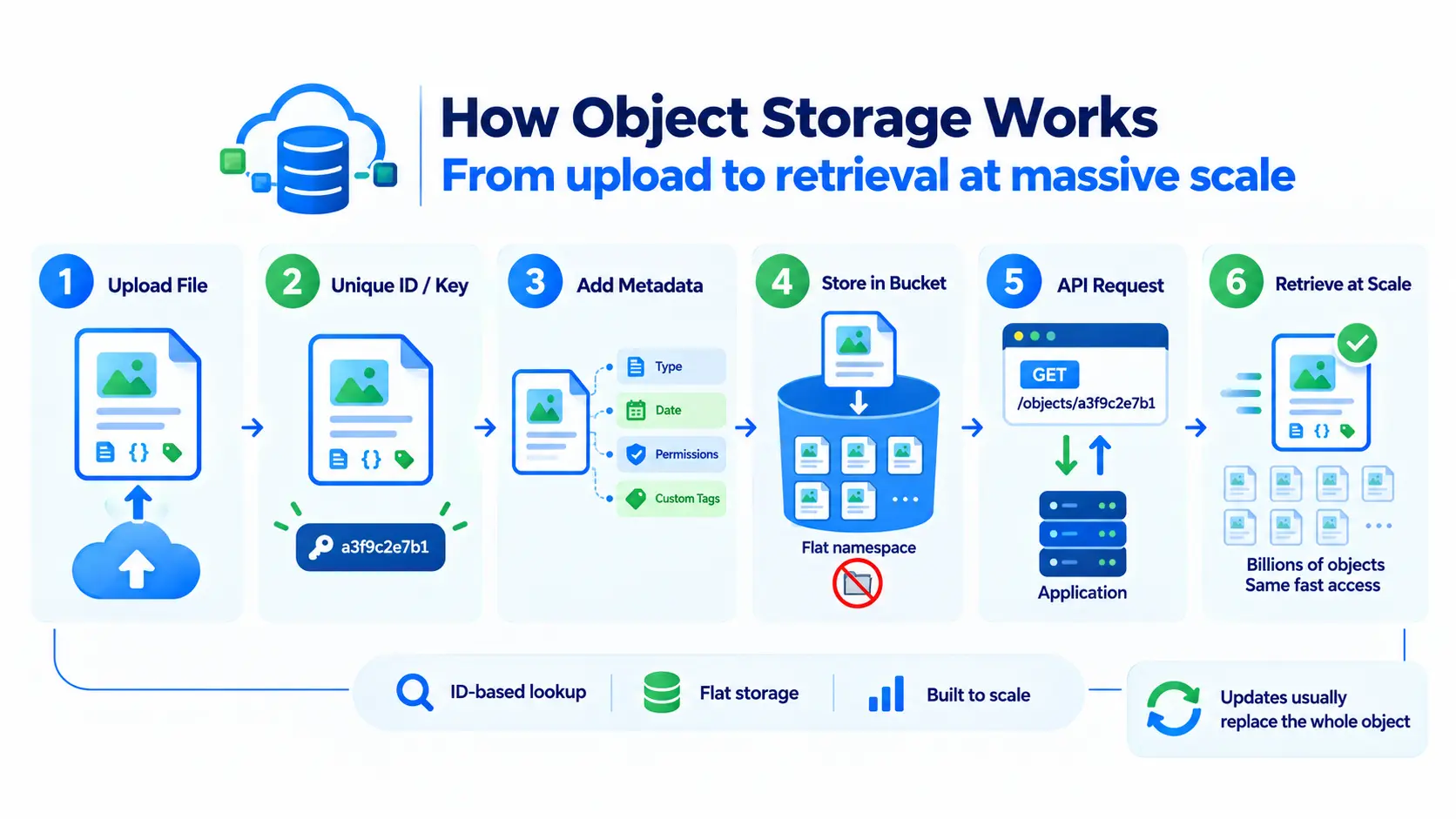
Below are the steps of how object storage works:
- When you upload a file, object storage treats it as a single, self-contained object rather than splitting it into blocks.
- The system generates a unique identifier (or key) for that object — this is how it gets found again later, instead of a file path.
- Metadata gets bundled with the data itself: file type, creation date, permissions, or custom tags you define, all attached directly to the object.
- The object lands in a flat address space (often called a bucket or container), not a nested folder hierarchy, so there’s no directory tree to search through.
- To retrieve it, an application sends a request. Typically over HTTP(S) through an API, using the object’s unique ID, and the system returns the whole object, data, and metadata together.
- Because lookup is ID-based rather than path-based, retrieval speed doesn’t degrade as the number of objects grows into the billions.
Since each object is self-contained, most object storage systems replace the entire object when it’s updated rather than editing part of it in place. That’s the trade-off that makes object storage scale so well for huge volumes of largely unchanging data.
Where object storage came from
Let’s look at where object storage came from:
1996: Research origins at Carnegie Mellon
The term “blob” was coined by Jim Starkey while working at Digital Equipment Corporation, to describe opaque data entities, and the name is often read as shorthand for “binary large object.” The idea took more formal shape in 1996, when object storage was proposed as a research project at Garth Gibson’s lab at Carnegie Mellon University. That early work, alongside related research at UC Berkeley, focused on large-scale file systems and would later influence systems like the Google File System.
1999: The first object storage commands
Object storage as an industry effort dates to the late 1990s, when Seagate published specifications introducing some of the first commands that let an operating system interact with storage as objects rather than raw blocks. That 1999 command-set proposal was the product of work by the National Storage Industry Consortium, with Seagate’s Dave Anderson editing the submission. The same year, Gibson founded Panasas to commercialize the concepts his CMU team had developed.
2001: Object storage goes commercial
EMC built one of the first commercially recognized object storage platforms, Centera, out of its April 2001 acquisition of FilePool NV, a Belgian startup. Centera used content-addressable storage, retrieving data based on a cryptographic hash of the content itself, an approach later implementations moved away from in favor of separately assigned identifiers. Accessing data through an API rather than familiar protocols like SCSI or NFS was, at the time, one of the biggest barriers to adoption.
2006: Amazon S3 and the API standard
Amazon Web Services launched Amazon S3 in the United States on March 14, 2006. It offered object storage over a simple web API rather than specialized hardware or protocols, and that API shape is what most object storage providers still follow today. S3 held around 10 billion objects by October 2007; by 2021, that figure had passed 100 trillion.
Present day: An open standard
S3’s API became the de facto interface for the category. Open-source projects like OpenStack Swift and Ceph, along with self-hosted tools like MinIO, adopted S3 compatibility so existing code could run against them unchanged, which is why “S3-compatible” is now the baseline expectation for any object storage service.
Why object storage scales so well
Traditional file systems slow down as the number of files grows, since the system has to maintain and search through an increasingly complex folder structure. Object storage skips that problem entirely. Since every object is accessed directly by its unique ID, adding a billion more objects doesn’t make retrieving any single one slower. This is exactly why object storage underpins large-scale cloud services and massive data lakes.
Common use cases
- Backups and archives: Reliable, low-cost storage for data you need to keep but access infrequently.
- Media storage: Images, videos, and audio files for websites and apps, where content doesn’t change often after upload.
- Static website hosting: Serving unchanging files like HTML, CSS, and images directly from object storage.
- Data lakes and analytics: Storing huge volumes of raw data (logs, datasets) for later processing or machine learning.
- AI training data: Storing the large datasets used to train machine learning models, where scale matters more than frequent small edits.
Object storage vs block storage
These solve different problems, and the difference comes down to how the data is structured and accessed:
| Aspects | Object storage | Block storage |
| Structure | Whole objects with metadata | Fixed-size blocks, no built-in metadata |
| Best for | Backups, media, large-scale unstructured data | Databases, VM disks, low-latency workloads |
| Editing data | Typically replaces the whole object on update | Can update small parts of a file directly |
| Scalability | Scales massively with minimal overhead | Scales well, but with more management complexity |
A simple way to picture it: object storage is a warehouse of labeled boxes, easy to add more boxes indefinitely, but you swap out the whole box to make a change. Block storage is a filing cabinet where you can update one specific page inside a document directly. For a full side-by-side, our block storage glossary entry covers it from that angle.
Is object storage slower than block storage?
For the kind of workload each is built for, neither is “slower”; they’re just optimized for different things. Object storage typically has higher latency for small, frequent updates, since changing an object usually means rewriting the whole thing. But for storing and retrieving large files at scale, which is what it’s designed for, object storage performs extremely well and is usually far cheaper per gigabyte than block storage.
How you access object storage
Object storage is almost always accessed over HTTP(S), through an API, most commonly one that’s S3-compatible, meaning it follows the same request format Amazon S3 popularized. This is why many object storage providers, including most cloud platforms, support S3-compatible APIs; it lets existing tools and code work with minimal changes, regardless of which provider is actually storing the data.
Where object storage fits in cloud infrastructure
Object storage typically works alongside block storage rather than replacing it. Block storage runs your active databases and VMs, while object storage handles backups, media, and large datasets in the same system. It’s also commonly used to store training data and model checkpoints for machine learning workloads.