Migrating production workloads to an Indian cloud is not simply about moving virtual machines, databases, and application files from one server to another. It is about ensuring that business-critical applications remain secure, accessible, and reliable throughout the transition.
For businesses running customer portals, ERP systems, e-commerce platforms, SaaS applications, or databases, even a short period of downtime can interrupt operations, affect customers, and result in lost revenue.
The safest approach is to assess the existing infrastructure, select a reliable cloud provider, prepare the target environment, migrate workloads in phases, and validate everything before switching production traffic.
Here is a quick guide on how to smoothly and securely migrate your production workloads:
1. Assess your existing production environment
Before choosing an Indian cloud provider, understand exactly what needs to move.
Start by creating an inventory of your infrastructure, including:
- Compute: Virtual machines, vCPUs, RAM, operating systems, and resource utilization.
- Storage: Disk capacity, storage performance, file systems, and data growth.
- Applications: Web servers, APIs, ERP systems, databases, and background services.
- Networking: Public and private IPs, DNS records, VPNs, firewall policies, and load balancers.
- Dependencies: Database connections, third-party APIs, authentication services, and scheduled jobs.
- Recovery requirements: Existing backups, acceptable downtime, and maximum tolerable data loss.
For example, an e-commerce application may depend on a frontend server, an application server, a database, and a payment gateway. Moving only the application server without considering these dependencies can lead to application failures.
This assessment also helps identify opportunities to resize resources rather than copying oversized infrastructure into the new environment.
2. Choose a reliable Indian cloud provider
Not all cloud platforms offer the same level of infrastructure resilience, security, performance, or operational support.
Evaluate providers using measurable criteria rather than relying exclusively on pricing.
| Evaluation factor | What to check |
| Indian data centres | Workload and backup locations in India |
| Availability | Contractual uptime SLA and service credits |
| Infrastructure | Compute redundancy, storage resilience, network architecture |
| Performance | CPU allocation, storage IOPS, throughput, network latency |
| Security | Firewall, IAM, MFA, encryption, DDoS protection |
| Backups and DR | Automated backups, restore testing, disaster recovery options |
| Scalability | Ability to expand CPU, RAM, storage, and GPU resources |
| Support | 24/7 response, escalation process, technical expertise |
| Pricing | Compute, storage, bandwidth, IP, backup, and support charges |
An Indian data centre location alone does not guarantee reliability. Ask whether the cloud has independent failure domains, redundant networking, and tested disaster recovery procedures.
Providers such as AWS, Microsoft Azure and Indian cloud platforms can be evaluated against the same requirements.
For government workloads, confirm current MeitY empanelment where required. Regulated sectors such as banking may have additional cloud outsourcing obligations under RBI directions.
Migrate your production workloads to CloudPe with confidence.
Explore Migration Services3. Choose the right migration strategy
The migration method should depend on application architecture, downtime tolerance, and the amount of data involved.
| Migration method | Best suited for | Downtime considerations |
| Rehosting (lift and shift) | Existing VMs and legacy applications | Often requires a cutover window |
| Replication-based migration | Critical VM workloads | Can minimize interruption |
| Database replication | Transaction-heavy applications | Brief final write freeze may be required |
| Replatforming | Applications moving to managed services | Depends on compatibility |
| Blue-green deployment | Web applications and APIs | Can support near-zero-downtime switching |
For traditional business applications, rehosting is often the simplest starting point. Applications with stricter availability requirements may benefit from continuous replication or blue-green deployment.
Microsoft’s cloud migration guidance recommends explicitly defining acceptable downtime, testing replication capabilities, and establishing rollback procedures before migration.
4. Build and secure the target cloud environment
Before transferring production workloads, configure the destination infrastructure.
Example: Production architecture on an Indian cloud
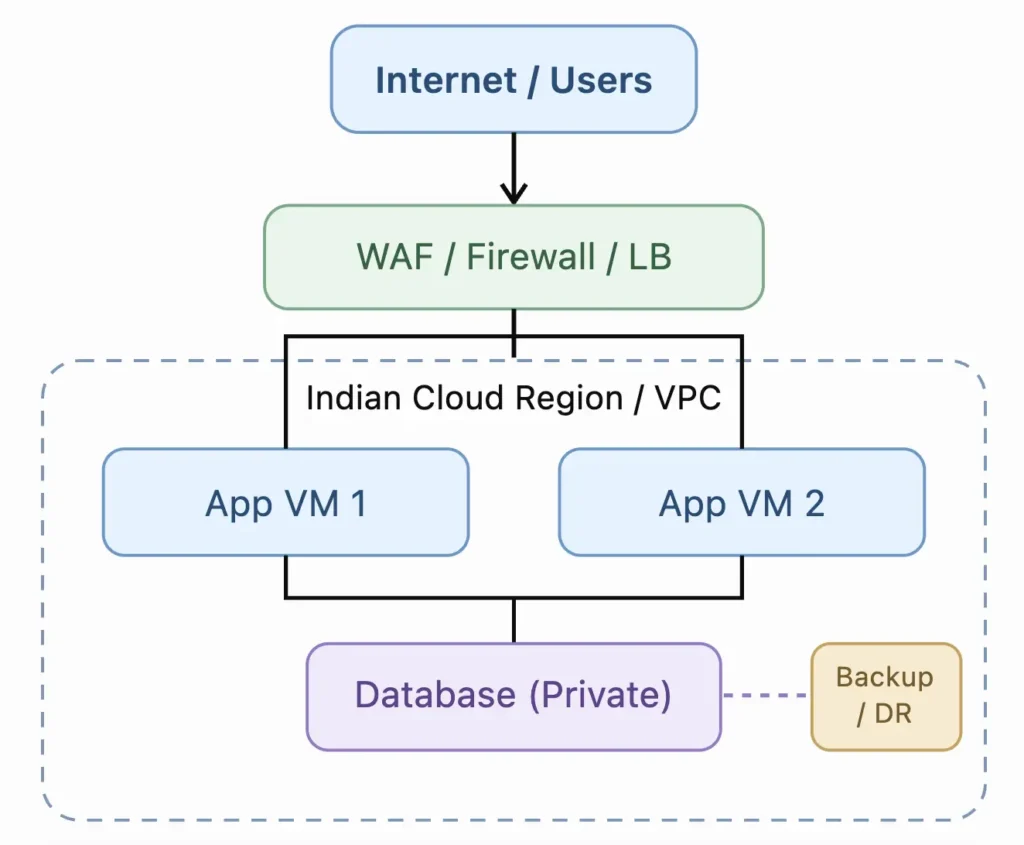
Configure private networks, access controls, firewall rules, encrypted storage, monitoring, backup policies, and application connectivity.
Avoid exposing databases and management ports directly to the internet. Use private networking and restricted administrative access wherever possible.
Also verify that the operating systems, software licences, storage drivers, and applications are compatible with the destination cloud.
5. Migrate data and applications in controlled phases
Instead of migrating everything simultaneously, divide the project into manageable migration waves.
Phase 1 → Discovery and readiness
Complete inventory, dependencies, backup and recovery checks.
Phase 2 → Pilot migration
Move a low-risk workload and test application functionality.
Phase 3 → Production synchronization
Replicate application data and databases while the original system remains active.
Phase 4 → Cutover
Complete final synchronization, validate data consistency, then redirect production traffic.
Phase 5 → Verification and stabilization
Monitor the environment, verify backups, and retain rollback capability.
For database-heavy workloads, the most important consideration is controlling writes during final synchronization. Otherwise, records created during the cutover could be lost or become inconsistent.
6. Test before switching live traffic
A VM that starts successfully on the new cloud is not necessarily ready for production.
Validate application availability, login and authentication, API connections, database read/write operations, transaction processing, DNS resolution, TLS certificates, firewall policies, and scheduled jobs.
Also conduct performance and resilience testing:
- Compare application response times with the existing environment.
- Verify disk IOPS and database latency.
- Test backup restoration, not just backup creation.
- Confirm monitoring and alert delivery.
- Simulate an instance failure where the architecture supports failover.
- Rehearse cutover and rollback.
Define clear go/no-go criteria. If a critical test fails, do not proceed with production cutover.
7. Plan downtime and rollback
For critical applications, downtime planning is as important as migration itself.
Before the cutover, agree on the maintenance window, notify stakeholders, lower relevant DNS TTL values in advance, and prepare a verified recovery plan.
The rollback plan should specify how traffic and data will return to the original environment if migration fails. Database writes made after cutover require special handling; simply pointing DNS back to the old system can lead to missing or inconsistent records.
AWS highlights cutover planning, communication, and minimizing traffic-switching disruptions as core migration practices.
8. Address Indian data residency and security requirements
Choosing an Indian cloud can help meet data-location requirements, but hosting in India does not automatically establish regulatory compliance.
Confirm where production data, snapshots, backups, logs, and disaster recovery copies are stored.
India’s CERT-In directions include requirements to retain specified ICT system logs securely for a rolling 180-day period within Indian jurisdiction. Applicable incident-reporting and recordkeeping requirements must also be considered.
For sensitive workloads in sectors such as banking, healthcare, or government, review applicable sector-specific rules, contractual security obligations, and audit requirements before migration.
9. Monitor and optimize after migration
Once production traffic has moved, monitor infrastructure and application health closely.
Track CPU and memory utilization, disk latency, application response time, database replication status, network errors, security alerts, and backup success.
Compare performance against pre-migration baselines. Right-size compute and storage where necessary, and review unexpected billing components such as data transfer, snapshots, and public IP usage.
Do not immediately delete the old infrastructure. Retain it for a defined stabilization period, subject to the rollback plan, data retention policy, and cost implications.
Final production migration checklist
Migration readiness
- Inventory and application dependencies documented
- Indian cloud provider and SLA evaluated
- Target infrastructure and security configured
- Full backup created and restore tested
- Pilot migration completed
- Database and application synchronization verified
- Performance and security tests passed
- Cutover and rollback procedures approved
- Production monitoring and alerts enabled
- Post-migration validation and sign-off completed
Conclusion
Migrating production workloads to a reliable Indian cloud requires careful planning, not just transferring servers.
The most effective approach combines workload assessment, provider due diligence, secure infrastructure preparation, staged migration, tested rollback procedures, and continuous monitoring.
The goal is not merely to complete the migration with minimal downtime. It is to ensure that the new cloud environment remains reliable, secure, recoverable, and scalable long after the migration is complete.