What is AI infrastructure?
AI infrastructure is the full set of hardware, software, and networking that teams use to build, train, deploy, and run AI models. It covers everything from the GPUs doing the calculations to the storage holding the data and the tools managing the workflow.
Think of a factory. The model is the product. AI infrastructure is the whole factory floor: the machines, the power, the conveyor belts, and the people and systems that keep everything running.
Why AI needs its own infrastructure
Traditional IT was built for tasks like hosting websites, running databases, and handling business apps. These workloads are mostly CPU-based and handle requests one at a time.
AI workloads are different. They need massive parallel math, large datasets moving quickly, and many processors working together on one job. A setup built for a web server will struggle with training a large model, and expensive GPUs will sit idle waiting for data.
The layers of AI infrastructure
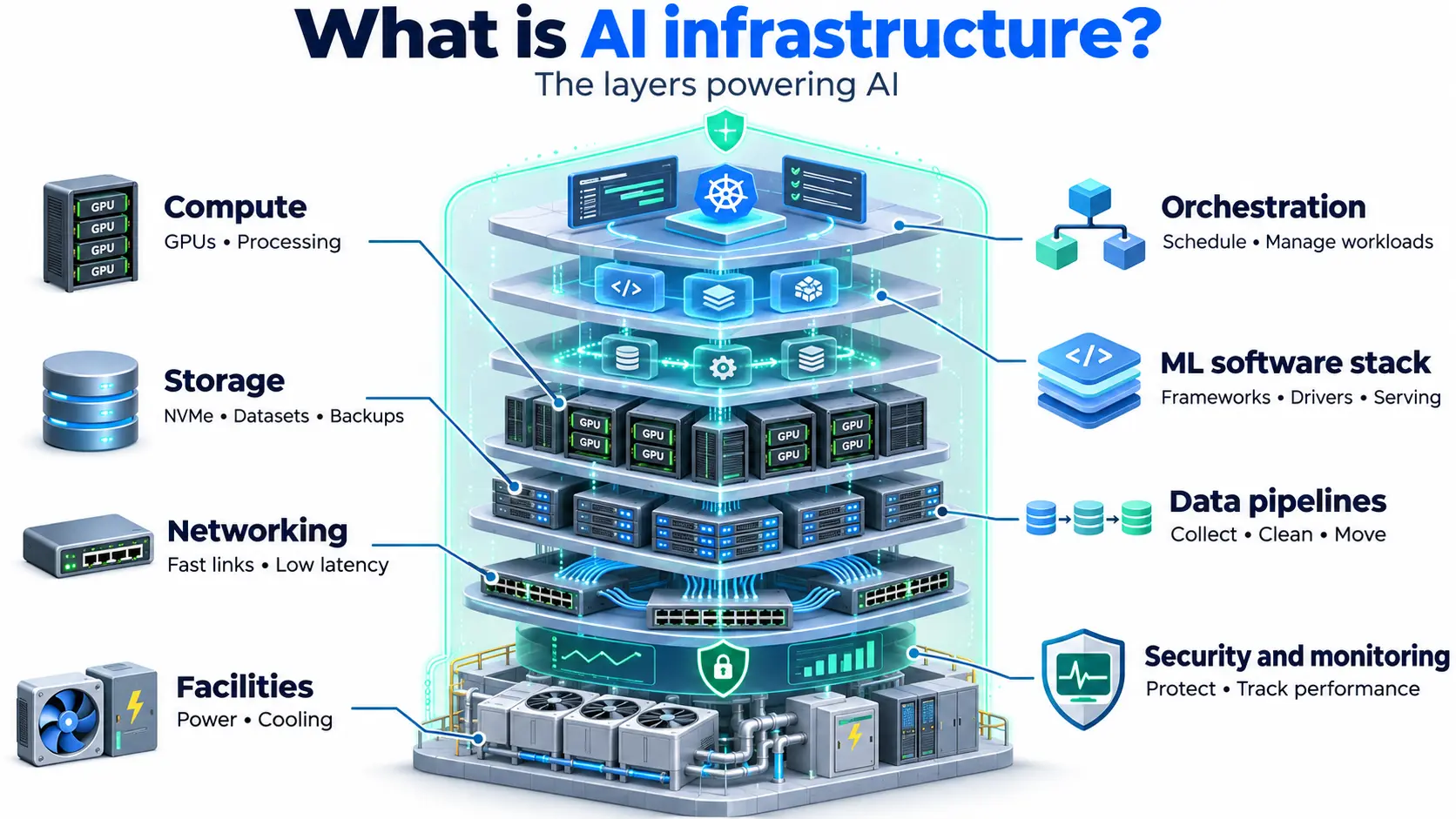
AI infrastructure is easiest to understand as layers:
- Compute: The processors that do the work, mainly GPUs. The right choice depends on the FLOPs and VRAM your model needs. This is the core of AI compute.
- Storage: Fast storage to feed data to the GPUs, and cheaper storage for datasets, checkpoints, and backups. Common choices are NVMe SSD and block storage for active work, and object storage for large datasets.
- Networking: High bandwidth and low latency links, both between servers and between GPUs, so large jobs do not slow down waiting for data.
- Orchestration: Tools that schedule and manage workloads across many machines. Most teams use a Kubernetes cluster with tools like Kubeflow.
- ML software stack: Frameworks like PyTorch and TensorFlow, GPU drivers and libraries like CUDA, and tools for experiment tracking and model serving.
- Data pipelines: Systems that collect, clean, and move data into training and inference.
- Security and monitoring: Access control, firewalls, and monitoring to protect models and data and to track cost and performance.
- Facilities: The data center power and cooling that dense GPU racks need.
AI infrastructure vs traditional IT infrastructure
| Traditional IT | AI infrastructure | |
| Main processor | CPU | GPU (plus CPU) |
| Typical workload | Web apps, databases, business software | Model training, fine-tuning, inference |
| Storage need | General purpose | High throughput, large datasets |
| Networking | Standard | High speed, low latency between GPUs |
| Power and cooling | Moderate | Very high, dense racks |
Training vs inference infrastructure
The two phases of AI need different setups:
- Training: Needs many GPUs working in sync, fast links between them, and high-throughput storage. It is heavy but usually temporary.
- Inference: Needs low latency and steady availability to serve users in real time. It runs continuously and scales with usage.
Many teams plan for both from the start, since a setup built only for training can be a poor fit for production inference.
Where AI infrastructure runs
- On-premises: You buy and run the hardware yourself. Full control, but high upfront cost and a long setup time.
- Cloud: You rent infrastructure on demand through GPU cloud or AI cloud. No hardware to buy, and you can scale up or down.
- Hybrid: A mix of both. For example, sensitive data stays on-premises, while training bursts run in the cloud.
Most teams start in the cloud. Owning hardware usually only pays off when GPUs stay busy nearly all the time over several years.
AI infrastructure vs GPU infrastructure
The two terms overlap, but they are not the same. GPU infrastructure focuses on the GPUs and the systems directly around them. AI infrastructure is wider. It includes GPU infrastructure, plus the data pipelines, software tools, orchestration, security, and monitoring needed to run AI end-to-end.
Common challenges
- Cost: GPUs are expensive, and idle time wastes money.
- Availability: Getting the right GPUs when you need them can be hard.
- Bottlenecks: Slow storage or networking can leave GPUs waiting.
- Complexity: Many tools need to work together, and skills are hard to find.
- Data and compliance: Training data often includes sensitive information. Where it is stored matters for rules like India’s DPDP Act.
- Scaling: Moving from one experiment to production use often needs a redesign.
How to choose AI infrastructure
- Start with the workload: Training, fine-tuning, and inference have different needs.
- Match the GPU to the model: Check that the VRAM can hold your model and the FLOPs fit your speed goals.
- Check storage and network speed: They decide whether your GPUs stay busy.
- Scale plan: Make sure you can add capacity without a rebuild.
- Look at location: A provider close to your users cuts latency, and in-country hosting helps with data residency.
- Compare pricing models: On-demand, reserved, and spot options suit different workloads.
- Check security and support: See what cybersecurity for the basics is.
Where AI infrastructure fits
AI infrastructure sits on top of cloud computing and supports everything above it, from LLMs and machine learning pipelines to the AI products your users see. The quality of this layer decides how fast you can train, how well your models respond, and how much it all costs.