Every modern software deployment relies on a standard invented in 1956, the intermodal shipping container.
Before physical shipping containers, transport was slow and error-prone because every ship, truck, and crane had to handle mismatched cargo shapes. Standardizing the steel box allowed any ship to transport any product anywhere in the world.
In 2013, Docker brought this exact principle to software. Instead of shipping bare code and praying the destination server had matching configuration, Docker packages software into standard, self-contained units that run anywhere without friction.
What is Docker?
Docker is a platform for building, packaging, and running applications inside containers. A container bundles your application together with everything it needs to run: code, libraries, dependencies, and configuration. So it behaves the same way on any machine, whether that’s your laptop, a test server, or production.
The problem Docker solves is an old one: “it works on my machine” but breaks somewhere else. Docker packages the whole environment, not just the code, so that gap mostly disappears.
How Docker works
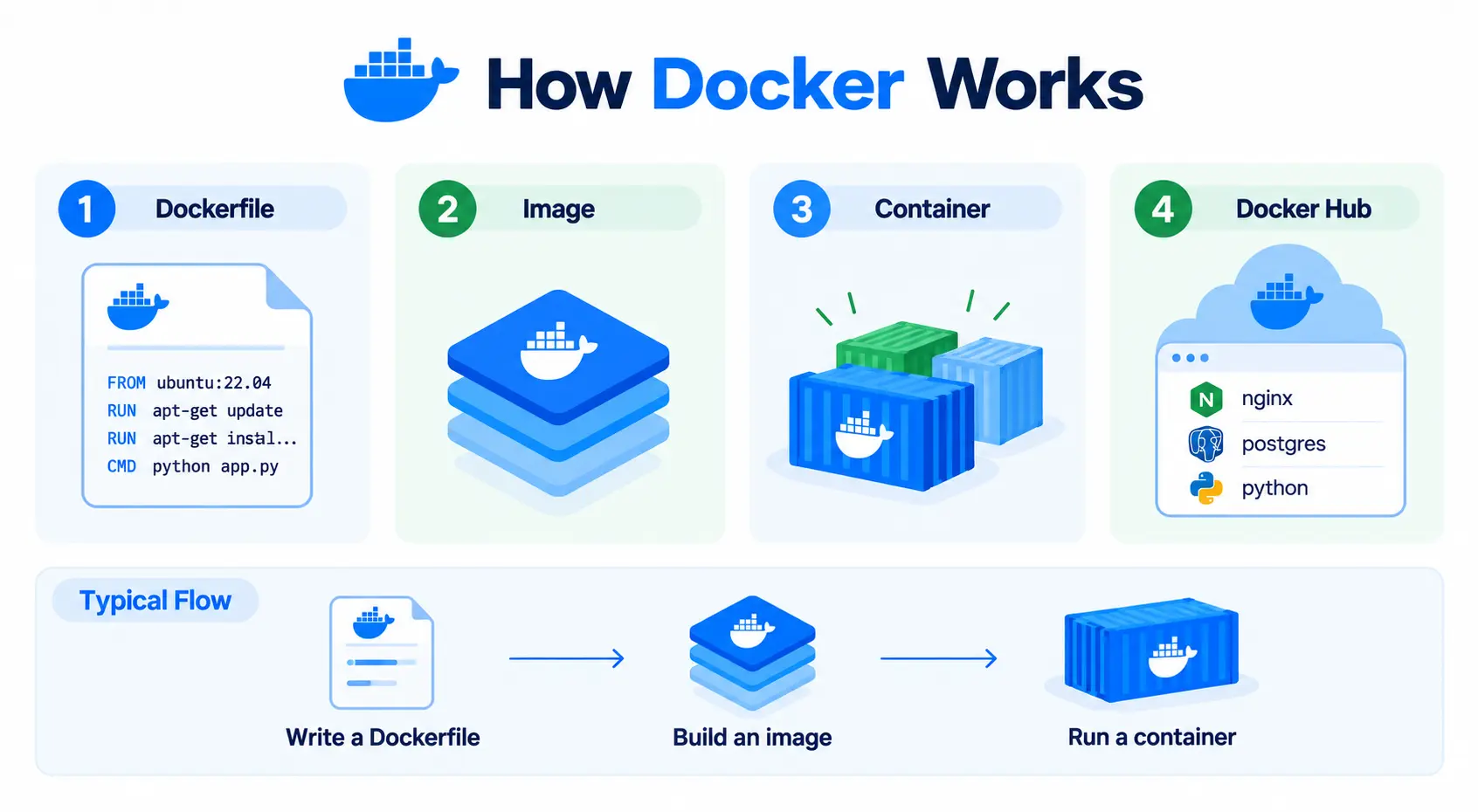
The following are the pointers that explain how Docker works
- Dockerfile: A simple text file with instructions for building an image: which base OS to start from, what to install, and what command to run.
- Image: A packaged, read-only snapshot built from a Dockerfile. It contains everything needed to run the application, but isn’t running itself yet.
- Container: A running instance of an image. You can start multiple containers from the same image, each running independently.
- Docker Hub: A public registry where prebuilt images (like nginx, postgres, or python) are stored and shared, so you rarely need to build common setups from scratch.
A simple example
Here is how a Node.js application is packaged and executed:
# Dockerfile
FROM node:20
WORKDIR /app
COPY . .
RUN npm install
CMD ["node", "server.js"]
docker build -t my-app .      # Build the image
docker run -p 3000:3000 my-app   # Run it as a container
This packages a Node.js app with its dependencies into an image, then runs it as a container, exposing port 3000.
Docker vs a virtual machine
Both isolate applications, but very differently:
| Virtual machine | Docker container | |
| Includes | A full guest operating system | Just the app and its dependencies |
| Startup time | Minutes | Seconds |
| Resource use | Heavier, each VM runs its own OS | Lightweight, containers share the host’s OS kernel |
A VM is like giving each app its own house. A container is like giving each app its own apartment in the same building, isolated, but sharing the underlying structure. That’s why you can run far more containers than VMs on the same hardware.
Docker vs Kubernetes
These aren’t competitors; they solve different problems at different scales:
| Docker | Kubernetes | |
| Role | Builds and runs individual containers | Manages many containers across many machines |
| Handles | Packaging an app into a container | Scheduling, scaling, self-healing, and networking across a cluster |
You still use a container runtime to run containers inside Kubernetes; Docker (or, more precisely, containerd, which Docker is built on) does that job at the node level. Kubernetes just decides where and how many containers run. Our container runtime glossary entry covers this relationship in more detail.
Docker Compose
For applications made up of multiple containers, say, a web app, a database, and a cache, Docker Compose lets you define and run all of them together with one YAML file and one command (docker compose up), instead of starting each container manually.
Is Docker free?
Docker Engine, the core tool that builds and runs containers, is free and open source. Docker Desktop, the GUI application many developers use on Mac and Windows, is free for individuals, small businesses, and non-commercial use, but requires a paid subscription for larger commercial use. Docker Hub, similarly, is free for public images, with paid tiers for private repositories and higher usage limits.
Where Docker fits in your infrastructure
Docker (or its underlying runtime) is what actually runs the containers that kubelet starts on each node, based on decisions made by kube-scheduler. It’s the foundational layer that makes the rest of the Kubernetes cluster possible.