Cloud gaming and cloud rendering are changing how studios deliver graphics-intensive experiences without relying entirely on local hardware. The NVIDIA L4 cloud GPU brings together graphics processing, AI acceleration, and dedicated video encoding in a power-efficient data centre GPU.
With 24 GB of GDDR6 memory and support for ray tracing and DLSS 3, it can support workloads such as game streaming, remote workstations, and real-time visualisation.
This article explains what the L4 offers studios, how game streaming works on it, and where it fits across testing, review, visualisation and rendering. It also covers its limits and what it costs in India. It does not cite named studio case studies, because none are public. It explains how the card and the platforms around it match studio workloads.
What is the NVIDIA L4 cloud GPU?
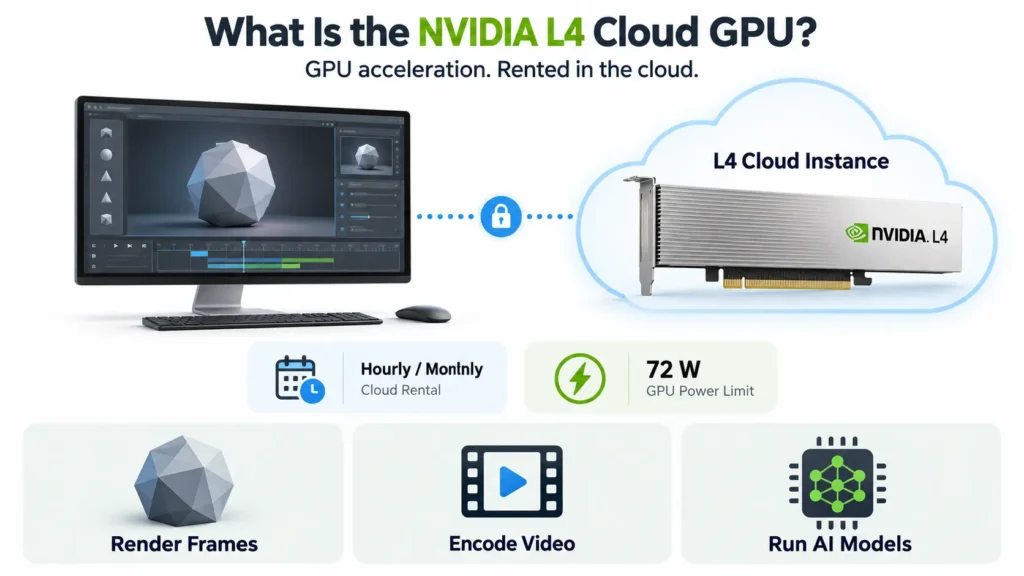
The NVIDIA L4 cloud GPU is an L4 Tensor Core GPU rented as a cloud instance, by the hour or the month. NVIDIA introduced the L4 at GTC in March 2023 as the successor to the T4, a GPU used for AI inference, cloud gaming, video and visual computing.
NVIDIA describes the L4 as a universal, energy-efficient accelerator for video, graphics, virtualisation and AI. That mix is why it suits studios. One card can render a frame, encode it as video and run an AI model, all within a 72 W power limit.
NVIDIA L4 cloud GPU specs for graphics
The NVIDIA L4 datasheet comes down to 24 GB of GDDR6 memory, 300 GB/s of memory bandwidth, and a 72 W power limit. The table lists the specifications that matter for graphics and streaming.
| Specification | NVIDIA L4 |
| Architecture | Ada Lovelace |
| GPU memory | 24 GB GDDR6 with ECC |
| Memory bandwidth | 300 GB/s |
| Ray tracing | Third-generation RT cores |
| AI features | Fourth-generation Tensor Cores, DLSS 3 |
| Video engines | 2 NVENC, 4 NVDEC, 4 JPEG decoders, with AV1 encode and decode |
| Maximum power | 72 W |
| Form factor | Single-slot, low-profile, PCIe Gen4 x16 |
| Virtual GPU software | vPC, vApps and RTX Virtual Workstation |
| MIG and NVLink | Not supported |
The figures come from NVIDIA’s L4 page, the datasheet and a server-vendor guide. For a longer walk-through, see CloudPe’s NVIDIA L4 specs guide.
Memory and power shape what a studio can run
24 GB of memory caps the size of the scenes, textures, and assets one card can hold. The 72 W limit lets servers pack many cards, which keeps the cost per streaming session low.
| ⭐Recommended read: Deploy Nvidia L4 in minutes |
How game streaming works on the NVIDIA L4
Game streaming runs the game on a remote GPU and sends the result to the player as video. The L4 handles two jobs in that loop: rendering each frame and encoding it with its hardware video engines.
The server renders the frame and encodes it as video
The game or application runs on the cloud instance, and the GPU renders each frame. The hardware encoder then compresses the frames into a video stream, which frees the processor from that work. The L4’s engines support AV1 encode and decode, and NVIDIA lists hardware-accelerated image and video processing engines as part of the card.
The player’s input travels the same path in reverse
The client decodes the video and sends controller or keyboard input back to the server. Every keypress makes a round trip to the data centre before the result appears on screen, so rendering, encoding and network delay all count towards how responsive the stream feels.
Ray tracing, DLSS 3 and video engines
Three hardware features matter most to studios: ray tracing cores, AI-assisted upscaling and the video engines. NVIDIA reports that the L4 delivers nearly 4x higher performance than the T4 for AI-based avatars, Omniverse virtual worlds, cloud gaming and virtual workstations, using third-generation RT cores and DLSS 3.
RT cores and DLSS 3 target visual quality and speed
RT cores accelerate ray tracing, and DLSS 3 uses AI to improve image quality or performance. Both help only software that supports them. A game or tool must integrate DLSS 3 before it benefits, so a studio should check support for its own engine and tools.
In production tools, RT cores also matter. Blender’s Cycles renderer uses OptiX to take advantage of hardware ray tracing on RTX graphics cards.
Hardware video engines carry the stream
With 2 NVENC encoders and 4 NVDEC decoders, the L4 does encoding and decoding in dedicated silicon. That lowers the load on the host CPU, which matters when one server hosts many sessions.
Deploy NVIDIA L4 for game streaming and cloud rendering.
Try CloudPeStreaming quality depends on more than the GPU
A fast GPU cannot fix a slow network or a starved host. CPU, system memory, GPU memory, and network quality all shape the final experience.
CPU, system RAM and GPU memory set the ceiling
Game engines load assets, run simulation and physics, and handle background processes on the CPU and in system memory. A GPU paired with too little of either waits for data. L4 GPU memory sets how many assets the card can hold at once, and 24 GB suits many titles and tools but not every large scene.
Network latency and bandwidth decide how the stream feels
The published requirements of one large cloud gaming service show the scale. It needs at least 15 Mbps for a 720p stream and 25 Mbps for 1080p, and it expects under 80 ms of latency to its data centre.
Its guidance also recommends less than 40 ms where possible. Those figures describe that service, not the L4, and they show why server location matters.
L4 cloud instances are offered in Indian regions, which shortens the round trip for players and testers in India.
How studios can use the NVIDIA L4
Studios can use the NVIDIA L4 for the interactive parts of a pipeline: testing, review, visualisation and streaming. Heavy production rendering is a separate job, and the table keeps the two apart.
| Workload | Why the L4 can fit | Watch-out |
| Remote playtests and compatibility testing | Cloud instances run game engines and supply gaming drivers | Sessions may not need a full card, so check sizing |
| Virtual workstations for artists and reviewers | RTX Virtual Workstation support for Vulkan, OpenGL and Direct3D apps | Virtual GPU software adds a licensing question |
| Real-time visualisation and engine previews | Third-generation RT cores and 24 GB of memory | Large scenes can exceed the memory |
| Production rendering | Hardware ray tracing in supported renderers | Scene size and throughput often favour larger GPUs |
Remote playtests and compatibility testing
A studio can run test builds on a remote GPU without buying a workstation for every tester. One major cloud supplies NVIDIA gaming drivers for game development at no additional cost, and it sells fractional GPU sizes for sessions that cannot fill a whole L4. Another says its L4 instances can run game engines such as Unreal and Unity.
Virtual workstations for artists and reviewers
NVIDIA RTX Virtual Workstations suit workloads that use APIs such as Vulkan, OpenGL or Direct3D on a cloud remote desktop, and the L4 is supported on them. Remote workstations let artists, reviewers and QA staff open the same build from any device.
Real-time visualisation and engine previews
Interactive previews are the L4’s strongest studio fit. They need graphics hardware, hardware video encoding and low power, and they rarely need the memory or throughput of a production render farm. NVIDIA’s reported gain over the T4 also covers Omniverse virtual worlds.
Production rendering needs more than interactive power
Interactive rendering draws frames in real time for preview or streaming. Production rendering computes final-quality frames, and it favours memory and sustained throughput. For Blender Cycles, one provider’s benchmark data recommends GPUs with 48 GB or 96 GB when a scene does not fit in 32 GB, and it shows an L40S scoring about 30% below an RTX 4090.
Suggestion: A studio should render a representative scene on it before committing.
NVIDIA L4 cloud GPU for gaming
The NVIDIA L4 cloud GPU suits efficient, mid-range game streaming and testing, not flagship performance. A 72 W card trades peak throughput for density and low running cost, and real results depend on the game, its settings, the CPU and the network.
Expect efficient streaming, not flagship performance
For streaming many sessions, the L4’s hardware encoders and low power are its strengths. For a title that needs the most powerful graphics hardware available, a higher-power GPU is the safer choice.
Test the studio’s own build with its own settings
Published benchmarks rarely match a given engine, content and settings. A short trial on the intended instance size answers the question more reliably than any general figure. This article gives no frame-rate numbers for that reason.
Check licensing before streaming to the public
Streaming a game to players involves game licences and NVIDIA software terms. A studio streaming its own builds to testers has different needs from a public service, so the terms for the intended use should be checked first.
NVIDIA L4 limitations
The L4’s limits are the flip side of its efficiency. Three of them decide whether it fits a studio’s work.
24 GB limits scene and asset size
A scene that does not fit in GPU memory cannot render on one card. Large textures, dense geometry, and heavy volumetrics can exceed 24 GB, and the L4 has no NVLink to pool memory across cards.
Interactive power is not production throughput
The L4 is built for efficient, many-session workloads. Final-quality renders at high sample counts run longer on it than on higher-power GPUs, so it is rarely the first choice for a render farm.
Virtual workstation features depend on virtual GPU software
Features such as RTX Virtual Workstation rely on NVIDIA’s virtual GPU software, so a studio should check how a provider supplies and prices it.
When a workload outgrows the L4, higher-memory options include GPUs with 48 GB or 96 GB.
NVIDIA L4 cloud GPU price in India
An NVIDIA L4 can be rented by the hour, bought inside a server or bought as a card, and each has a different price.
The median on-demand NVIDIA L4 price is $0.86 an hour, and large-cloud list prices include $0.707 and $0.805 an hour. In India, CloudPe lists an L4 instance at ₹35.86 an hour, or ₹26,180 a month, with 8 vCPUs and 32 GB of RAM, excluding GST.
The NVIDIA L4 24GB price as a card, in Indian listings seen in the past three months, runs from ₹3.24 lakh to ₹3.78 lakh, and ₹4.90 lakh before the server around it.
For graphics work, two questions need a direct answer from any provider: whether a virtual workstation or gaming driver licence adds to the hourly rate, and which drivers the instance supports.
Get L4 instance starting at ₹35.86 an hour.
Check pricingIs the NVIDIA L4 right for a studio?
The L4 is right for a studio when the work is interactive, the scenes fit in 24 GB and the cost per session matters. Four questions turn that into a decision.
| Question | The L4 fits when | Look elsewhere when |
| What is the workload? | Playtests, remote workstations, previews, and streaming | Final-quality production rendering at scale |
| Do the scenes fit? | Assets and scenes stay under 24 GB | Scenes need 48 GB or more |
| How close are the users? | An instance region sits near players and testers | Users are far from any region |
| What matters most? | Cost per session and power | Raw throughput |
Conclusion
The NVIDIA L4 cloud GPU is a tool for the interactive half of a studio pipeline: preview, test, review, and stream. It is not the heavy-lift renderer. The useful question is not “can it render?” but “which parts of the pipeline are interactive?”
For those parts, an efficient 24 GB card with hardware video engines is often enough. We think the sensible path is to start with a short trial on a real build, measure what the studio actually needs, and move up to a larger GPU only for the work that outgrows it.
Get a L4 14-day trial.
Try CloudPeFrequently Asked Questions
What is an NVIDIA L4 GPU?
The NVIDIA L4 is a low-profile data centre GPU built on the Ada Lovelace architecture, introduced in March 2023 as the successor to the T4. It has 24 GB of GDDR6 memory, third-generation RT cores and video engines with AV1 support, and it is designed for graphics, video and AI.
What is the maximum power consumption of NVIDIA L4?
The maximum power consumption of the NVIDIA L4 is 72 W. It is a single-slot, low-profile PCIe card, which lets servers fit many of them. That low power draw is one reason cloud providers use it for streaming, video and inference at lower running cost.
What workloads is the NVIDIA L4 best suited for?
The L4 is best suited to AI inference on models that fit in 24 GB, video transcoding and analytics, game streaming, remote virtual workstations and real-time visualisation. It is less suited to large model training and to final-quality production rendering, which need more memory and throughput.
Is the NVIDIA L4 cloud GPU good for gaming?
It suits efficient, mid-range game streaming and remote testing, with hardware video encoding and low power per session. It is not a flagship gaming card, and results depend on the game, settings, CPU and network, so a short trial on the studio’s own build is the best test.
What is the NVIDIA L4 24GB price in India?
In India, renting an L4 costs about ₹35.86 an hour on CloudPe, or ₹26,180 a month. The card alone is listed at roughly ₹3.24 lakh to ₹4.90 lakh, before the server around it. Prices change with seller and stock, so confirm current figures.
Is the NVIDIA L4 suitable for 3D rendering?
It suits interactive rendering, such as previews, review sessions and real-time scenes. For final-quality production rendering, scene size and throughput often favour GPUs with 48 GB or more of memory. We found no published Blender score for the L4, so test a representative scene first.