What is kubelet in Kubernetes?
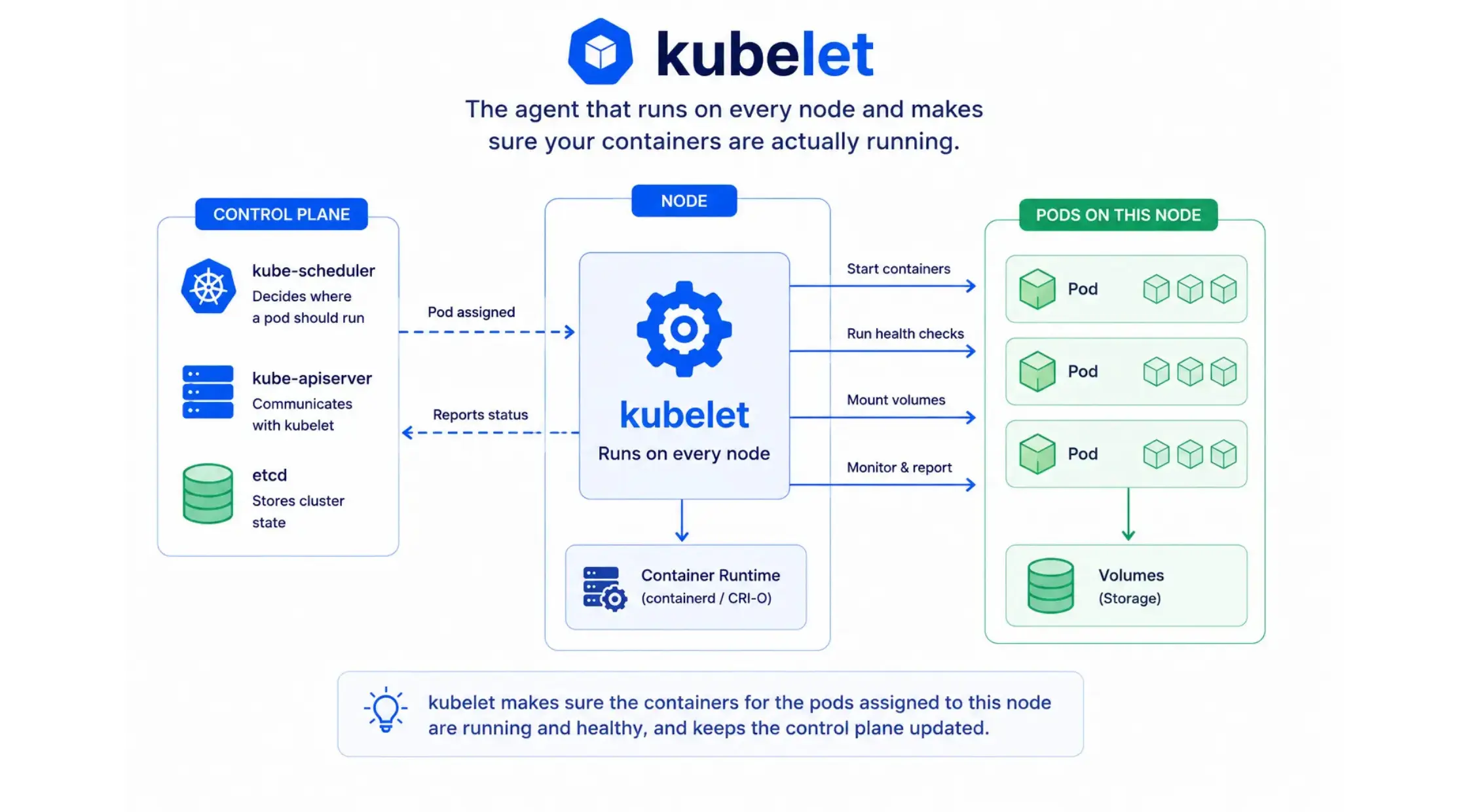
kubelet is the agent that runs on every node in a Kubernetes cluster. kubelet’s job is to ensure that the containers described in a pod’s spec are actually running and healthy on that node. kube-scheduler decides where a pod should run, kubelet is what actually makes it happen on the node itself.
Every node needs a running kubelet. Without it, that node can’t run any pods at all.
kubelet meaning
The name is straightforward: “kube” for Kubernetes, and “let” as in a small, worker-level version of something, similar to how “booklet” is a small book. kubelet is the small agent that does the actual work on each node.
What kubelet actually does
- Runs containers: Takes the pod specs assigned to its node and starts the containers inside them, using the node’s container runtime.
- Reports node health: Continuously reports the node’s status back to the control plane, so Kubernetes knows if a node is healthy or not.
- Runs health checks: Executes liveness and readiness probes you define, and restarts containers that fail them.
- Mounts volumes: Attaches any storage volumes a pod needs before its containers start.
kubelet only manages containers that Kubernetes created. If you start a container manually on a node outside of Kubernetes, kubelet ignores it.
kubelet vs kubectl
These sound alike but do completely different jobs:
| kubelet | kubectl |
| Runs on every node, keeps containers running as instructed by the control plane | The command-line tool you use on your own machine to talk to the cluster |
You use kubectl to tell the cluster what you want. kubelet is what carries that out on each individual node. You never run kubectl commands from inside kubelet, and kubelet isn’t something you interact with directly day to day.
kubelet port and API
kubelet exposes its own API on each node, mainly used by the control plane, not by end users directly:
- Port 10250: The main kubelet API, used for things like fetching logs and executing commands in a container (what powers kubectl logs and kubectl exec).
- Port 10255 (older versions): A read-only, unauthenticated port, now deprecated in most current setups for security reasons.
Checking kubelet on a nde
kubelet runs as a system service, not as a pod, so you check it differently from other control plane components:
# Check kubelet’s status
sudo systemctl status kubelet# View kubelet logs
sudo journalctl -u kubelet -f# Restart kubelet
sudo systemctl restart kubeletRestarting the kubelet on a control plane node also restarts any static pods on that node, including kube-apiserver, etcd, and kube-scheduler if they run there.
Installing kubelet
kubelet is typically installed alongside kubeadm and kubectl when setting up a cluster manually, using your Linux distribution’s package manager (for example, apt install kubelet on Ubuntu). Most managed Kubernetes services install and manage kubelet on your worker nodes automatically, so you never touch this step.
For deeper implementation details, the kubelet source code is in the main Kubernetes GitHub repository.
Where it fits in the cluster
kubelet works with kube-scheduler, which decides pod placement, and reports back through kube-apiserver, which stores that status in etcd.