What is node patching?
Node patching is the process of applying updates, security fixes, and bug fixes to the operating system running on a server (a “node”), whether that’s a standalone VM or a worker node in a Kubernetes cluster. It’s routine maintenance that keeps your infrastructure secure and up to date.
The tricky part isn’t applying the patch itself. It’s doing it without taking down whatever is running on that node.
Why node patching matters
Unpatched nodes are one of the most common security risks in any infrastructure. Most attacks that exploit known vulnerabilities target systems that simply never got updated. Regular patching also fixes bugs, improves performance, and keeps you on OS versions that are still supported and receiving security updates.
Skipping patches doesn’t just leave you vulnerable. It also means updates pile up, making each patching cycle bigger and riskier when you finally do it.
Patching a standalone server
On a single server, patching is straightforward:
# Debian/Ubuntu
sudo apt update && sudo apt upgrade -y# RHEL/CentOS
sudo yum update -ySome patches, especially kernel updates, require a reboot to take effect. That’s where things get harder once that server is part of a cluster running live workloads.
Patching a node in a Kubernetes cluster
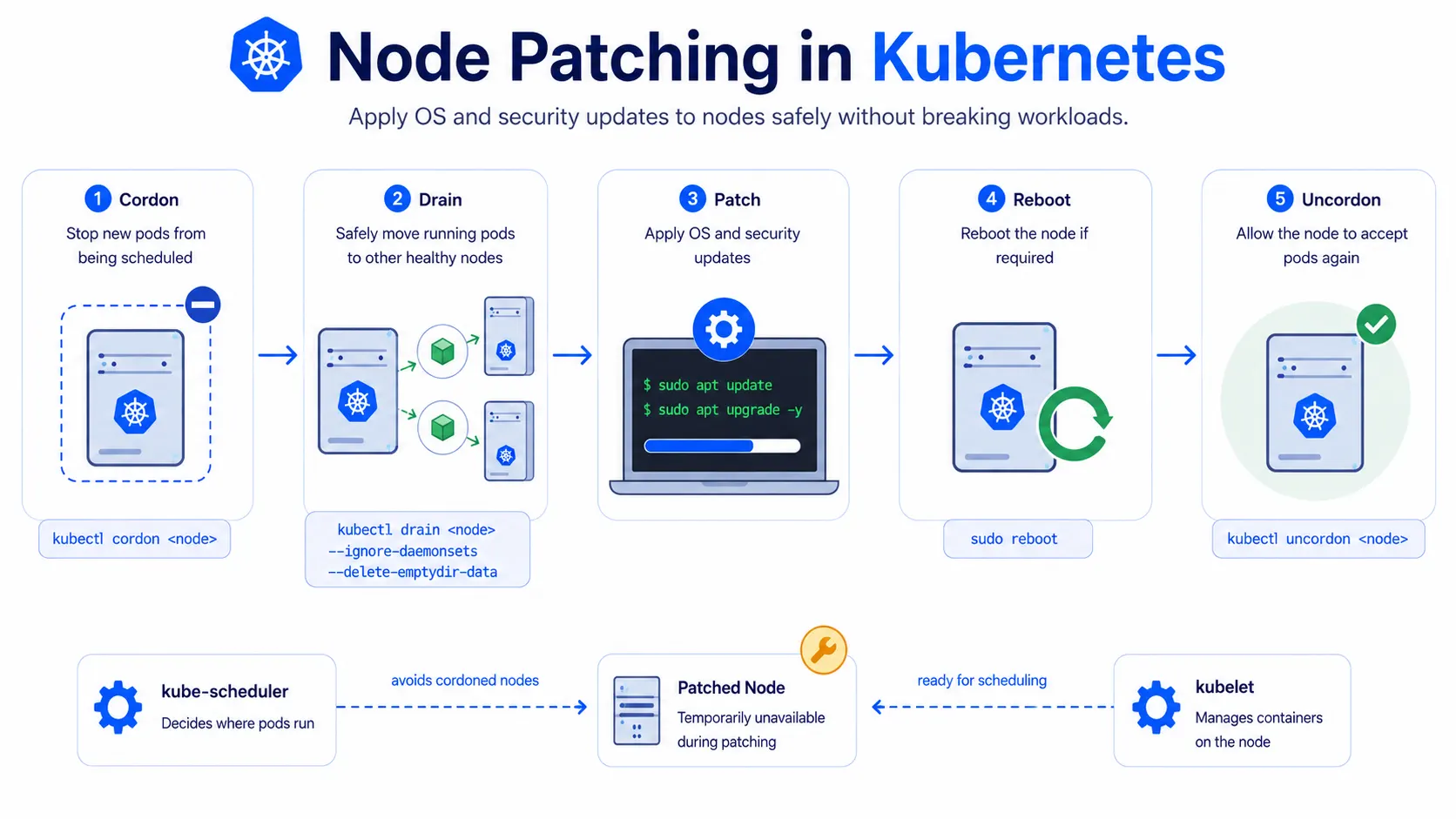
You can’t just patch and reboot a worker node without warning. Kubernetes has a proper process for this, so pods get moved off safely first:
# 1. Cordon the node (stop new pods from being scheduled on it)
kubectl cordon <node-name># 2. Drain the node (safely evict running pods to other nodes)
kubectl drain <node-name> --ignore-daemonsets --delete-emptydir-data# 3. Patch the node
sudo apt update && sudo apt upgrade -y# 4. Reboot if required
sudo reboot# 5. Uncordon the node (allow scheduling again)
kubectl uncordon <node-name>This sequence makes sure the kube-scheduler stops sending new pods to the node, and existing pods get rescheduled elsewhere before you touch anything.
Patching strategies
- Rolling patching: Patch one node at a time, moving to the next only after the first is healthy again. It keeps your application available throughout.
- Blue-green node pools: Spin up a fully patched, new set of nodes, shift workloads over, then remove the old nodes entirely. Zero risk to the running cluster, but needs extra capacity temporarily.
- Maintenance windows: Schedule patching during known low-traffic periods, reducing impact even if something goes wrong.
For a cluster with many nodes, rolling patching is the most common approach; you never lose more capacity than one node’s worth at a time.
What can go wrong
- Skipping cordon/drain: Patching or rebooting a node with pods still running on it causes sudden pod disruption instead of a clean handoff.
- Patching all nodes at once: Leaves no healthy capacity if something breaks mid-patch.
- Kernel updates without reboot: Some security patches don’t take effect until the node restarts, so patching without rebooting leaves you only partially protected.
Where it fits in cluster management
Node patching is one part of broader cluster management, alongside scaling and monitoring. It works closely with kubelet and kube-scheduler, since both need to be aware a node is temporarily unavailable during the process.