What is an NVMe SSD?
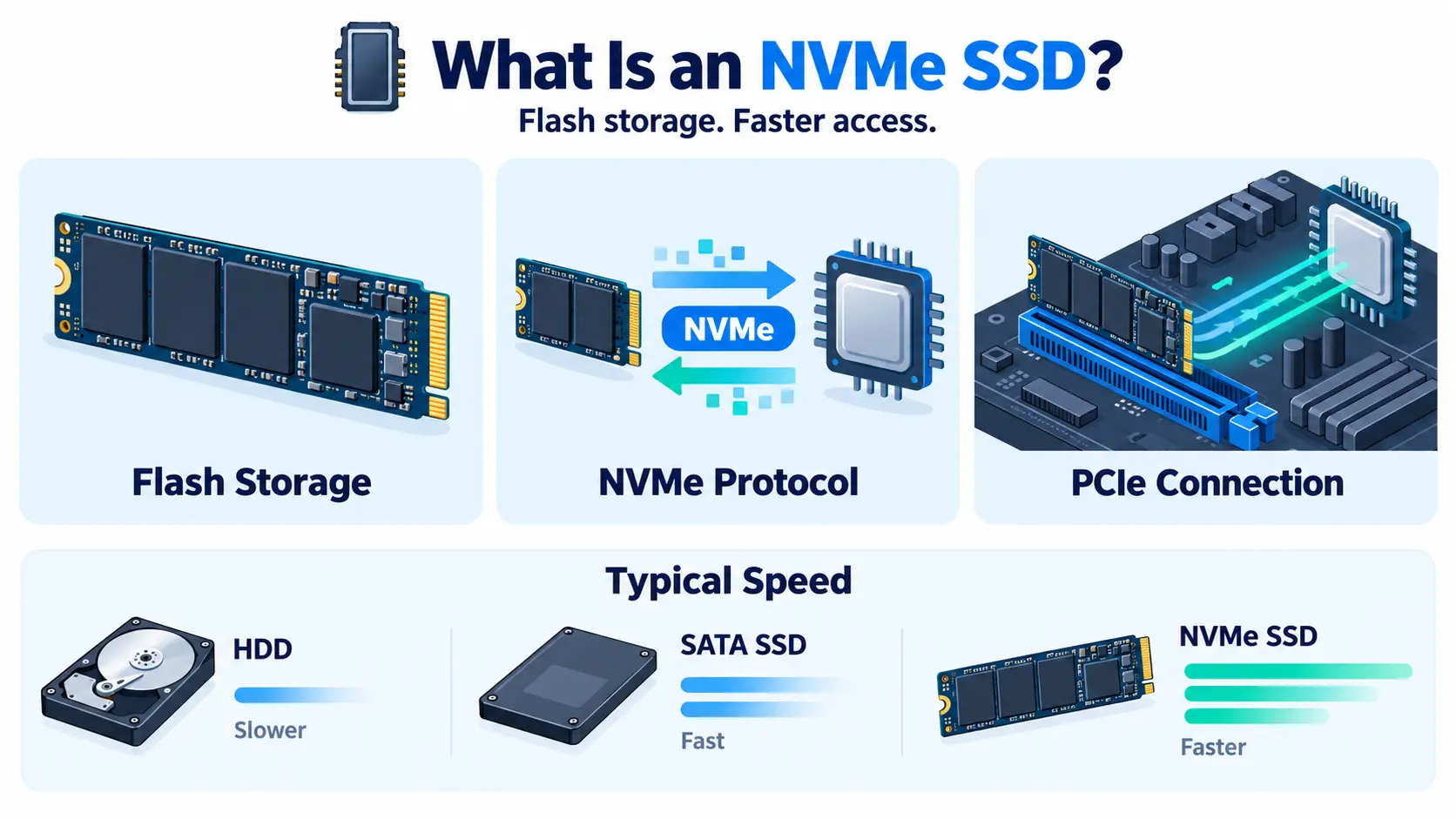
An NVMe SSD is a solid-state drive that uses the NVMe (Non-Volatile Memory Express) protocol to talk to a computer over a PCIe connection. It is much faster than older SATA SSDs and hard disk drives (HDDs) because it was designed from the start for flash storage.
In short: an SSD stores your data on flash memory chips. NVMe is the fast “language” and connection it uses to move that data in and out.
NVMe full form
NVMe stands for Non-Volatile Memory Express. “Non-volatile” means the memory keeps its data even when the power is off. “Express” refers to PCIe (PCI Express), the high-speed connection the drive uses to reach the processor.
How an NVMe SSD works
Older SSDs use the SATA interface, which was built for spinning hard drives. It limits how much data can move at once. NVMe removes that limit in two ways:
- PCIe connection: The drive plugs straight into the PCIe lanes that connect to the CPU, instead of going through a slower SATA controller.
- Parallel queues: NVMe supports up to 65,535 queues, each holding up to 65,535 commands. SATA supports a single queue with 32 commands. This lets NVMe handle huge numbers of requests at the same time.
The result is higher speed and lower delay, especially when many programs read and write data at once.
NVMe vs SATA SSD vs HDD
| HDD | SATA SSD | NVMe SSD | |
| Technology | Spinning disks | Flash memory | Flash memory |
| Connection | SATA | SATA | PCIe |
| Typical speed | Around 100 to 200 MB/s | Around 550 MB/s | Around 3,500 MB/s (PCIe 3.0) up to 14,000 MB/s (PCIe 5.0) |
| Latency | Highest | Low | Lowest |
| Cost per GB | Lowest | Medium | Highest |
| Best for | Cheap bulk storage | General everyday use | Performance-heavy workloads |
Speeds depend on the drive model and PCIe generation, so treat these as typical ranges.
Does the PCIe generation matter?
Yes, each PCIe generation roughly doubles the maximum speed:
- PCIe 3.0: Up to about 3,500 MB/s
- PCIe 4.0: Up to about 7,000 MB/s
- PCIe 5.0: Up to about 14,000 MB/s
A faster drive still needs a system that supports the same generation. Otherwise, it runs at the lower speed.
Common NVMe form factors
Below are the common NVMe form factors:
- M.2: A small stick that plugs into the motherboard. Common in laptops and desktops.
- U.2 / U.3: A 2.5-inch drive used in servers, often hot-swappable.
- PCIe add-in card: A card that slots into a PCIe port. Used for very high performance.
- E1.S / E1.L: Compact server formats built for dense data center racks.
Why NVMe matters for servers and the cloud
For servers, storage speed often decides how fast an application feels. Databases, virtual machines, and analytics tools all read and write data constantly. With NVMe, they spend less time waiting on storage.
Two numbers matter most:
- IOPS (input/output operations per second): How many small reads and writes the drive can handle each second. NVMe drives reach hundreds of thousands, or even millions.
- Latency: How long one request takes. NVMe responds in microseconds.
Common NVMe SSD use cases
The following are the common NVMe SSD use cases:
- Databases: Faster queries and quicker transactions.
- Virtual machines and containers: Quick boot and smooth performance when many run on one host.
- AI and machine learning: Fast loading of large datasets so expensive GPUs are not left waiting.
- Analytics and big data: Quicker processing of large files.
- Video editing and rendering: Smooth handling of large media files.
- High-traffic websites and APIs: Faster response under load.
NVMe SSD vs block storage
These two terms are related but not the same. An NVMe SSD is the physical drive technology. Block storage is the way data is organized and delivered to a server. In the cloud, block storage volumes are often built on NVMe SSDs, which gives you the flexibility of a cloud volume with the speed of NVMe. For storing large amounts of data that you do not access often, object storage is usually cheaper.
NVMe over Fabrics (NVMe-oF)
NVMe-oF extends NVMe across a network, so servers can use remote NVMe storage almost as fast as local drives. It is common in modern data centers where storage is shared across many machines. Fast networking and enough bandwidth are needed to get the full benefit.
Things to consider
Below are the things to consider:
- Cost: NVMe costs more per gigabyte than SATA SSDs and HDDs.
- Heat: Fast drives can run hot and may slow down (throttle) without good cooling.
- Endurance: Flash memory wears out after many writes. Check the drive’s rated endurance, shown as TBW (terabytes written) or DWPD (drive writes per day).
- Right-sizing: If your workload does not need high speed, you may not need NVMe everywhere.
Where NVMe fits in your infrastructure
NVMe SSDs are the storage layer under many cloud services. Your virtual machines, your Kubernetes cluster volumes, and your GPU cloud instances all benefit from fast storage. It is one of the simplest ways to remove a performance bottleneck in cloud computing.