What is bandwidth?
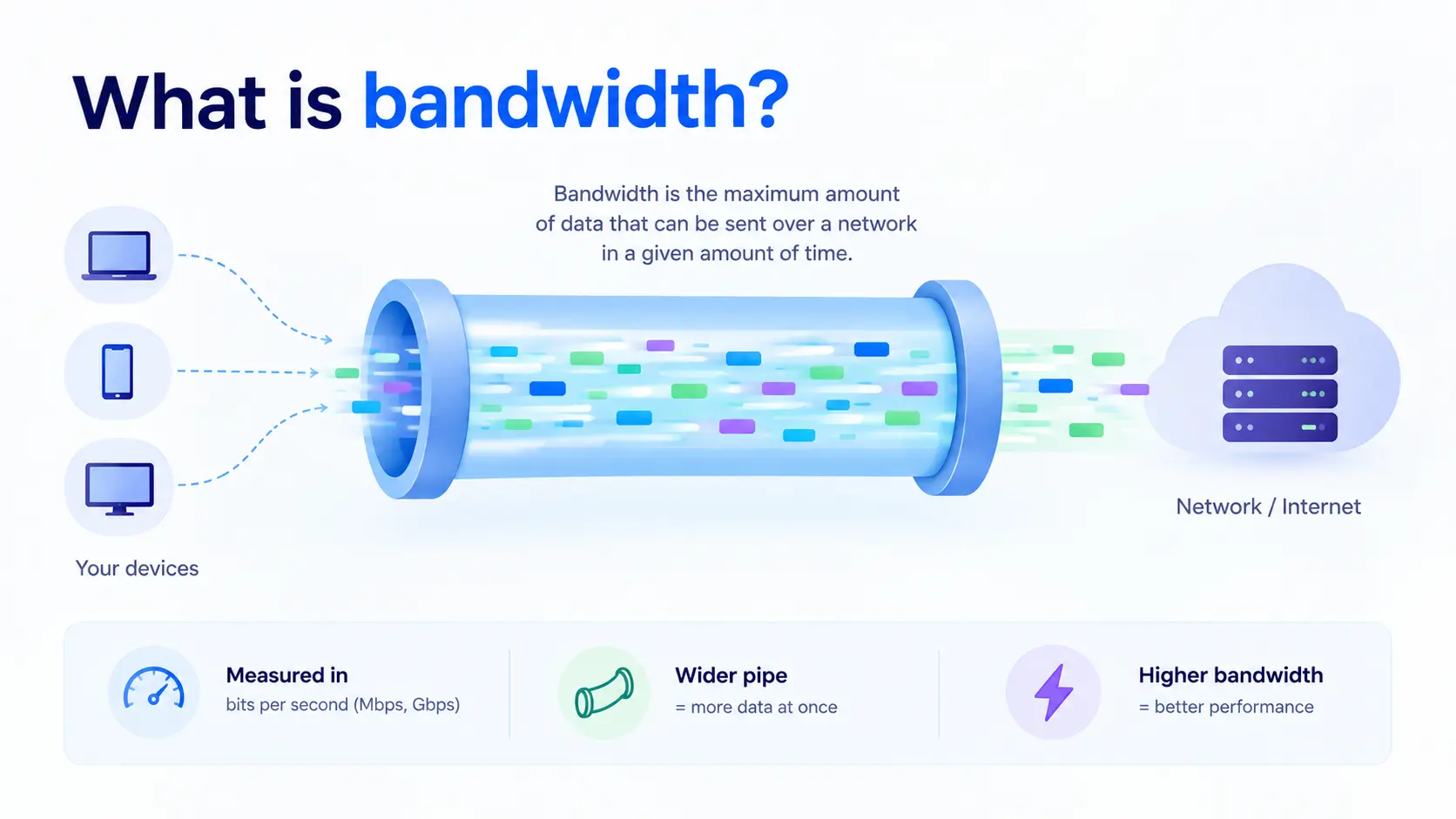
Bandwidth is the maximum amount of data that can be sent over a network connection in a given amount of time. It is usually measured in bits per second, such as Mbps (megabits per second) or Gbps (gigabits per second).
Think of a water pipe. Bandwidth is how wide the pipe is. A wider pipe lets more water flow at once. In the same way, higher bandwidth lets more data move through a connection at the same time.
How bandwidth is measured
Bandwidth is measured in bits per second, with a prefix to show the scale:
| Unit | Meaning |
| Kbps | Thousand bits per second |
| Mbps | Million bits per second |
| Gbps | Billion bits per second |
| Tbps | Trillion bits per second |
A 100 Mbps connection can carry up to 100 million bits of data every second, under ideal conditions.
Mbps vs MBps
These look almost the same but mean different things:
- Mbps (megabits per second): How internet plans and network bandwidth are usually advertised.
- MBps (megabytes per second): How file sizes and download speeds are often shown on your screen.
One byte equals 8 bits. So a 100 Mbps connection can download at most about 12.5 MBps. This is why your download speed often looks lower than the number on your plan.
Bandwidth vs speed vs latency
People use these words as if they mean the same thing. They do not.
| Term | What it means |
| Bandwidth | The maximum amount of data the connection can carry at once (capacity) |
| Throughput | The amount of data that actually gets through, which is usually lower than bandwidth |
| Latency | The delay before data starts to arrive |
A connection can have high bandwidth and still feel slow if latency is high. Think of a wide highway with a very long drive. Many cars can travel at once, but each car still takes a long time to arrive.
What affects your bandwidth
- Your plan or provider limit: The maximum capacity you pay for.
- Network congestion: When many users share the same connection, the available bandwidth is split between them.
- Number of connected devices: Streaming, downloads, and video calls all draw from the same pool.
- Hardware and cabling: Old routers, switches, or cables can limit what the connection can carry.
- Wired vs wireless: Wired connections are usually more stable and faster than Wi-Fi.
How much bandwidth do you need
It depends on what you do and how many people share the connection:
- Browsing and email: A few Mbps is enough.
- HD video streaming: Around 5 to 10 Mbps per stream.
- Video calls: Around 2 to 5 Mbps per call.
- Large file transfers and backups: The more bandwidth, the faster they finish.
- Servers and applications: Needs grow with the number of users and the size of the data you serve.
How to check bandwidth
Run an online speed test, such as Speedtest by Ookla or Fast.com. It shows your download and upload speeds in Mbps. For servers, tools like iperf3 measure the real bandwidth between two machines:
# On the server
iperf3 -s
# On the client
iperf3 -c <server-ip>
How to increase bandwidth
- Upgrade your plan with your internet or hosting provider.
- Use a wired connection instead of Wi-Fi where possible.
- Replace old hardware, like routers or switches that cap your speed.
- Reduce unnecessary traffic by closing apps and devices that use the connection in the background.
- Use a CDN to serve content from servers closer to your users, so less data travels over your own link.
Bandwidth in cloud hosting
In the cloud, bandwidth also affects cost and performance. Providers often describe it in two directions:
- Ingress: Data coming into your server, which is often free.
- Egress: Data going out of your server to users or other services, which is often charged.
Some plans include a fixed amount of data transfer. Others charge for what you use. Always check how your provider counts bandwidth before you choose a plan, especially if you serve a lot of video, images, or large files. Heavy traffic spikes can also look like an attack, so bandwidth planning goes hand in hand with protection against a DDoS attack.
Where bandwidth fits in your infrastructure
Bandwidth is one part of network performance, alongside latency. It also depends on where your servers sit. A data center close to your users gives you faster, more reliable connections, and a load balancer helps spread traffic so no single link gets overloaded.
Enough bandwidth, in the right location, keeps your applications fast for every user. CloudPe runs cloud infrastructure in India-based data centers, so your traffic stays close to your Indian users with reliable network connectivity.