What is Kubernetes architecture?
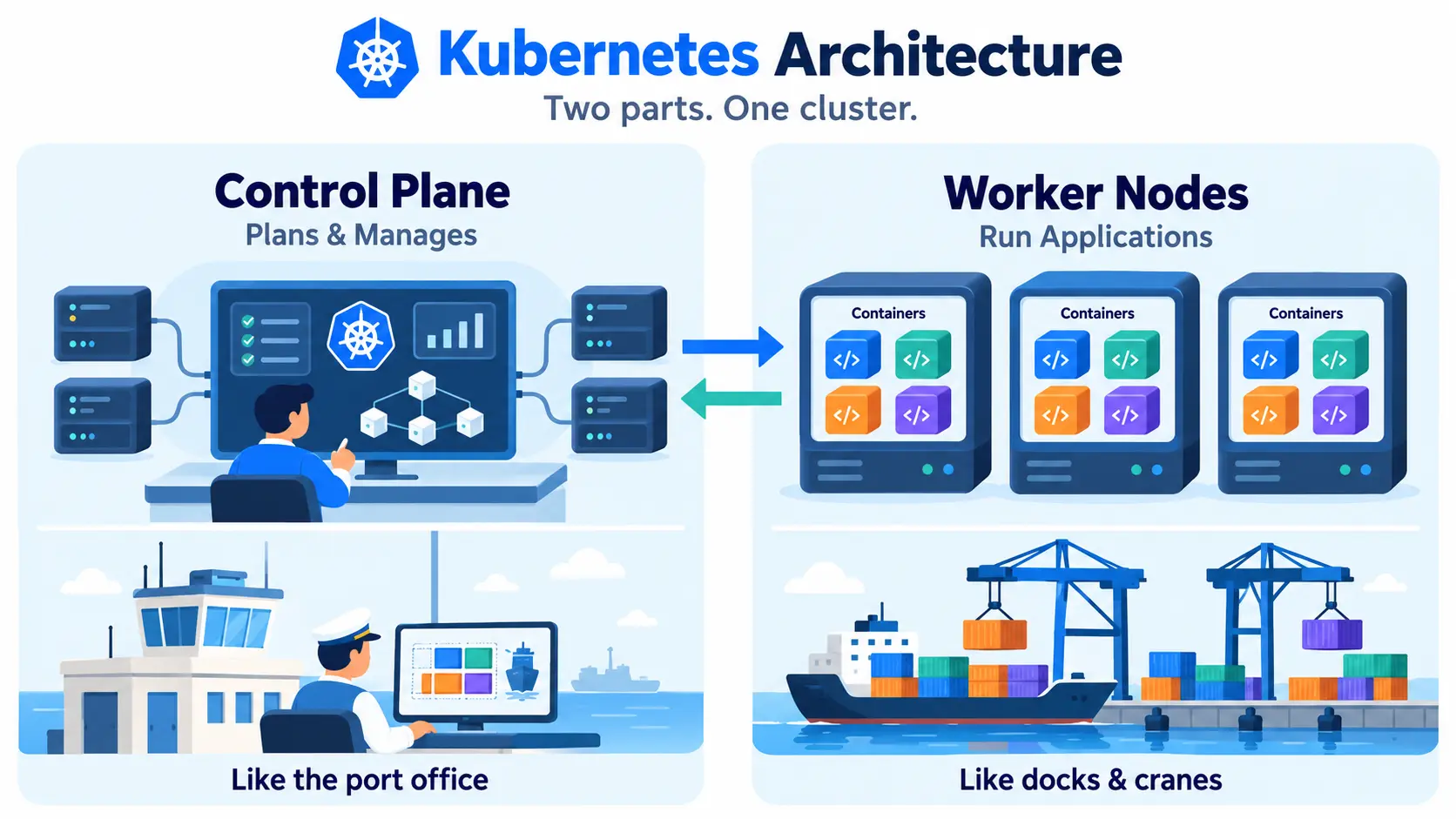
Kubernetes architecture is the way a Kubernetes cluster is organized. It has two main parts: a control plane that makes decisions and keeps track of the cluster, and worker nodes that run your applications inside containers.
Think of a shipping port. The control plane is the office that plans where every container goes. The worker nodes are the docks and cranes that actually move and hold them.
Kubernetes architecture diagram
Here is a simple text diagram of how the pieces connect:
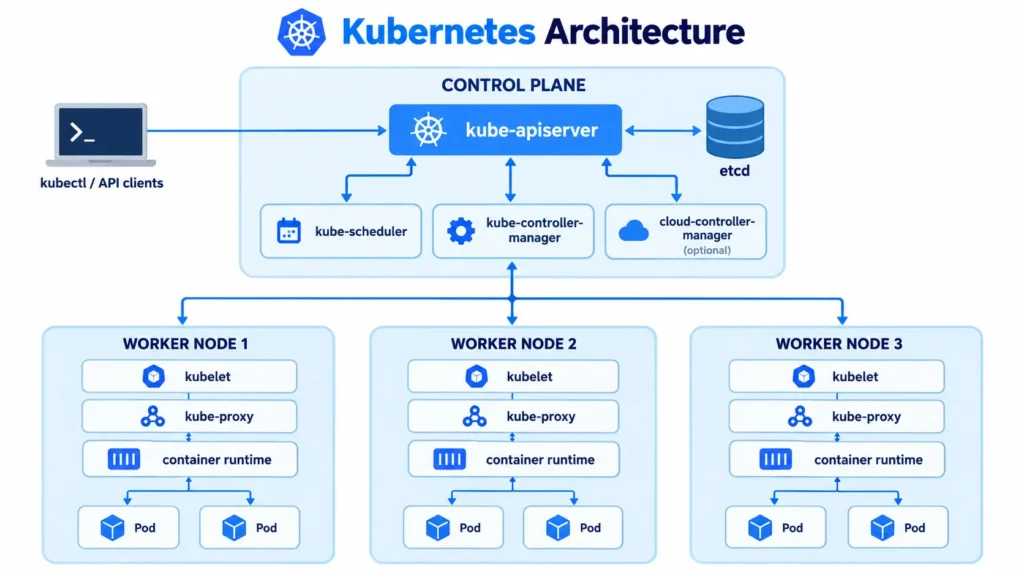
Everything talks to the control plane through the API server. The worker nodes report back the same way.
Control plane components
The control plane makes global decisions for the cluster, like where to run a pod and how to react when something fails.
- kube-apiserver: The front door of the cluster. Every request from kubectl, other components, and automation goes through it.
- etcd: A key-value database that stores the whole state of the cluster. Only the API server reads from and writes to it.
- kube-scheduler: Picks the best node for each new pod, based on resources and rules.
- kube-controller-manager: Runs controllers that keep the cluster’s actual state matching what you asked for. For example, it replaces a pod that crashed.
- cloud-controller-manager: Connects the cluster to cloud provider features, like load balancers and storage volumes. It is only present when the cluster runs on a cloud.
Worker node components
Worker nodes are the machines that run your workloads. Each one runs three key components:
- kubelet: The agent on each node. It makes sure the containers described in a pod spec are running and healthy.
- kube-proxy: Sets up network rules so traffic can reach the right pods through Services.
- Container runtime: The software that actually runs the containers, such as containerd.
Pods and other objects
Inside the nodes, your application runs as pods, the smallest deployable unit in Kubernetes. You usually do not create pods directly. You use a Deployment to manage them, and a Service to give them a stable network address.
How a request flows through the architecture
Say you run kubectl apply to create a Deployment with 3 replicas. Here is what happens:
- kubectl sends the request to kube-apiserver, which checks and validates it.
- The API server saves the desired state in etcd.
- kube-controller-manager notices that 3 pods are needed and none exist, so it creates them.
- kube-scheduler sees the new pods have no node and assigns each one to a suitable worker node.
- The kubelet on each chosen node sees the assignment and tells the container runtime to start the containers.
- kube-proxy updates network rules so traffic can reach the new pods.
If a pod crashes later, the controller manager notices the difference and starts a replacement. This loop of comparing desired state to actual state is the core idea behind Kubernetes.
Single control plane vs high availability
| Setup | What it means | Best for |
| Single control plane | One control plane node. Simple, but if it fails, you cannot manage the cluster. | Learning and testing |
| High availability (HA) | Three or more control plane nodes, with etcd replicated across them. | Production |
Worker nodes keep running existing pods if the control plane goes down. But nothing new can be scheduled or fixed until it comes back.
Kubernetes architecture vs Docker
Docker builds and runs individual containers on one machine. Kubernetes architecture manages many containers across many machines. The container runtime on each node still runs the containers. Kubernetes decides where, when, and how many. Our Docker entry covers the container side.
Managed vs self-managed architecture
- Self-managed: You set up and run both the control plane and worker nodes. You handle upgrades, backups of etcd, and security.
- Managed Kubernetes: The provider runs and maintains the control plane. You manage only your worker nodes and workloads, or sometimes not even those.
Most teams choose managed Kubernetes, since running the control plane well takes ongoing effort.
Where this fits
This page is the big picture. For the full definition of the unit that holds all of these parts, see what a cluster in Kubernetes is. Each component above has its own glossary entry if you want to go deeper. A load balancer usually sits in front of the cluster to spread outside traffic across the nodes.