What is an AI server?
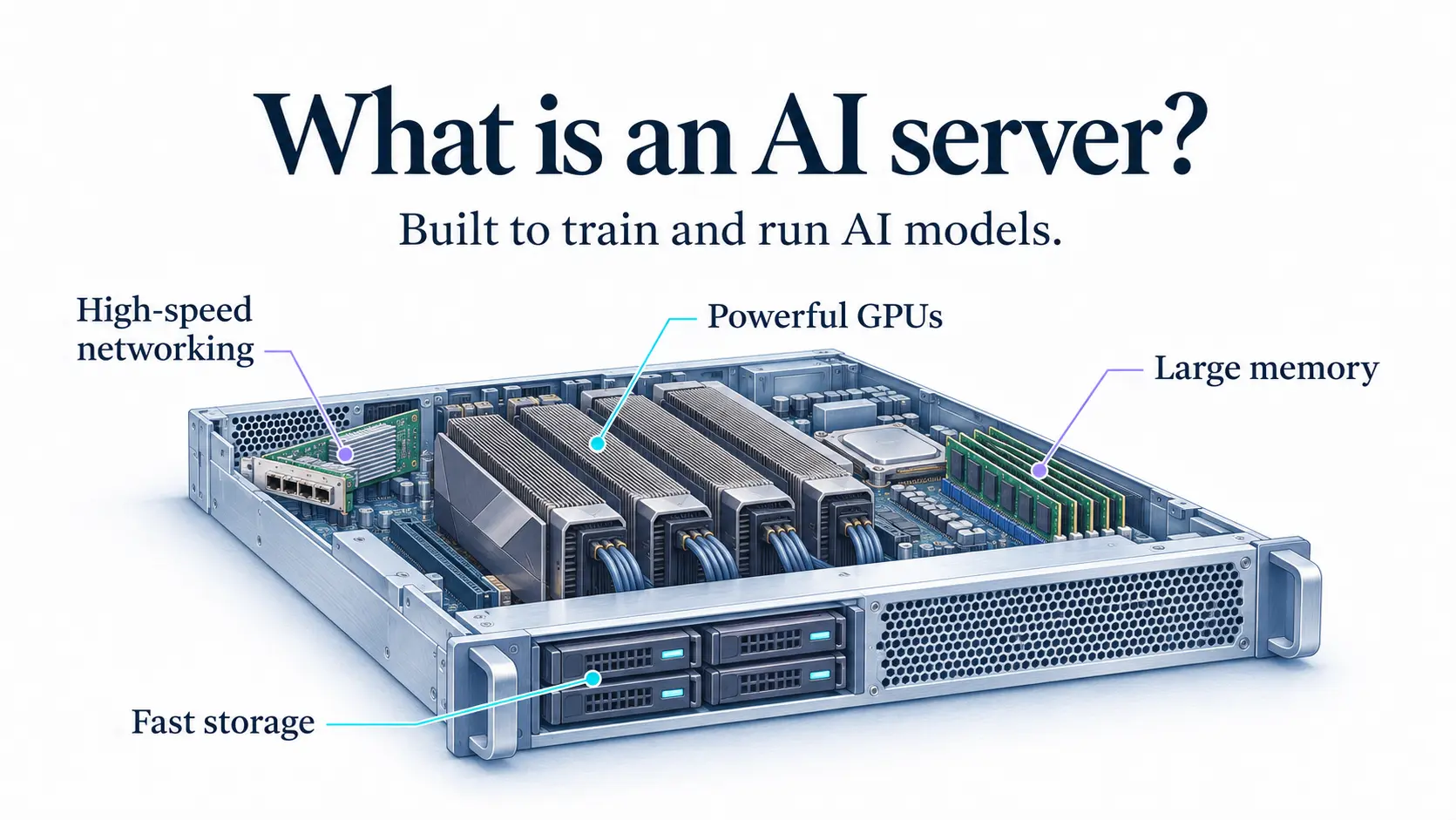
An AI server is a server built to train and run AI models. It packs in powerful GPUs, a large amount of memory, fast storage, and high-speed networking, so it can handle the heavy parallel math that AI workloads need.
Think of a regular server as a family car and an AI server as a freight truck. Both are vehicles, but one is designed to carry far heavier loads.
How an AI server differs from a regular server
A regular server is built for general tasks, like hosting a website or running a database. These tasks mostly use the CPU and handle requests one after another.
AI workloads are different. They need thousands of calculations to run at the same time, and huge amounts of data to move quickly. A CPU-only server falls behind, so AI servers put GPUs at the center of the design.
| Regular server | AI server | |
| Main processor | CPU | GPUs (plus CPU) |
| Typical workload | Websites, databases, business apps | Model training, fine-tuning, inference |
| GPU count | None or one | Often 4 to 8 per server |
| Memory | Standard system RAM | Large system RAM plus high-capacity VRAM |
| Networking | Standard | High bandwidth, low latency |
| Power and cooling | Moderate | Very high, often liquid or advanced air cooling |
| Cost | Lower | Much higher |
Main components of an AI server
The following are the main components of an AI Server:
- GPUs: The core of the machine. They do the parallel math behind AI. The right model depends on the FLOPs and VRAM your workload needs.
- CPU: Handles general tasks, prepares data, and feeds it to the GPUs. It is still needed, but it is not the star.
- System memory (RAM): Holds data before it moves to the GPUs. AI servers often have far more RAM than regular servers.
- GPU interconnects: High-speed links, such as NVLink, that let GPUs in the same server share data quickly, so they can work together on one job.
- Storage: Fast drives, usually NVMe SSD, so data reaches the GPUs without delay.
- Networking: High-speed network cards for moving data between servers when a job spans many machines.
- Power and cooling: AI servers draw a lot of power and make a lot of heat, so they need strong power supplies and cooling.
Training servers vs inference servers
AI servers are often set up differently for the two main stages of AI:
- Training servers: Use many GPUs with fast links between them, and high-throughput storage. Built for heavy, sustained work on large models.
- Inference servers: Focus on fast, steady responses for users. They may use fewer or smaller GPUs, and often serve many requests at once.
Some teams use the same hardware for both. Others split them to control cost.
How many GPUs does an AI server have
It varies, but common setups include:
- 1 to 2 GPUs: Good for small models, testing, and light inference.
- 4 to 8 GPUs: The standard size for training mid-size models and high-volume inference. Many data center AI servers are built around 8 GPUs.
- Multiple servers together: Very large models are trained across many AI servers linked as a cluster.
AI server vs GPU server
The terms overlap a lot. A GPU server is any server with one or more GPUs, including ones used for video rendering or scientific work. An AI server is a GPU server built and tuned for AI. It has the memory, interconnects, storage, and networking that AI jobs need to keep the GPUs fully busy.
AI server vs AI infrastructure
An AI server is one building block. AI infrastructure is the whole picture, including many servers, storage systems, networking, orchestration tools, and security. A single AI server is the machine. AI infrastructure is the factory.
Common AI server use cases
Common AI server use cases are as follows:
- Training and fine-tuning models: Including an LLM or an image model.
- Inference: Serving trained models to users in real time.
- Generative AI applications: Chat, image generation, and code assistants.
- AI agents: Running many model calls in a row.
- Computer vision: Analyzing images and video.
- Data analytics and scientific computing: Heavy parallel processing jobs.
Buy an AI server or rent one
| Buy | Rent (cloud) | |
| Upfront cost | Very high | None, pay as you go |
| Setup time | Weeks or months, including delivery, power, and cooling | Minutes |
| Scaling | Limited by what you bought | Add or remove GPUs on demand |
| Maintenance | Your team handles it | Handled by the provider |
| Best for | Steady, heavy use over many years | Variable, growing, or experimental workloads |
Most teams start by renting through a GPU cloud. Owning only makes sense when the GPUs stay busy nearly all the time. You also need a data center with enough power and cooling to host them.
How to choose an AI server
Following are the pointers to choose an AI Server:
- Match the GPU to the model. Check that the VRAM can hold your model and that the FLOPs meet your speed target.
- Check the GPU count and links. Multi-GPU jobs need fast interconnects.
- Look at storage and network speed. Slow data leaves expensive GPUs idle.
- Growth plan. Make sure you can add capacity without a rebuild.
- Consider location. A server close to your users cuts latency. For Indian businesses, in-country hosting also helps with data residency rules.
- Compare pricing models. On-demand, reserved, and spot options suit different workloads.
- Think about security. Protect models and data with a firewall and a private network such as a VPC.
Where AI servers fit
AI servers are the hardware layer under AI and machine learning work. Teams often run them inside a Kubernetes cluster with Docker containers, so workloads can be scheduled and scaled across many machines.